パッケージ、リポジトリ、アプリカテゴリを検索

simple_month_year_picker のカバー
パッケージ詳細v1.1.0

simple_month_year_picker

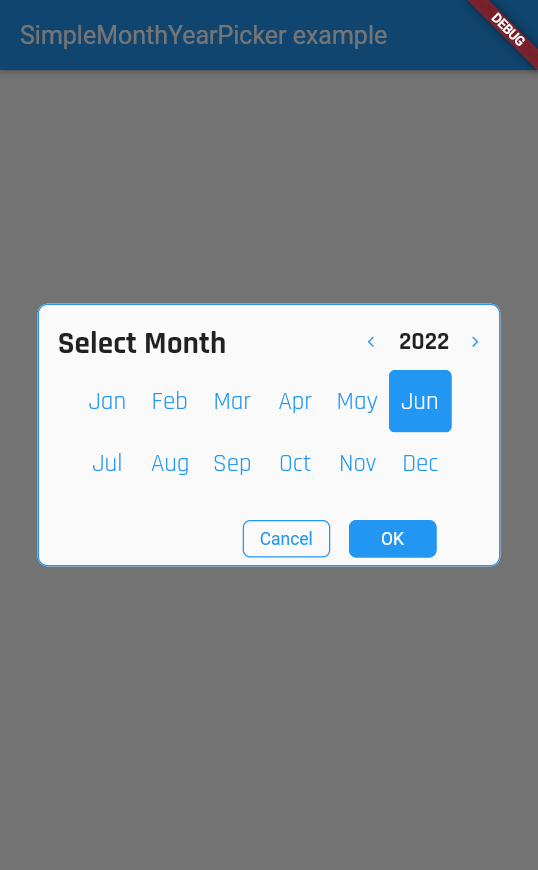
アプリに簡単に使える月/年ピッカーで、カスタマイズ性の高いオプションを提供しています。

AndroidiOSWebmacOSWindowsLinux
30日間ダウンロード
300
いいね数
7
Pub ポイント
160

パッケージをインストール

flutter pub add simple_month_year_picker

パッケージ概要

公開情報に基づく選定ガイドです。参考としてご利用ください。

Flutterアプリケーション向けのシンプルで高カスタマイズ可能な月/年ピッカーです。簡単な統合を目的としており、最小限の設定で特定の月と年を選択できるように設計されています。このパッケージはAndroid、iOS、Web、macOS、Windows、Linuxなど複数のプラットフォームをサポートしており、クロスプラットフォームアプリに最適です。柔軟なスタイルおよび設定オプションにより、開発者はピッカーの外観や動作をアプリのデザインに合わせてカスタマイズできます。軽量であり、不要な複雑さなく、日付選択に特化しています。

用途

  • フォームで生年月日を選択する
  • 月と年でデータをフィルタリングする
  • 予約日を設定する
  • レポートの期間範囲を設定する
  • カレンダーに基づく機能の構築

主な機能

  • カスタマイズ性の高いUI
  • クロスプラットフォーム互換性
  • シンプルな API インテグレーション
  • すべての主要プラットフォームをサポートしています
  • 軽量で高速
  • 設定可能な日付範囲

適している対象

  • 日付選択インターフェースを構築している開発者
  • 月/年入力が必要なアプリ
  • 軽量な日付ピッカーが必要なプロジェクト
  • クロスプラットフォームのFlutterアプリ
  • UI中心のアプリケーション

注意事項

  • 月/年選択のみに制限
  • 日次粒度なし
  • 日付ロジックの手動処理が必要です
  • 完全カレンダービューには適していません
  • エッジケースに対する追加の検証が必要になる場合があります

元の README

関連するソースリポジトリの README 原文のスナップショットです。最新の内容はリポジトリをご覧ください。

Simple Month Year Picker

Simple to use month/year picker for your apps with highly customisable options.

screenshot1

Getting started

Add this to your package's pubspec.yaml file

dependencies:
  simple_month_year_picker: ^1.1.0

Usage

Next, you just have to import the package using:

import 'package:simple_month_year_picker/simple_month_year_picker.dart';
  Widget build(BuildContext context) {
   return ElevatedButton(
              onPressed: () async {
                // This is in order to get the selected date.
                final selectedDate =
                    await SimpleMonthYearPicker.showMonthYearPickerDialog(
                        context: context,
                        titleTextStyle: TextStyle(),
                        monthTextStyle: TextStyle(),
                        yearTextStyle: TextStyle(),
                        disableFuture:
                            true // This will disable future years. it is false by default.
                        );
                // Use the selected date as needed
                print('Selected date: $selectedDate');
              },
              child: const Text('show dialog'),
            );
  }

Additional information

Pull requests are welcome. For major changes, please open an issue first to discuss what you would like to change.

カテゴリー

ソースリポジトリ

このパッケージを使用しているプロジェクト

データはまだありません。