パッケージ、リポジトリ、アプリカテゴリを検索

snap_scroll_physics のカバー
パッケージ詳細v0.0.1+3

snap_scroll_physics

ユーザーのスクロールを異なるオフセットで固定するためのスクロール物理

AndroidiOSWebmacOSWindowsLinux
30日間ダウンロード
9
いいね数
76
Pub ポイント
140

パッケージをインストール

flutter pub add snap_scroll_physics

パッケージ概要

公開情報に基づく選定ガイドです。参考としてご利用ください。

スクロール位置を特定のオフセットにスナップさせるスクロール物理を提供するFlutterパッケージで、スクロール可能なウィジェットにおけるユーザー体験を向上させます。正確なスクロール動作の制御が可能であり、事前に定義された位置に整列が必要なカルーセル風インターフェースやグリッドレイアウトに最適です。このパッケージはすべての主要プラットフォームをサポートし、標準のScrollViewとシームレスに統合されます。Flutterの組み込み物理システムを拡張し、カスタマイズ可能なスナップ間隔とスムーズな遷移を提供します。

用途

  • カルーセルスライダー
  • グリッドレイアウトと配置
  • フォームフィールドのナビゲーション
  • 製品カルーセル
  • カスタムスクロールスナップ
  • インタラクティブなチュートリアル

主な機能

  • 事前定義されたオフセットにスナップする
  • スムーズな遷移アニメーション
  • クロスプラットフォーム対応
  • デフォルトの物理を拡張
  • 設定可能なスナップ間隔
  • ScrollView との簡単な統合

適している対象

  • インタラクティブなスクロールインターフェースを開発する開発者
  • 正確なスクロールアラインメントが必要なデザイナー
  • カルーセルまたはタブベースのナビゲーションを持つアプリ
  • カスタムスクロール動作を必要とするプロジェクト
  • 複数のプラットフォームをターゲットにするチーム

注意事項

  • 最適なUXを実現するには調整が必要になる場合があります
  • 適切に管理されない場合、他の物理学と競合する可能性があります
  • 連続スクロールコンテンツには適していません
  • 多数のスナップポイントによるパフォーマンスへの影響
  • スクロール可能なウィジェットのみに制限

元の README

関連するソースリポジトリの README 原文のスナップショットです。最新の内容はリポジトリをご覧ください。

Snap Scroll Physics

pub package

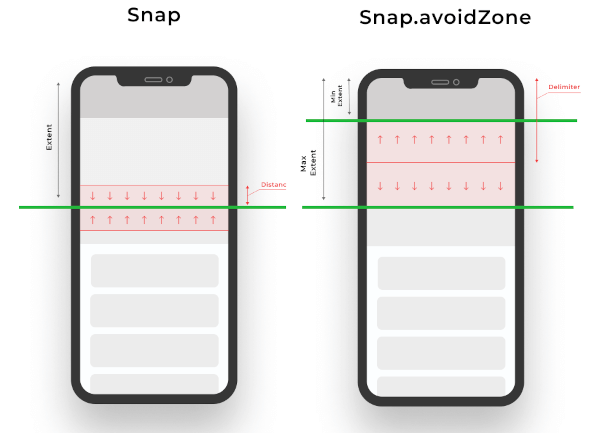
When building scrollable views, sometimes you would prefer that the scroll stopped at a given offset, or that it avoids to stop inside some area. This package allows you to implement this on any Flutter scroll view.

This kind of behaviour can be seen in any iOS app using the UIKit/SwiftUI Navigation bar, also with custom headers inside some popular apps like Twitter, Chrome, Gmail, Google Photos, Apple Music, Facebook and many more!

snap_scroll

physics: SnapScrollPhysics(
    snaps: [
        Snap(200, distance: 50), // If the scroll offset is expected to stop between 150-250 the scroll will snap to 200,
        Snap(200, leadingDistance: 50), // If the scroll offset is expected to stop  between 150-200 the scroll will snap to 200,
        Snap(200, trailingDistance: 50), // If the scroll offset is expected to stop between 150-200 the scroll will snap to 200,
        Snap(200, trailingDistance: 50), // If the scroll offset is expected to stop between 150-200 the scroll will snap to 200,
        Snap.avoidZone(0, 200), // If the scroll offset is expected to stop between 0-200, the scroll will snap to 0 if the expected one is between 0-99, and to 200 if it is between 100-200,
        Snap.avoidZone(0, 200, delimiter: 50), // If the scroll offset is expected to stop between 0-200, the scroll will snap to 0 if the expected one is between 0-49, and to 200 if it is between 50-200
    ]
),
physics: SnapScrollPhysics.cupertinoAppBar, // Default values for the Cupertino appbar

https://user-images.githubusercontent.com/19904063/116775316-b67b8f80-aa62-11eb-9ae1-58da68a381e4.mp4

https://user-images.githubusercontent.com/19904063/116775452-56391d80-aa63-11eb-95ae-f8fd8154cbc9.mp4

IMPORTANT! Sadly ScrollPhysics are not reactivily updated, so if you change the values, they won't be automatically updated. See #80051.

This can be temporaly fixed by this, while is discouraged in production if no changes are needed at runtime:


List<Snap> getSnaps() {
    return [
       Snap(200), // Hot reload works
    ];
}
@override
  Widget build(BuildContext context) {
    return CustomScrollView(
      physics: SnapScrollPhysics.builder(getSnaps),
      slivers: [
       // ....
      ],
    );
  }

カテゴリー

ソースリポジトリ

このパッケージを使用しているプロジェクト