パッケージ、リポジトリ、アプリカテゴリを検索

soft_edge_blur のカバー
パッケージ詳細v0.1.3

soft_edge_blur

子ウィジェットの1つまたは複数のエッジにソフトでプログレッシブなぼかし効果を適用するカスタマイズ可能なFlutterウィジェットです。

AndroidiOSWebmacOSWindowsLinux
30日間ダウンロード
1.4万
いいね数
250
Pub ポイント
160

パッケージをインストール

flutter pub add soft_edge_blur

パッケージ概要

公開情報に基づく選定ガイドです。参考としてご利用ください。

子ウィジェットの1つまたは複数のエッジにソフトでプログレッシブなぼかし効果を適用するカスタマイズ可能なFlutterウィジェットです。繊細な視覚的な奥行きとモダンなUIエフェクトを作成するのに最適であり、ぼかしの強度やエッジの方向を正確に制御できます。このパッケージは、モバイル、Web、デスクトップを含むすべての主要プラットフォームをサポートしており、クロスプラットフォームアプリケーションに非常に適しています。既存のFlutterレイアウトとシームレスに統合され、パフォーマンスのオーバーヘッドなしに視覚的魅力を高めます。

用途

  • カード内のソフトエッジのトランジションを作成する
  • 奥行きを活かして背景要素を強化する
  • フローティングUIコンポーネントの設計
  • スクロール可能なリストにおける視覚的階層の改善
  • ナビゲーションバーに繊細なぼかし効果を追加する

主な機能

  • カスタマイズ可能なぼかし強度
  • 個別のエッジターゲティングのサポート
  • クロスプラットフォーム互換性
  • 軽量でパフォーマンスに優れる
  • 既存のウィジェットとの簡単な統合
  • スムーズなプログレッシブなぼかし効果

適している対象

  • モダンな美学を求めるUIデザイナー
  • 没入型インターフェースを構築する開発者
  • 繊細なビジュアルレイヤーが必要なアプリ
  • 複数のプラットフォームをターゲットにするプロジェクト
  • パフォーマンスとシンプルさに注力するチーム

注意事項

  • 低性能デバイスでのパフォーマンスに影響を与える可能性があります
  • ぼかしの品質は、デバイスのレンダリング能力に依存します
  • エッジベースのぼかしのみに制限
  • フルスクリーンのブラー効果には適していません
  • 最適な視覚的結果を得るためには、注意深くチューニングが必要です

元の README

関連するソースリポジトリの README 原文のスナップショットです。最新の内容はリポジトリをご覧ください。

banner

SoftEdgeBlur

pub package

A Flutter package that provides a customizable soft progressive blur effect for widgets.

Map blurred

Demos

Map - with control points

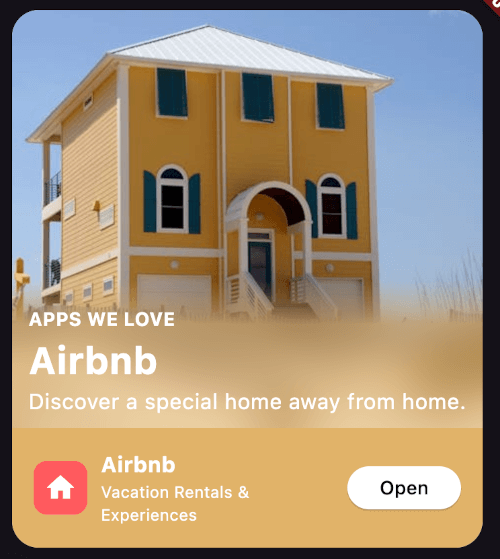
Airbnb Card with tint color

Screenshot 2024-09-17 at 22 22 01

Music play list with tint color

Screenshot 2024-09-17 at 22 22 01

Wallpapers grid with tilemode

Screenshot 2024-09-17 at 22 22 01

Usage

Import the package in your Dart code:

import 'package:soft_edge_blur/soft_edge_blur.dart';

Wrap any widget with SoftEdgeBlur to apply the blur effect:

return SoftEdgeBlur(
  edges: [
    EdgeBlur(
      type: EdgeType.topEdge,
      size: 100,
      sigma: 30,
      controlPoints: [
        ControlPoint(
          position: 0.5,
          type: ControlPointType.visible,
        ),
        ControlPoint(
          position: 1,
          type: ControlPointType.transparent,
        )
      ],
    )
  ],
  child: YourWidget(),
);

Customization

You can customize the following properties for each edge:

Edge Type

Specify which edges to apply the blur effect:

  • EdgeType.topEdge
  • EdgeType.bottomEdge
  • EdgeType.leftEdge
  • EdgeType.rightEdge

You can apply blur to multiple edges simultaneously.

Edge Size

Set the size of the blurred area. This determines how far the blur effect extends from the edge of the widget.

Blur Sigma

Adjust the intensity of the blur effect.

Tint Color

Apply a tint color on top of the blurred area.

Control Points

Define points to control the blur gradient along the edge. Each control point has two properties:

  • position: A value between 0.0 and 1.0, representing the position along the edge.
  • type: Either ControlPointType.visible or ControlPointType.transparent.
Try it live here

https://soft_edge_blur.codemagic.app/

カテゴリー

ソースリポジトリ

このパッケージを使用しているプロジェクト