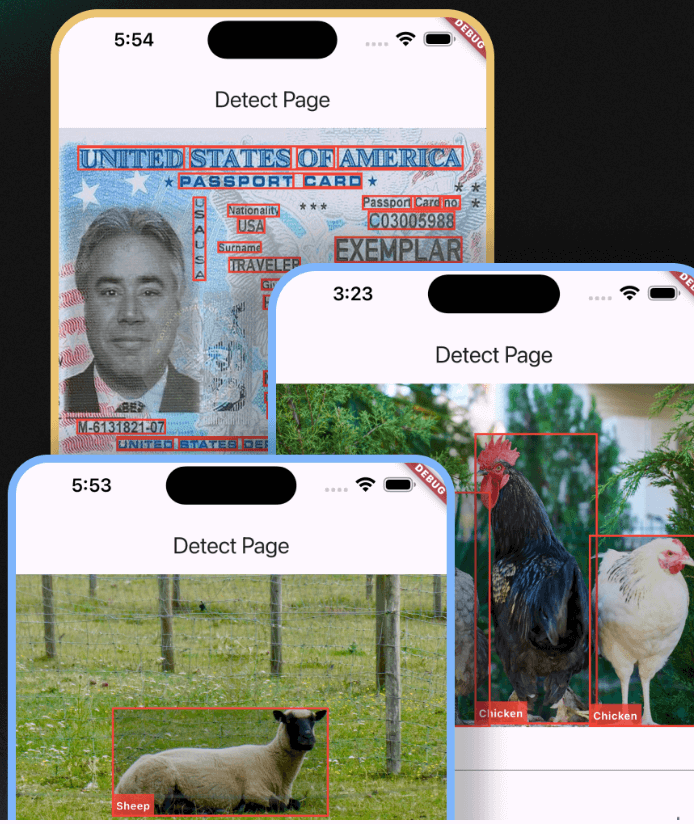
Sphinx Verify
Sphinx Verify is a Flutter package that amis to provider an interface to amazon recognition service. with built-in use cases.
More demo images
Features 🚀
- ✅ Text Detection
- ✅ Face Detection
- ✅ Label Detection
- ✅ content Moderation
- ✅ compare Faces
use cases
- ✅ ( KYC flow ) Verify a user by comparing a selfie with a document photo ( driving license )
Installation 💻
❗ In order to start using Sphinx Verify you must have the Fkutter installed on your machine.
Install via flutter pub add:
flutter pub add sphinx_verify
Install via pubspec.yaml:
dependencies:
  sphinx_verify: ^0.1.0
Usage 📖
import 'package:sphinx_verify/sphinx_verify.dart';
SphinxVerify sphinxVerify = SphinxVerify(
region: AwsRegionEnum.usEast1 <- adjust to your region,
accessKey: 'your access key',
secretKey: 'your secret key',
onVerificationComplete: (FaceMatchesModel faceMatchesModel) {
print({
'❌similarity': faceMatchesModel.matchedFaces?.first.similarity,
'faceMatchesModel': faceMatchesModel,
});
},
);
LabelDetectionModel? res = await widget.sphinxVerify.awsSDK.detectLabels(
file: _imageFile,
imageUrl: _imageUrl,
);
List<TextDetectionModel>? res = await widget.sphinxVerify.awsSDK.detectText(
file: _imageFile,
imageUrl: _imageUrl,
);
List<FaceDetectionModel>? res = await widget.sphinxVerify.awsSDK.detectFaces(
file: _imageFile,
imageUrl: _imageUrl,
);
FaceMatchesModel? res = await widget.sphinxVerify.awsSDK.compareFaces(
sourceImageFile: _imageFile,
sourceImageUrl: _imageUrl,
targetImageFile: _targetImageFile,
targetImageUrl: _targetImageUrl,
similarityThreshold: 90,
);
ModerateContentModel? res = await widget.sphinxVerify.awsSDK.moderateContent(
file: _imageFile,
imageUrl: _imageUrl,
minConfidence: 5,
);
KYC flow
import 'package:flutter/material.dart';
import 'package:sphinx_verify/sphinx_verify.dart';

class KycPage extends StatelessWidget {
  const KycPage({super.key, required this.sphinxVerify});
  final SphinxVerify sphinxVerify;

  @override
  Widget build(BuildContext context) {
    return sphinxVerify.kycWidget;
  }
}