Spider Web Control


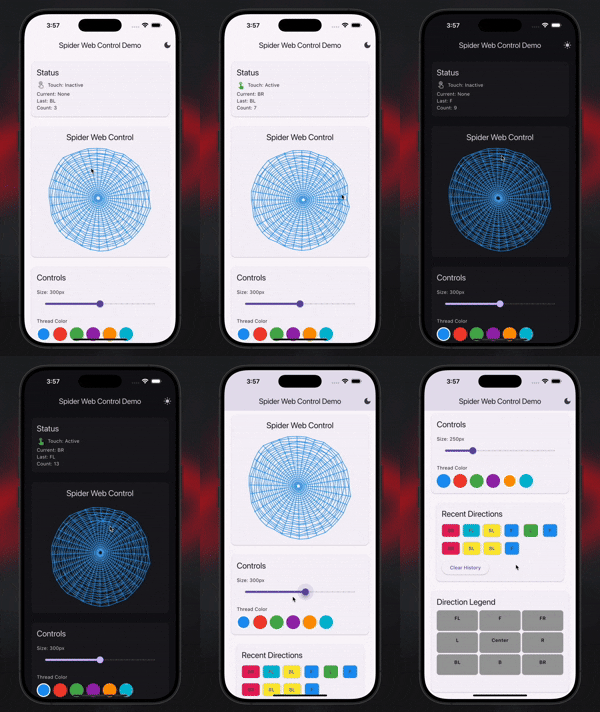
A customizable spider web control widget for Flutter that detects touch directions with interactive visual effects.
Features
- Customizable appearance: Change colors, size, and web structure
- Direction detection: Get callbacks for 8-directional touch input (R, L, F, B, FR, FL, BR, BL)
- Interactive effects: Web threads warp and bend around touch points
- Flexible integration: Works with any connection type (Bluetooth, HTTP, WebSocket, etc.)
- Theme support: Built-in dark and light theme configurations
Installation
Add this to your package's pubspec.yaml file:
dependencies:
  spider_web_control: ^0.0.2
Usage
Basic Usage
import 'package:spider_web_control/spider_web_control.dart';
SpiderWebControl(
onDirectionChanged: (direction) {
print('Direction: $direction');
},
)
Custom Configuration
SpiderWebControl(
config: SpiderWebConfig(
size: 400.0,
threadColor: Colors.cyan,
dewDropColor: Colors.lightBlue,
centerThreshold: 100.0,
sendInterval: Duration(milliseconds: 500),
),
onDirectionChanged: (direction) {
},
onTouchStart: () => print('Touch started'),
onTouchEnd: () => print('Touch ended'),
)
Using with Bluetooth
class MyBluetoothController extends StatelessWidget {
final BluetoothConnection connection;
MyBluetoothController({required this.connection});
@override
Widget build(BuildContext context) {
return SpiderWebControl(
config: SpiderWebConfig.darkTheme(size: 350.0),
onDirectionChanged: (direction) {
connection.output.add(Uint8List.fromList(direction.codeUnits));
},
);
}
}
Theme Examples
SpiderWebControl(
config: SpiderWebConfig.darkTheme(size: 300.0),
onDirectionChanged: (direction) => handleDirection(direction),
)
SpiderWebControl(
config: SpiderWebConfig.lightTheme(size: 300.0),
onDirectionChanged: (direction) => handleDirection(direction),
)
SpiderWebControl(
config: SpiderWebConfig(
size: 320.0,
threadColor: Colors.purple,
minorThreadColor: Colors.purpleAccent,
dewDropColor: Colors.pink,
radialDivisions: 48,
circleDivisions: 30,
),
onDirectionChanged: (direction) => handleDirection(direction),
)
Configuration Options
| Property |
Type |
Default |
Description |
size |
double |
300.0 |
Size of the spider web widget |
threadColor |
Color |
Colors.blue |
Main thread color |
minorThreadColor |
Color |
Colors.blueGrey |
Minor thread color |
dewDropColor |
Color |
Colors.lightBlue |
Dew drop accent color |
centerThreshold |
double |
80.0 |
Dead zone radius in center |
sendInterval |
Duration |
Duration(seconds: 1) |
Minimum time between direction callbacks |
radialDivisions |
int |
36 |
Number of radial web divisions |
circleDivisions |
int |
25 |
Number of circular web divisions |
Direction Values
The widget returns these direction strings:
'R' - Right'L' - Left'F' - Forward/Up'B' - Back/Down'FR' - Forward-Right'FL' - Forward-Left'BR' - Back-Right'BL' - Back-Left'Disabled Zone' - Center area (not sent to callback)
License
MIT License - see LICENSE file for details.

