Flutter StepperA
Key Features
Stepper A can easily build Stepper facility of you any flutter app.
Form Validation with FormKey [GlobalKey()]
Support Horizontal and Vertical Stepper
Customized Stepper step Shape [Rectangle, Circle,Diamond,Triangle]
Customized Stepper step border [Dash, Straight]
Customized Stepper line [Dash, Straight]
Smooth sliding with Animation
Number step text style provision added.
Stepper page swipe
Easily Customize Step [Image, IconData, or a fully custom widget builder]
Forward and previous button custom style .
Material 3 theming support via StepA.fromTheme(context)
Screen-reader friendly (Semantics labels on every step)
Jump directly to any step with StepperAController.jumpToStep()
Listen to step changes with the onStepChanged callback
package.yaml
stepper_a: <latest version>
Import
import 'package:stepper_a/stepper_a.dart' ;
Simple Example
StepperA (
stepperSize: const Size (300 , 90 ),
borderShape: BorderShape .rRect,
borderType: BorderType .straight,
stepperAxis: Axis .horizontal,
lineType: LineType .dotted,
stepperBackgroundColor: Colors .transparent,
stepperAController: controller,
stepHeight: 40 ,
stepWidth: 40 ,
stepBorder: true ,
pageSwipe: false ,
formValidation: true ,
previousButton: (int index) => StepperAButton (
width: 90 ,
height: 40 ,
onTap: (int currentIndex){
},
buttonWidget: const Icon (
Icons .arrow_back,
color: Colors .white,
),
),
forwardButton: (index) => StepperAButton (
width: index == 0 ? 200 : 90 ,
height: 40 ,
onTap: (int currentIndex){
},
onComplete: (){
debugPrint ("Forward Button click complete step call back!" );
},
buttonWidget: index == 3
? const Text ('Complete' , style: TextStyle (fontSize: 14 , color: Colors .white))
: const Text ('Next' , style: TextStyle (fontSize: 14 , color: Colors .white)),
),
customSteps: [
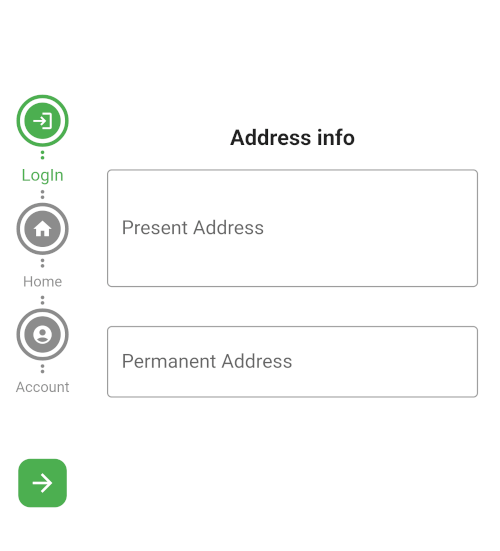
const CustomSteps (stepsIcon: Icons .login, title: "LogIn" ),
const CustomSteps (stepsIcon: Icons .home, title: "Home" ),
const CustomSteps (stepsIcon: Icons .account_circle, title: "Account" ),
CustomSteps (image: Image .asset ("assets/pic/pay.png" ,color: Colors .white,), title: "Payment" ),
],
step: const StepA (
currentStepColor: Colors .green,
completeStepColor: Colors .indigo,
inactiveStepColor: Colors .black45,
margin: EdgeInsets .all (5 )
),
stepperBodyWidget: [
StepOne (controller: controller),
StepTwo (controller: controller),
StepThree (controller: controller),
StepFour (controller: controller),
]
)
New in 1.4.0
Material 3 theming
Let the stepper pick up your app's ColorScheme automatically:
step: StepA .fromTheme (context),
Any color you still pass explicitly (e.g. StepA.fromTheme(context, currentStepColor: Colors.green)) overrides the theme default.
Jump to a step
controller.jumpToStep (
index: 2 ,
onTap: (currentIndex) {
},
);
Listen for step changes
StepperA (
onStepChanged: (currentIndex) {
debugPrint ('Now on step $currentIndex ' );
},
)
Fully custom step widget
CustomSteps (
title: "Payment" ,
builder: (context, index, isCompleted, isCurrent) => Icon (
isCompleted ? Icons .check : Icons .payment,
color: Colors .white,
),
)
ScreenShot
FormKey validation
Custom Steps
Others
Support
If this package was useful to you, helped you to easily deliver your app, saved you a lot of time, or you just want to
support the project, I would be grateful if you give us a rating.