パッケージ、リポジトリ、アプリカテゴリを検索

パッケージ詳細v0.0.2

swipeable_button_view

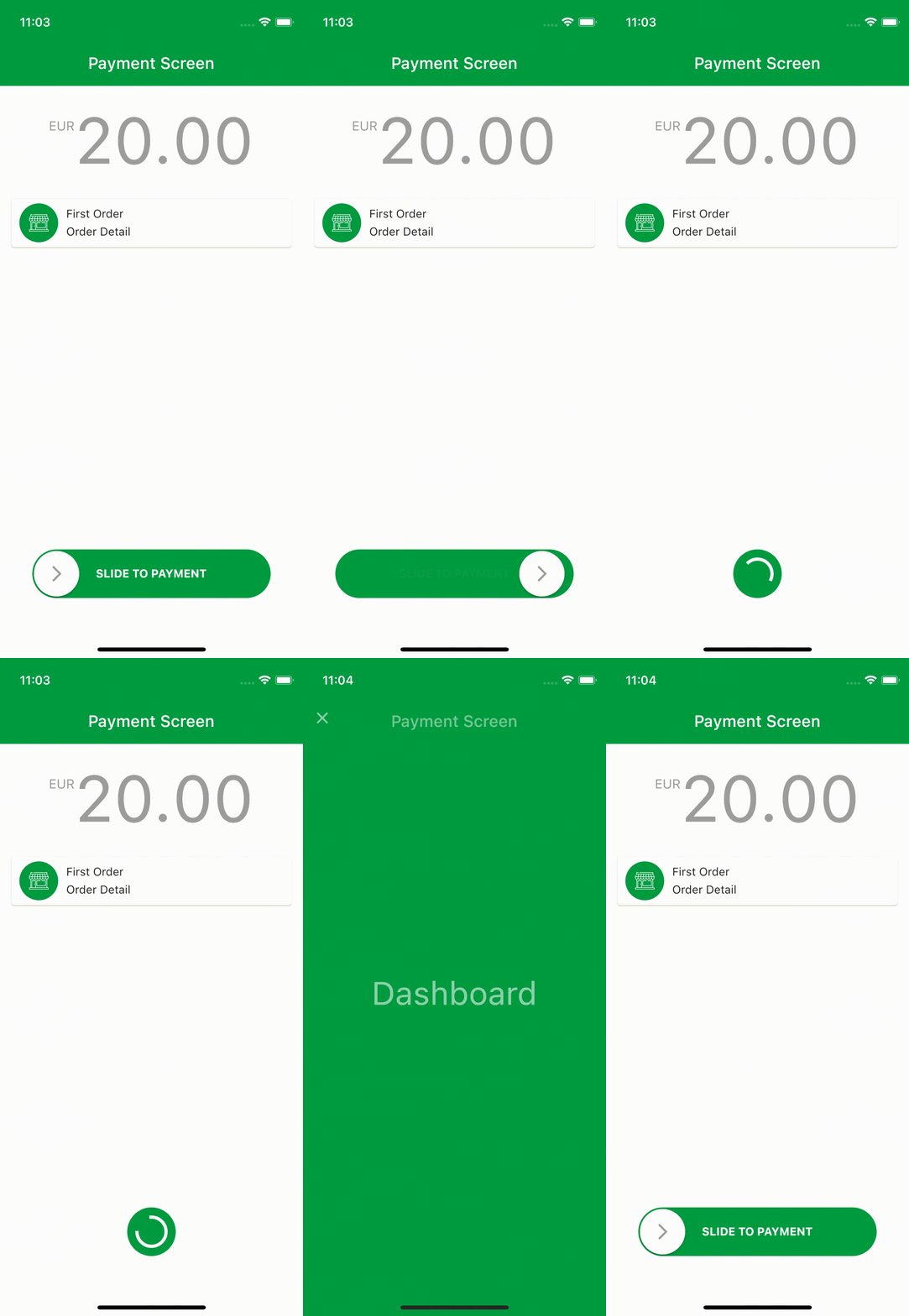
swipeable_button_view を使用してリップルアニメーション付きのページを作成できます。

AndroidiOSWebmacOSWindowsLinux
30日間ダウンロード
2650
いいね数
114
Pub ポイント
140

パッケージをインストール

flutter pub add swipeable_button_view

パッケージ概要

公開情報に基づく選定ガイドです。参考としてご利用ください。

SwipeableButtonView は、スワイプジェスチャーを通じてインタラクティブでリップルアニメーション付きのボタンやページを作成できるFlutterパッケージです。ユーザーがボタンをスワイプする際、滑らかなアニメーションと応答性の高いフィードバックにより、ユーザー参加度を高めます。ゲストベースのインタラクションを必要とするモダンなUIに最適で、Android、iOS、Web、macOS、Windows、Linuxなど複数のプラットフォームをサポートしています。Flutterアプリへのシームレスな統合を実現し、カスタマイズ可能なビジュアルエフェクトと直感的なタッチインタラクションを提供します。開発者は最小限のコードでスワイプ駆動のナビゲーションやアクションを簡単に実装できます。軽量な設計により、シンプルなインターフェースから複雑なジェスチャー対応インターフェースまで幅広く活用可能です。

用途

  • ジェスチャーによるナビゲーション
  • インタラクティブなボタンアニメーション
  • スワイプ時のリップル効果
  • モバイル最優先のUIコンポーネント
  • クロスプラットフォームのジェスチャー対応
  • オンボーディング画面の活用

主な機能

  • スワイプ時のリップルアニメーション
  • マルチプラットフォーム互換性
  • カスタマイズ可能なスワイプ動作
  • スムーズなトランジション効果
  • 軽量で統合が簡単
  • タッチおよびドラッグジェスチャーをサポート

適している対象

  • ジェスチャー豊富なアプリを開発する開発者
  • インタラクティブなUI要素を探しているデザイナー
  • スワイプで有効化する機能を必要とするアプリ
  • クロスプラットフォームのモバイルおよびWebアプリケーション
  • UI/UXに焦点を当てたFlutterプロジェクト

注意事項

  • 複雑なレイアウトには追加のスタイル設定が必要になる場合があります
  • 低スペックデバイスへのパフォーマンスへの影響
  • スワイプベースの操作に限定
  • ジェスチャー以外のワークフローには適していない
  • ジェスチャー認識におけるエッジケースの慎重な取り扱いが必要です
  • タッチ対応デバイスに最適

元の README

関連するソースリポジトリの README 原文のスナップショットです。最新の内容はリポジトリをご覧ください。

swipeable_button_view

Pub Version License

You can create ripple animated pages with swipeable_button_view.

Install

Add swipeable_button_view: to your pubspec.yaml dependencies then run flutter pub get

dependencies:
  swipeable_button_view:

Then import the package to use

import 'package:swipeable_button_view/swipeable_button_view.dart';

Example

import 'package:swipeable_button_view/swipeable_button_view.dart';

SwipeableButtonView(
    buttonText: 'SLIDE TO PAYMENT',
    buttonWidget: Container(
        child: Icon(Icons.arrow_forward_ios_rounded,
            color: Colors.grey,
                ),),
    activeColor: Color(0xFF009C41),
    isFinished: isFinished,
    onWaitingProcess: () {
    Future.delayed(Duration(seconds: 2), () {
            setState(() {
                isFinished = true;
                      });
                    });
                  },
    onFinish: () async {
        await Navigator.push(context,
                        PageTransition(
                            type: PageTransitionType.fade,
                            child: DashboardScreen()));

                    //TODO: For reverse ripple effect animation
                    setState(() {
                      isFinished = false;
                    });
                  },
)

Screen Recording

Props

props types defaultValues isRequired
onFinish VoidCallback true
onWaitingProcess VoidCallback true
activeColor Color true
buttonWidget Widget true
buttonText String true
isFinished bool false
isActive bool true
disableColor Color Colors.grey
buttonColor Color Colors.white
buttontextstyle TextStyle TextStyle(color: Colors.white, fontWeight: FontWeight.bold)
indicatorColor Animation<Color?> AlwaysStoppedAnimation<Color>(Colors.white)})

カテゴリー

ソースリポジトリ

このパッケージを使用しているプロジェクト

データはまだありません。