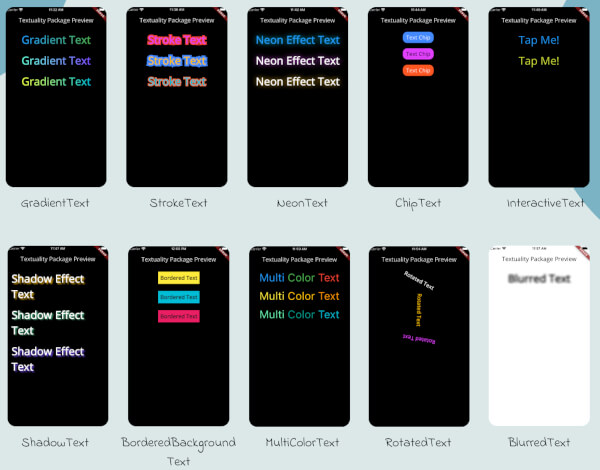
Textuality is a powerful Flutter package that enhances the appearance of text widgets with a variety of customizable text effects and styles. With this package, you can easily add gradient text, stroke text, neon effects, shadow effects, interactive text, and more to your Flutter app.
Features
GradientText: Add gradient colors to your text.
StrokeText: Apply an outline or stroke around your text.
NeonText: Create a glowing neon text effect.
ChipText: Display text inside stylish chip-like containers.
ShadowText: Add customizable shadows to your text.
InteractiveText: Make text interactive for clicks, taps, or custom gestures.
MultiColorText: Display text in multiple colors, even within the same string.
RotatedText: Rotate the text in any direction, including vertical.
BlurredText: Add a blurred effect to your text.
BorderedBackgroundText: Add a border around the background of your text.
Each widget accepts various optional parameters for customization, such as style, text alignment, maxLines, overflow, and more.
Installation
To use the textuality package in your Flutter project, follow these steps:
Add the package to your pubspec.yaml file:
dependencies:textuality:^0.0.1
Run the following command to install the package:
flutter pub get
💻Example
Below is an example of how to use the Textuality package in your Flutter app: