パッケージ、リポジトリ、アプリカテゴリを検索

theme_manager のカバー
パッケージ詳細v2.0.4

theme_manager

ライト、ダーク、システムテーマ用のテーママネージャー。テーマを動的に変更し、選択されたテーマを永続化します。

AndroidiOSWebmacOSWindowsLinux
30日間ダウンロード
285
いいね数
34
Pub ポイント
140

パッケージをインストール

flutter pub add theme_manager

パッケージ概要

公開情報に基づく選定ガイドです。参考としてご利用ください。

テーママネージャーは、ライトモード、ダークモード、システムテーマのサポートを簡単に実装できるFlutterパッケージです。アプリ再起動後に自動的に永続化される動的なテーマ切り替えを可能にします。開発者はテーマ状態を簡単に管理し、グローバルに適用でき、一貫したユーザー体験を確保できます。このパッケージはFlutterのテーマシステムとシームレスに統合されており、モバイル、Web、デスクトップを含むすべての主要プラットフォームをサポートしています。

用途

  • アプリでのダイナミックテーマ切り替え
  • ユーザーのテーマ設定を保持する
  • ダークモードおよびシステムテーマのサポート
  • 複数のテーマを使用してアクセシブルなUIを構築する
  • カスタマイズ可能なユーザーインターフェースの作成

主な機能

  • ライト、ダーク、およびシステムテーマのサポート
  • 自動テーマの永続化
  • Flutter のテーマシステムとの簡単な統合
  • クロスプラットフォーム互換性
  • テーマ変更のためのシンプルな API
  • リアルタイムテーマの更新

適している対象

  • ダークモードを必要とするアプリ
  • カスタマイズ可能なUIを構築する開発者
  • 複数のプラットフォームをターゲットにするプロジェクト
  • テーマの好みを持つユーザー向けアプリケーション
  • テーマ管理の最小限のセットアップを希望するチーム

注意事項

  • テーマ状態の初期化を手動で処理する必要があります
  • 事前に定義されたテーマタイプに限定
  • カスタムテーマ用に追加の論理が必要になる可能性があります
  • Flutter の組み込みテーマシステムに依存しています
  • ライト/ダーク/システム以外の複雑なテーマ設定には適していません

元の README

関連するソースリポジトリの README 原文のスナップショットです。最新の内容はリポジトリをご覧ください。

theme_manager

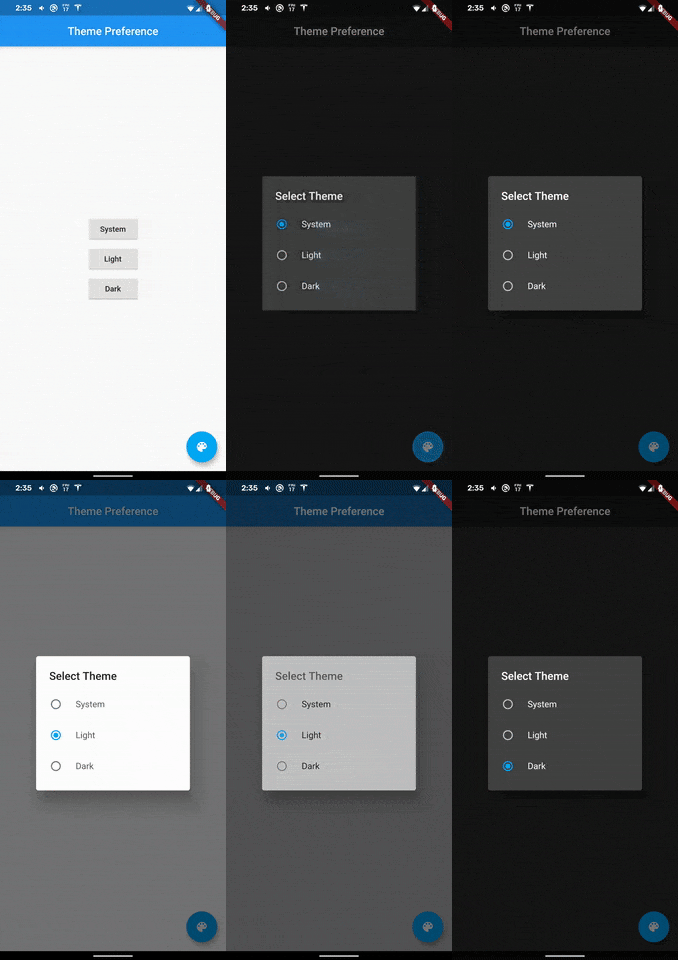
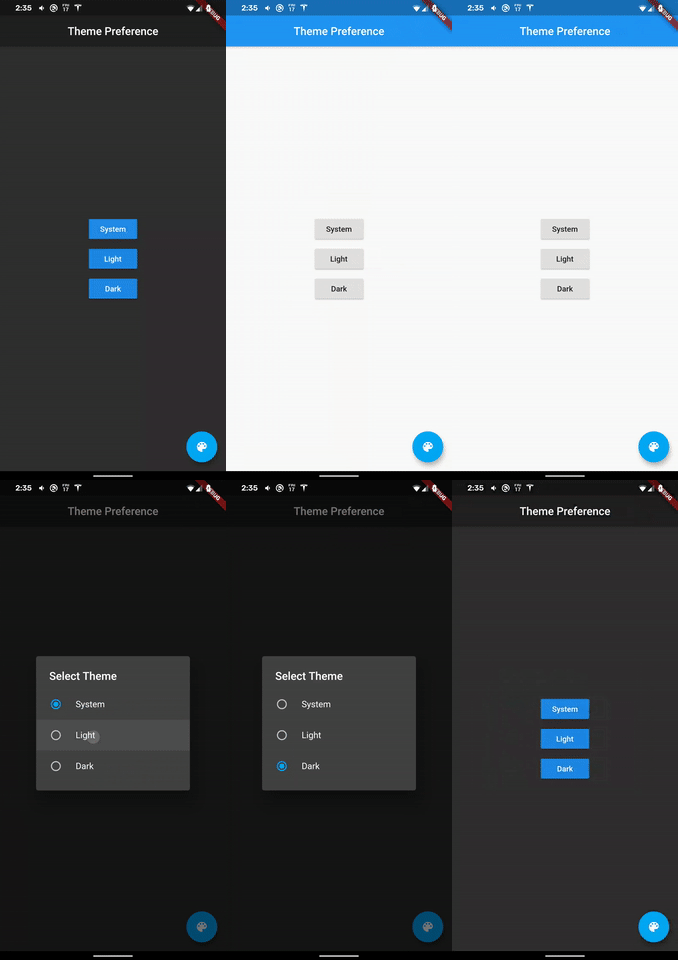
A theme manager for light, dark, and system themes.

A theme manager that supports light, dark, and system default themes. State is retained and applied upon application start. Heavily inspired by dynamic_theme by Norbert Kozsir.

Getting Started

Add theme_manager to your project.

  dependencies:
    theme_manager: ^2.0.4

run flutter packages get and import theme_manager

import 'package:theme_manager/theme_manager.dart';

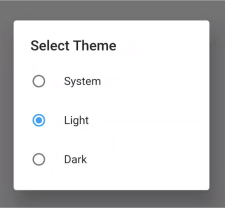
A dialog is provided that can switch between themes.

import 'package:theme_manager/theme_picker_dialog.dart';

How to use

Make sure WidgetsFlutterBinding are initialized. This is required.

void main() {
  WidgetsFlutterBinding.ensureInitialized(); // Required
  runApp(MyApp());
}

Wrap your MaterialApp with ThemeManager:

class MyApp extends StatelessWidget {
  @override
  Widget build(BuildContext context) {
    return ThemeManager(
      defaultBrightnessPreference: BrightnessPreference.system,
      data: (Brightness brightness) => ThemeData(
        primarySwatch: Colors.blue,
        accentColor: Colors.lightBlue,
        brightness: brightness,
      ),
      loadBrightnessOnStart: true,
      themedWidgetBuilder: (BuildContext context, ThemeData theme) {
        return MaterialApp(
          title: 'Theme Manager Demo',
          theme: theme,
          home: MyHomePage(),
        );
      },
    );
  }
}

When you want to change your theme:

void setAsSystemDefault() => 
  ThemeManager.of(context).setBrightnessPreference(BrightnessPreference.system);
void setAsLight() => 
  ThemeManager.of(context).setBrightnessPreference(BrightnessPreference.light);
void setAsDark() => 
  ThemeManager.of(context).setBrightnessPreference(BrightnessPreference.dark);

The system default will load either light or dark based on the device preferences. If your device changes themes at sunset or sunrise then light/dark mode will apply automatically.

The BrightnessPreference is saved in SharedPreferences automatically. There is also a clear function to remove the preferences.

void clear() => ThemeManager.of(context).clearBrightnessPreference();
A dialog widget to change the brightness!

Getting Started

For help getting started with Flutter, view our online documentation.

For help on editing package code, view the documentation.

カテゴリー

依存関係

依存関係一覧 3 件

ソースリポジトリ

このパッケージを使用しているプロジェクト

データはまだありません。