ticket_material
A ticket view widget.
Platform compatibility
Plugin was tested on following platforms:
- Android;
- IOS;
- Windows 10 64 bit;
- Linux (Ubuntu 20.04.1 LTS).
The support of MacOS is not guaranteed, but you can try to build it.
Also on web platform it's does not work.
Usage
To use this plugin, add universal_navigation as a dependency in your pubspec.yaml file.
Getting Started
Add dependency into pubspec.yaml.
dependencies:
  ticket_material:
Create a page.
class ExamplePage extends StatefulWidget {
  static final routeName = '/example';

  @override
  _ExamplePageState createState() => _ExamplePageState();
}

class _ExamplePageState extends State<ExamplePage> {
  final colorBg = Colors.grey[300];

  @override
  Widget build(BuildContext context) {
    return Scaffold(
      backgroundColor: colorBg,
      body: SafeArea(
        child: Padding(
          padding: const EdgeInsets.all(16.0),
          child: TicketMaterial(
            height: 150,
            colorBackground: Colors.blue,
            leftChild: _buildLeft(),
            rightChild: _buildRight(),
          ),
        ),
      ),
    );
  }

  Widget _buildLeft() {
    return Container(
      child: Center(
        child: Text('LEFT PART'),
      ),
    );
  }

  Widget _buildRight() {
    return Container(
      child: Center(
        child: Icon(Icons.airplanemode_active),
      ),
    );
  }
}
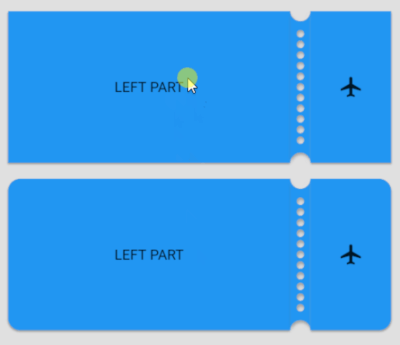
Result: 
With tap animation:

Full example with ticket_material you can check by this link.