パッケージ、リポジトリ、アプリカテゴリを検索

time_picker_sheet のカバー
パッケージ詳細v0.0.2+1

time_picker_sheet

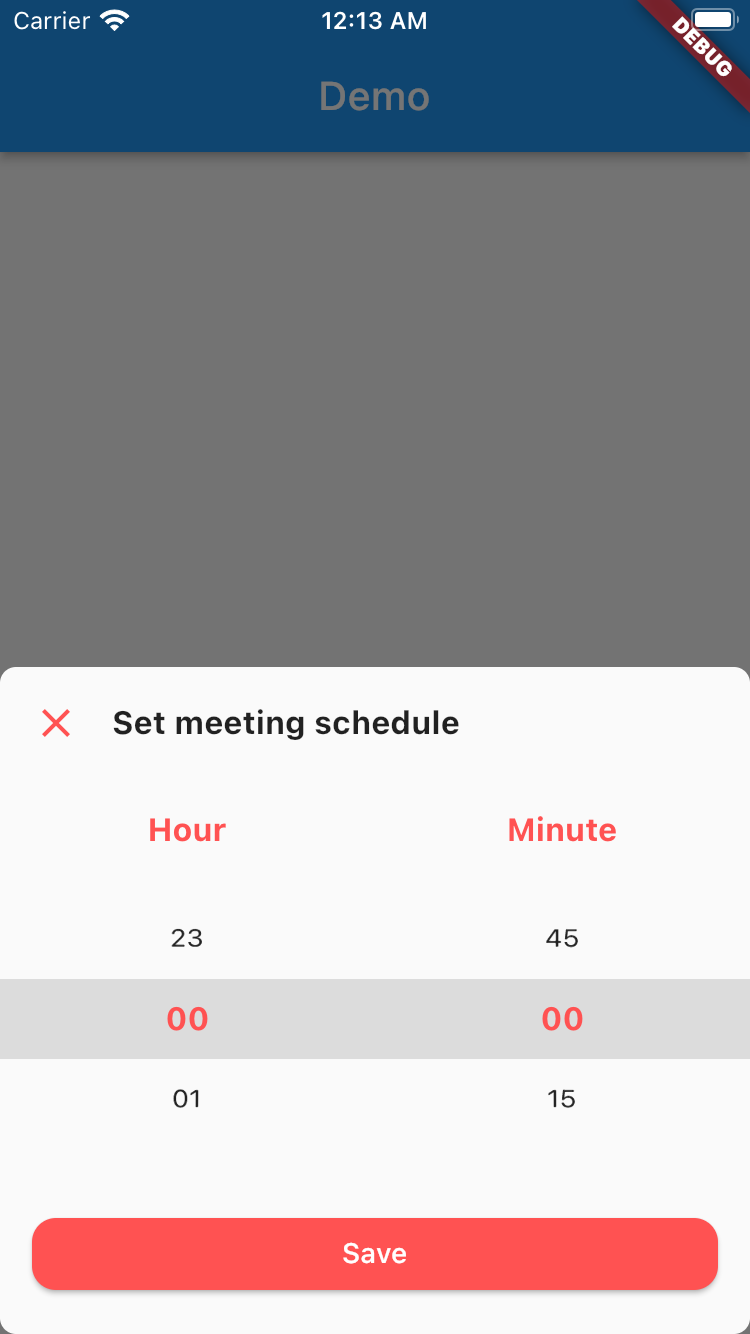
時間選択シートライブラリで、カスタマイズ可能なデザインにより、要件に合わせた美しい時間選択シートを実現できます。

30日間ダウンロード
7
いいね数
26
Pub ポイント
70

パッケージをインストール

flutter pub add time_picker_sheet

パッケージ概要

公開情報に基づく選定ガイドです。参考としてご利用ください。

モバイルアプリケーション向けにカスタマイズ可能で視覚的に魅力的な時刻ピッカー・シートを提供するFlutterパッケージです。開発者が柔軟なデザインオプションを備えた洗練されたボトムシートスタイルの時刻ピッカーを統合できるようにし、アプリ固有のテーマや要件と整合させることができます。このライブラリは使いやすく、既存のFlutterプロジェクトへのスムーズな統合を目的としています。カスタムスタイルや滑らかなアニメーションをサポートしており、時刻選択時のユーザー体験を向上させます。

用途

  • フォーム内のカスタム時刻選択
  • モダンなボトムシートでUIを強化する
  • スケジューリングアプリにタイムピッカーを統合する
  • プラットフォーム間で一貫した時間入力を設計する
  • 応答性のある時間選択インターフェースの作成

主な機能

  • カスタマイズ可能なデザインとテーマサポート
  • ボトムシートのアニメーションとレイアウト
  • Flutter ウィジェットとの簡単な統合
  • 応答性があり、モバイル対応のインターフェース
  • 午前/午後形式および24時間形式に対応しています

適している対象

  • カスタムUIが必要なモバイルアプリを開発する開発者
  • 時間入力におけるユーザー体験を重視するチーム
  • 一貫した時刻ピッカーの外観を必要とするアプリ
  • Flutterの初心者がインタラクティブなコンポーネントを探求しています
  • 軽量な日付/時刻ピッカーが必要なプロジェクト

注意事項

  • 制限されたプラットフォーム固有のカスタマイズ
  • 組み込みの検証やエラー処理なし
  • 時刻形式のロジックを手動で実装する必要があります
  • デスクトッププラットフォーム用に最適化されていません
  • 高度な機能には外部の依存関係に依存しています

元の README

関連するソースリポジトリの README 原文のスナップショットです。最新の内容はリポジトリをご覧ください。

Time Picker Sheet

A Time picker sheet library for flutter. You can also customize the widget inside the sheet to align with your requirement.


How to use

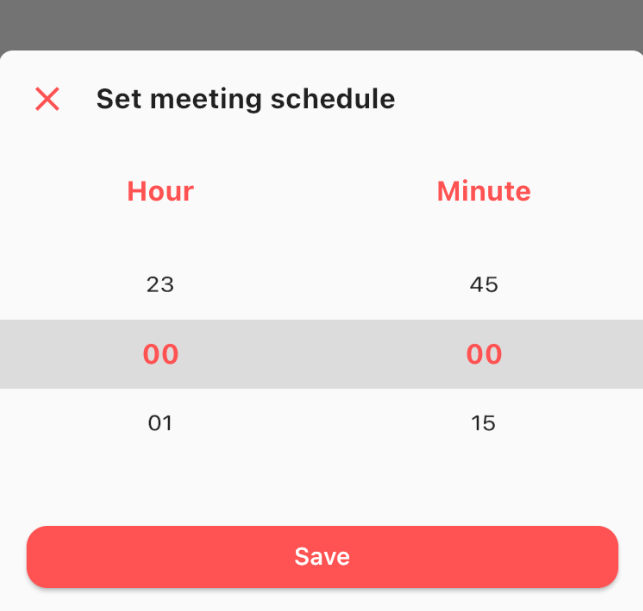
This is really simple and to the point actually, simply by doing this then your time picker sheet will goes up.

TimePicker.show(
    context: context,
    sheet: TimePickerSheet(
        sheetTitle: 'Set meeting schedule',
        hourTitle: 'Hour',
        minuteTitle: 'Minute',
        saveButtonText: 'Save',
    ),
);

If you wanna get the result from the time picker sheet then what you have to do is await the result. As you know if we wanna await the result we need to do it as an async process right? so please make sure to do so. The code must be like this

final result = await TimePicker.show<DateTime?>(
    context: context,
    sheet: TimePickerSheet(
        sheetTitle: 'Set meeting schedule',
        hourTitle: 'Hour',
        minuteTitle: 'Minute',
        saveButtonText: 'Save',
    ),
);

the result from the sheet is should be nullable DateTime, if user closed the sheet the result will be null, but if the user click on the save button then the result should be the selected time as a DateTime, so you can get the hour & the minute.

Customize

What you can customize?

  • Sheet title including the style
  • Sheet close icon including the color
  • Title hour including the style
  • Title minute including the style
  • Selected hour & minute including the style
  • Save button color & text
  • 1 or 2 digit format
    • the default format is 2 digit
  • Hour interval with min & max value
    • the default interval is 1, so the options will be started from 0 to 23
  • Minute interval with min & max value
    • the default interval is 15, so the options will be 0, 15, 30, 45
  • Initial date time
    • to make sure when your sheet goes up it select the right time. by default this is set to 00:00

All these things already have default value, so if you want to change one of them please make sure to set it via constructor.

カテゴリー

依存関係

依存関係一覧 1 件

ソースリポジトリ

このパッケージを使用しているプロジェクト

データはまだありません。