パッケージ、リポジトリ、アプリカテゴリを検索

パッケージ詳細v0.1.1

timed_widget

タイムベースのインタラクションに使用できる再利用可能なFlutterウィジェットのコレクション:遅延表示、スイッチャー、シーケンサー、アニメーションなど。

AndroidiOSWebmacOSWindowsLinux
30日間ダウンロード
9
いいね数
4
Pub ポイント
155

パッケージをインストール

flutter pub add timed_widget

パッケージ概要

公開情報に基づく選定ガイドです。参考としてご利用ください。

timed_widget は、ユーザーインターフェース内のタイムベースのインタラクションを管理するための再利用可能なウィジェットを提供するFlutterパッケージです。遅延表示、アニメーション切り替え、順次ウィジェット表示、タイムベースの遷移を簡単に実装できます。オンボーディングフロー、スプラッシュスクリーン、またはインタラクティブなチュートリアルに最適で、複雑なカスタムコードなしでタイムベースのUIロジックを実装しやすくなります。このパッケージはすべての主要プラットフォームをサポートしており、既存のFlutterプロジェクトにスムーズに統合できます。

用途

  • オンボーディングシーケンス
  • スプラッシュスクリーンアニメーション
  • ステップバイステップのチュートリアル
  • 時間によるコンテンツ表示
  • インタラクティブガイド
  • アニメーション付きの遷移

主な機能

  • 遅延されたウィジェットの可視性
  • 順次ウィジェット表示
  • 組み込みアニメーション
  • クロスプラットフォーム対応
  • シンプルな API
  • 再利用可能なコンポーネント

適している対象

  • UI/UXデザイナー
  • Flutter ビギナー
  • アプリオンボーディング開発者
  • インタラクティブなチュートリアル作成者
  • アニメーションを重視したアプリ

注意事項

  • Flutter のウィジェットライフサイクルの理解が必要です
  • 高度なアニメーションのカスタマイズが限られている
  • シンプルなタイミングシナリオに最適
  • 複雑な遷移には追加のパッケージが必要になる場合があります
  • 高パフォーマンスでアニメーションが多数必要なアプリには適していない

元の README

関連するソースリポジトリの README 原文のスナップショットです。最新の内容はリポジトリをご覧ください。

⏱️ timed_widget

A flexible and lightweight Flutter package that provides time-based UI building blocks — including delayed visibility, timed switchers, animated builders, scheduled sequences, and more.

Ideal for onboarding flows, staggered animations, tutorial steps, micro-interactions, and other UI effects that rely on timing.


✨ Features

  • Show or hide widgets after a delay
  • Switch between two widgets with timing & animation
  • Run a function after a specified delay
  • Rebuild widgets repeatedly on a timer
  • Animate widgets using AnimationController with duration + curve
  • Trigger a sequence of widget displays with custom delay per step
  • Manage widget visibility in groups or sequences
  • Use mixin utilities to manage Timer lifecycle cleanly

📦 Installation

Add to your pubspec.yaml:

dependencies:
  timed_widget: ^0.1.0

Then import:

import 'package:timed_widget/timed_widget.dart';

🧩 Available Widgets

Widget/Class Purpose
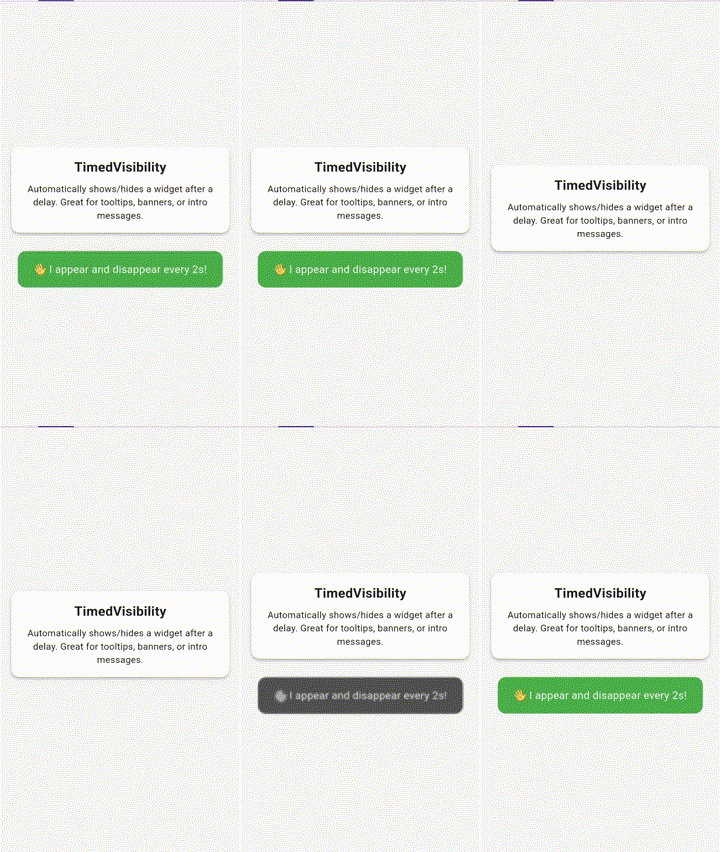
TimedVisibility Show/hide a widget after a delay, optionally reverse or loop
TimedSwitcher Switch between two widgets after a delay, animated
TimedBuilder Conditionally build a widget after a delay (bool isElapsed)
TimedFunction Execute a callback once after a delay
TimedRepeatBuilder Periodically rebuild a widget with tick counter
TimedAnimatedBuilder Animate a value (0.0 → 1.0) over time
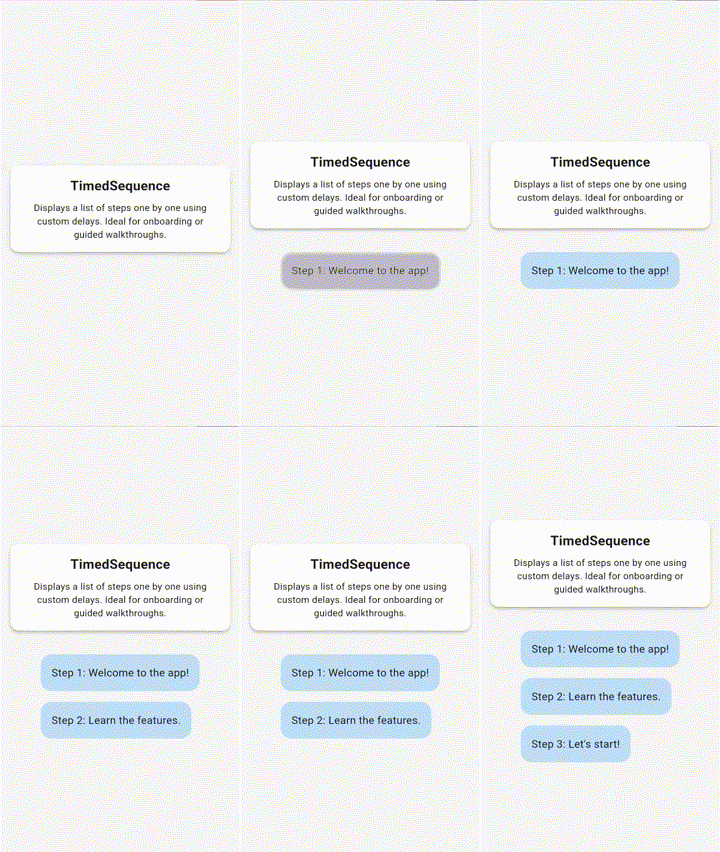
TimedSequence Step-based widget display with delays and optional controller
TimedVisibilityController Imperative control for TimedVisibility
TimedGroupController Start/reset multiple TimedVisibility widgets at once
TimedSequenceController External control of sequence progression or reset
TimedMixin Mixin for stateful widgets to safely manage timers

🚀 Example

TimedVisibility(
  delay: Duration(seconds: 2),
  reverseAfter: Duration(seconds: 3),
  loop: true,
  child: Text('Hello after 2 seconds!'),
);
TimedFunction(
  delay: Duration(milliseconds: 500),
  onElapsed: () => print('Half a second passed!'),
);
TimedSequence(
  steps: [
    TimedStep(delay: Duration(seconds: 1), child: Text('Step 1')),
    TimedStep(delay: Duration(seconds: 2), child: Text('Step 2')),
  ],
);

📷 Demo

🕑 TimedVisibility

TimedVisibility demo

📋 TimedSequence

TimedSequence demo


📝 License

MIT License. See LICENSE.


🙌 Contributing

Contributions are welcome and appreciated.

Whether you're fixing a typo, adding a test, or suggesting a new widget, your input helps make this package better for everyone.

Open an issue, start a discussion, or send a pull request — let's collaborate. 🧩


🔗 Links

カテゴリー

ソースリポジトリ

このパッケージを使用しているプロジェクト

データはまだありません。