パッケージ、リポジトリ、アプリカテゴリを検索

touch_indicator のカバー
パッケージ詳細v2.0.0

touch_indicator

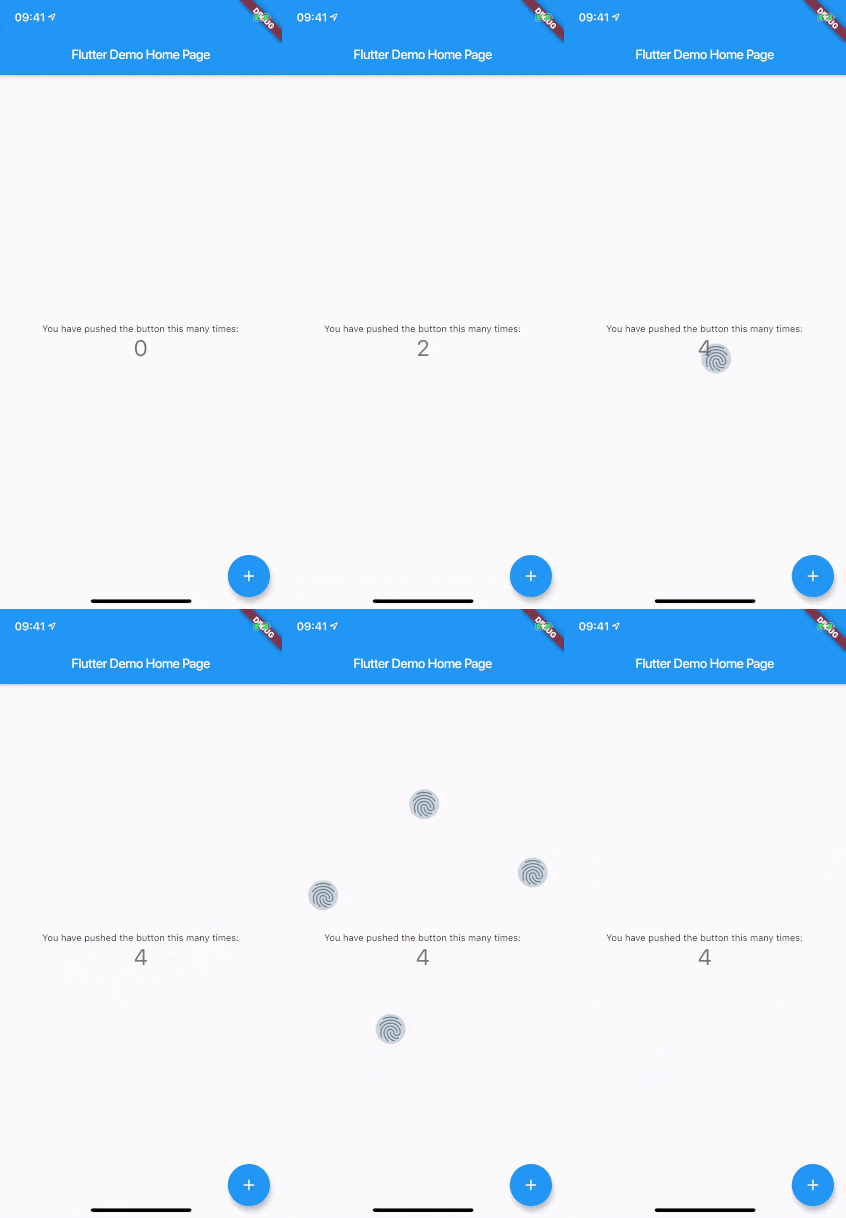
画面にタッチした場所に最大5つのタッチインジケーターを表示します。オーディエンス向けデモやアプリの録画時に便利です。

AndroidiOSWebmacOSWindowsLinux
30日間ダウンロード
1.3万
いいね数
57
Pub ポイント
150

パッケージをインストール

flutter pub add touch_indicator

パッケージ概要

公開情報に基づく選定ガイドです。参考としてご利用ください。

touch_indicator パッケージは、ユーザーが画面にタッチした位置に最大5つの視覚的インジケーターを表示します。ライブデモやスクリーンレコーディングに最適で、観客が正確に操作が行われた場所を確認できるようにします。インジケーターは控えめながらも明確に見えるため、ユーザー体験を損なわずアプリ機能を紹介するのにぴったりです。モバイル、ウェブ、デスクトップなど、主要プラットフォームすべてに対応しており、Flutterアプリへの統合は最小限の設定で簡単に実現できます。このパッケージは軽量で、デモやチュートリアルでの一時的な利用を目的として設計されています。

用途

  • ライブアプリケーションデモ
  • スクリーンレコーディングのチュートリアル
  • ユーザーインタラクションフィードバック
  • 教育アプリのウォークスルー
  • タッチ動作のデバッグ

主な機能

  • 最大 5 つのタッチポイントを表示します
  • クロスプラットフォーム対応
  • 最小限のパフォーマンスへの影響
  • シンプルな統合
  • カスタマイズ可能な外観

適している対象

  • アプリを紹介する開発者
  • ソフトウェアを示している教育者
  • UI テスター
  • アプリデモ作成者
  • チュートリアル動画の録画

注意事項

  • 本番環境での使用を想定していません
  • 最終ビルドではインジケーターを無効にするべきです
  • すべてのハードウェアで信頼性を持って動作するとは限りません
  • デモ中に一時的に使用するのが最適です
  • 一部の文脈では、視覚的なインジケーターが気を散らす可能性がある

元の README

関連するソースリポジトリの README 原文のスナップショットです。最新の内容はリポジトリをご覧ください。

touch_indicator

When you are recording a screencast of your app, you often want to give visual indication of where your fingers are touching the screen. Showing that on Android is easy. On iOS it's less intuitive. touch_indicator makes it easier and consistent on both platforms.

You add this widget as the main widget where you want to display user touches. Usually this will be the direct child of your MaterialApp. It will show an indicator on every touching finger and is completely customizable.

Installation

Add the plugin to your pubspec.yaml:

dependencies:
  touch_indicator: ^2.0.0

Usage

Import the package in your Dart code:

import 'package:touch_indicator/touch_indicator.dart';

Wrap all routes in your app in the TouchIndicator widget:

class MyApp extends StatelessWidget {
  MaterialApp(
    title: 'Touch indicator example',
    builder: (context, child) => TouchIndicator(child: child!),
    home: MyHomePage(title: 'Flutter Demo Home Page'),
  );
}

Customization options

indicatorColor

Changes the color of the backdrop and icon. Default is Colors.blueGrey.

indicatorSize

Changes the size of the indicator. Default is 40.0.

indicator

By adding a Widget here, you can change the complete look of the touch indicators. Make sure to supply a proper indicatorSize in order for the indicators to be positioned at the center of your touchpoints.

forceInReleaseMode

When you want to show indicators when the app is running in release mode, make sure to enable this option. Default is false.

enabled

You can enable or disable display of the indicators on the fly with this option. Default is true.

カテゴリー

ソースリポジトリ

このパッケージを使用しているプロジェクト

データはまだありません。