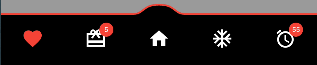
| icons |
Required Icons |
| titles |
Required Titles Use Empty Text For No Title |
| currentIndex |
Required Current Selected Index |
| backgroundColor |
Solid Background Color |
| foregroundColor |
Solid Foreground Color |
| foregroundStrokeBorderColor |
Foreground Stroke Solid Border Color |
| backgroundStrokeBorderColor |
Background Stroke Solid Border Color |
| backgroundStrokeBorderWidth |
Background Stroke Border Thickness |
| foregroundStrokeBorderWidth |
Foreground Stroke Border Thickness |
| backgroundGradient |
Background Gradient Color |
| foreGroundGradientShader |
Foreground Gradient Shader Color |
| foregroundStrokeGradientShader |
Foreground Stroke Border Gradient Shader Color |
| backgroundStrokeGradientShader |
Background Stroke Border Gradient Shader Color |
| navMargin |
Bottom Navigation Margin |
| backgroundBorderRadius |
Background Border Radius |
| selectedIconColor |
Selected Icon Color |
| selectedIconSize |
Selected Icon Size |
| selectedTextSize |
Selected Text Size |
| selectedTextColor |
Selected Text Color |
| unselectedIconColor |
Unselected Icon Color |
| unselectedIconSize |
Unselected Icon Size |
| unselectedTextSize |
Unselected Text Size |
| unselectedTextColor |
Unselected Text Color |
| showForeGroundStrokeAllSide |
Show Foreground Stroke Border All Sides |
| showBackGroundStrokeAllSide |
Show Background Stroke Border All Sides |
| useForeGroundGradient |
Use Foreground Gradient Color |
| showForeGround |
Show Hide Foreground |
| useForegroundShaderStroke |
Use Foreground Shader Border Stroke Color |
| useBackgroundShaderStroke |
Use Background Shader Border Stroke Color |
| underCurve |
Under Curve Or Upper Curve |
| staticCurve |
Static Curve Or Dynamic Curve |
| showCircleStaticMidItemStatic |
Show Circle Decoration For Static Curve |
| midItemCircleColorStatic |
Mid Item Circle Color For Static Curve |
| midItemCircleBorderColorStatic |
Mid Item Circle Border Color For Static Curve |
| showMidCircleStatic |
Show Mid Circle Or Hide For Static Curve |
| midCircleRadiusStatic |
Mid Circle Radius For Static Curve |
| midCircleBorderRadiusStatic |
Mid Circle Border Radius For Static Curve |
| customSelectedItemDecor |
Custom Selected Item Decoration |
| customUnSelectedItemDecor |
Custom Unselected Item Decoration |
| badgeData |
Badge Data For Individual Item |
| badgeColor |
Badge Background Color |
| badgeTextStyle |
Badge Text Style |
| badgeCircleRadius |
Badge Circle Radius |
| badgeTopPosition |
Badge Top Position |
| badgeBottomPosition |
Badge Bottom Position |
| badgeLeftPosition |
Badge Left Position |
| badgeRightPosition |
Badge Right Position |
| backgroundHeight |
Height for Background Container |
| foregroundHeight |
Height for Foreground Container |
| animationType |
Animation Type |
| animationDuration |
Animation Duration |
| onTap |
Item Tap Function |
| upperCurveWidthCtrl |
Controls the width of the upper curve. |
| leftX1UpperCurveCtrl |
Controls the x-coordinate of the left control point 1. |
| leftY1UpperCurveCtrl |
Controls the y-coordinate of the left control point 1. |
| leftX2UpperCurveCtrl |
Controls the x-coordinate of the left control point 2. |
| leftY2UpperCurveCtrl |
Controls the y-coordinate of the left control point 2. |
| leftX3UpperCurveCtrl |
Controls the x-coordinate of the left control point 3. |
| leftY3UpperCurveCtrl |
Controls the y-coordinate of the left control point 3. |
| rightX1UpperCurveCtrl |
Controls the x-coordinate of the right control point 1. |
| rightY1UpperCurveCtrl |
Controls the y-coordinate of the right control point 1. |
| rightX2UpperCurveCtrl |
Controls the x-coordinate of the right control point 2. |
| rightY2UpperCurveCtrl |
Controls the y-coordinate of the right control point 2. |
| rightX3UpperCurveCtrl |
Controls the x-coordinate of the right control point 3. |
| rightY3UpperCurveCtrl |
Controls the y-coordinate of the right control point 3. |
| upperStrokeCurveWidthCtrl |
Controls the width of the upper stroke curve. |
| leftStrokeX1UpperCurveCtrl |
Controls the x-coordinate of the left control point 1 for the upper stroke. |
| leftStrokeY1UpperCurveCtrl |
Controls the y-coordinate of the left control point 1 for the upper stroke. |
| leftStrokeX2UpperCurveCtrl |
Controls the x-coordinate of the left control point 2 for the upper stroke. |
| leftStrokeY2UpperCurveCtrl |
Controls the y-coordinate of the left control point 2 for the upper stroke. |
| leftStrokeX3UpperCurveCtrl |
Controls the x-coordinate of the left control point 3 for the upper stroke. |
| leftStrokeY3UpperCurveCtrl |
Controls the y-coordinate of the left control point 3 for the upper stroke. |
| rightStrokeX1UpperCurveCtrl |
Controls the x-coordinate of the right control point 1 for the upper stroke. |
| rightStrokeY1UpperCurveCtrl |
Controls the y-coordinate of the right control point 1 for the upper stroke. |
| rightStrokeX2UpperCurveCtrl |
Controls the x-coordinate of the right control point 2 for the upper stroke. |
| rightStrokeY2UpperCurveCtrl |
Controls the y-coordinate of the right control point 2 for the upper stroke. |
| rightStrokeX3UpperCurveCtrl |
Controls the x-coordinate of the right control point 3 for the upper stroke. |
| rightStrokeY3UpperCurveCtrl |
Controls the y-coordinate of the right control point 3 for the upper stroke. |
| underCurveWidthCtrl |
Controls the width of the under curve. |
| leftX1UnderCurveCtrl |
Controls the x-coordinate of the left control point 1 for the under curve. |
| leftY1UnderCurveCtrl |
Controls the y-coordinate of the left control point 1 for the under curve. |
| leftX2UnderCurveCtrl |
Controls the x-coordinate of the left control point 2 for the under curve. |
| leftY2UnderCurveCtrl |
Controls the y-coordinate of the left control point 2 for the under curve. |
| leftX3UnderCurveCtrl |
Controls the x-coordinate of the left control point 3 for the under curve. |
| leftY3UnderCurveCtrl |
Controls the y-coordinate of the left control point 3 for the under curve. |
| rightX1UnderCurveCtrl |
Controls the x-coordinate of the right control point 1 for the under curve. |
| rightY1UnderCurveCtrl |
Controls the y-coordinate of the right control point 1 for the under curve. |
| rightX2UnderCurveCtrl |
Controls the x-coordinate of the right control point 2 for the under curve. |
| rightY2UnderCurveCtrl |
Controls the y-coordinate of the right control point 2 for the under curve. |
| rightX3UnderCurveCtrl |
Controls the x-coordinate of the right control point 3 for the under curve. |
| rightY3UnderCurveCtrl |
Controls the y-coordinate of the right control point 3 for the under curve. |
| underStrokeCurveWidthCtrl |
Controls the width of the under stroke curve. |
| leftStrokeX1UnderCurveCtrl |
Controls the x-coordinate of the left control point 1 for the under stroke. |
| leftStrokeY1UnderCurveCtrl |
Controls the y-coordinate of the left control point 1 for the under stroke. |
| leftStrokeX2UnderCurveCtrl |
Controls the x-coordinate of the left control point 2 for the under stroke. |
| leftStrokeY2UnderCurveCtrl |
Controls the y-coordinate of the left control point 2 for the under stroke. |
| leftStrokeX3UnderCurveCtrl |
Controls the x-coordinate of the left control point 3 for the under stroke. |
| leftStrokeY3UnderCurveCtrl |
Controls the y-coordinate of the left control point 3 for the under stroke. |
| rightStrokeX1UnderCurveCtrl |
Controls the x-coordinate of the right control point 1 for the under stroke. |
| rightStrokeY1UnderCurveCtrl |
Controls the y-coordinate of the right control point 1 for the under stroke. |
| rightStrokeX2UnderCurveCtrl |
Controls the x-coordinate of the right control point 2 for the under stroke. |
| rightStrokeY2UnderCurveCtrl |
Controls the y-coordinate of the right control point 2 for the under stroke. |
| rightStrokeX3UnderCurveCtrl |
Controls the x-coordinate of the right control point 3 for the under stroke. |
| rightStrokeY3UnderCurveCtrl |
Controls the y-coordinate of the right control point 3 for the under stroke. |