パッケージ、リポジトリ、アプリカテゴリを検索

update_notification のカバー
パッケージ詳細v1.0.1

update_notification

ユーザーがFlutterアプリの最新バージョンを持っているか確認します。

AndroidiOSmacOS
30日間ダウンロード
22
いいね数
29
Pub ポイント
120

パッケージをインストール

flutter pub add update_notification

パッケージ概要

公開情報に基づく選定ガイドです。参考としてご利用ください。

update_notification パッケージは、リモートの構成ファイルをチェックすることで、Flutter アプリがユーザーが最新バージョンを使用しているかどうかを判断するのを助けます。Android、iOS、macOS プラットフォームをサポートしており、新しいバージョンが利用可能になるとユーザーに更新を促すことができます。このパッケージは指定された URL からバージョン情報を取得し、現在のアプリバージョンと比較して、それに応じて通知やアラートを発行します。アプリの品質を維持し、最新の改善点やセキュリティ修正の恩恵を受けられるようにするために最適です。

用途

  • ユーザーにアプリの更新を促す
  • モニターアプリバージョンの準拠状況
  • 新しいリリースについてユーザーに通知する
  • セキュリティパッチの導入を確実にする
  • 適切なタイミングでの更新を通じてユーザー体験を向上させる

主な機能

  • URLを介してリモートバージョンを確認します
  • 複数のプラットフォームをサポートしています
  • カスタマイズ可能な更新プロンプト
  • 軽量で簡単に統合可能
  • リアルタイムバージョン比較

適している対象

  • 頻繁な更新が必要なアプリ
  • エンタープライズアプリケーション
  • セキュリティに敏感なアプリ
  • ユーザー向けモバイルアプリ
  • クロスプラットフォームのFlutterプロジェクト

注意事項

  • パブリックにアクセス可能なバージョン構成ファイルが必要です
  • チェックにネットワークアクセスが必要です
  • 誤設定されているとパフォーマンスに影響する可能性があります
  • 外部サーバーの信頼性に依存しています
  • バージョンベースの更新検出に制限

元の README

関連するソースリポジトリの README 原文のスナップショットです。最新の内容はリポジトリをご覧ください。

update_notification

  • This flutter package will alert app users to update the application.
  • With the help of an alert pop-up, users can easily navigate to the respective stores(App Store or play Store) to update the app.

UI

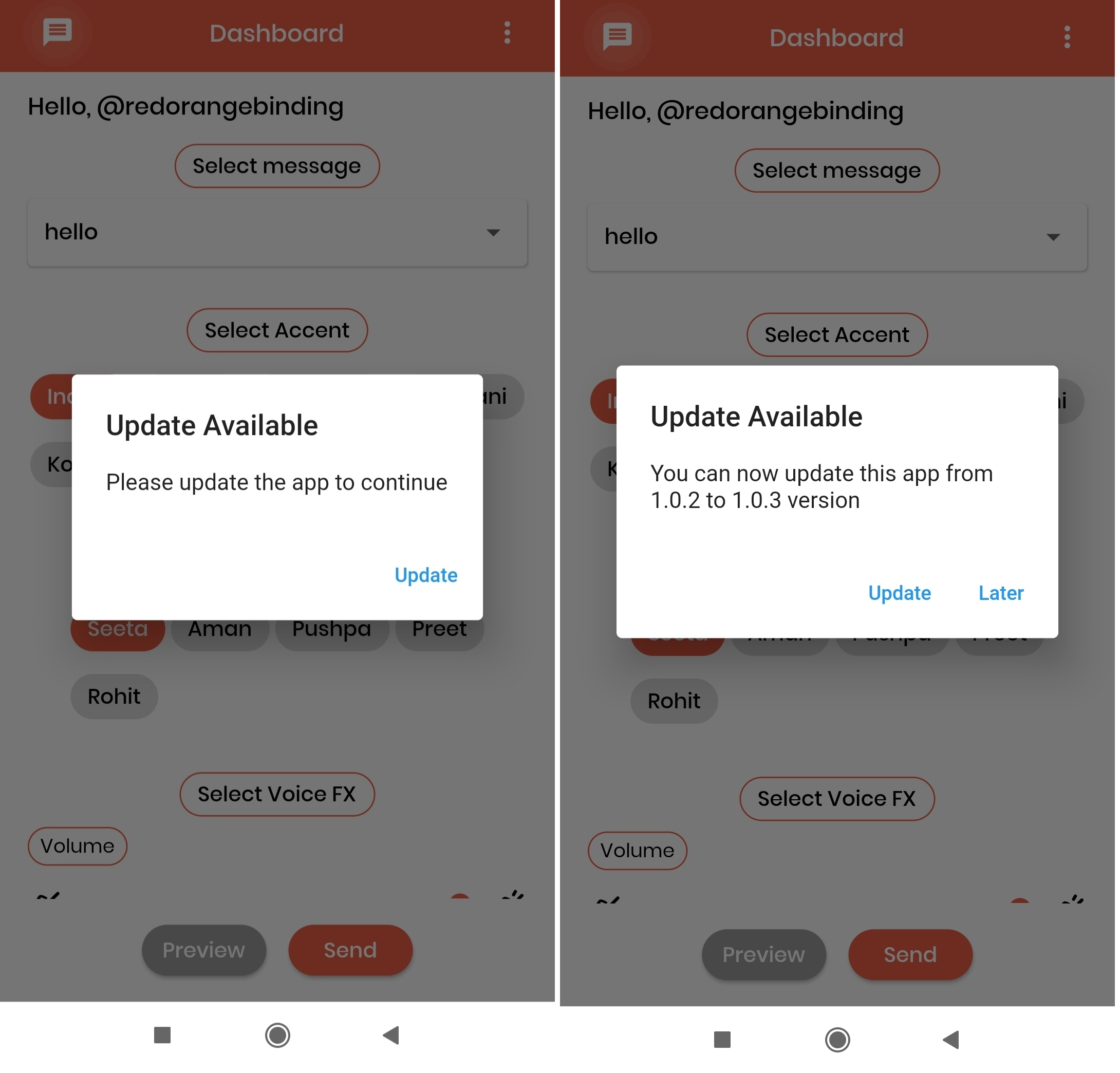
The UI of the alert dialog is simply a card.

Screenshots:

Installation

Add update_notification as a dependency in your pubspec.yaml file.

dependencies:
  update_notification: ^1.0.1

Usage

  • In main.dart (or any) file, first create an instance of the UpdateNotification class in your initState() method.

    final UpdateNotification updateNotification = UpdateNotification();

  • Pass the application package name in andoidAppId, iOSAppId.

  • Pass application minimum version value in minimumVersion parameter. This parameter is used to force people to update application, any user having version less than the specified version will be forced to update application

  • Call showAlertDialog method- updateNotification.showAlertDialog(context: context);

  • If updated app version is available on stores, application will get a popup on launch of application and an option to Update. On click of update button user will be directed to the respective stores(App store or play store).

Example

 import 'package:flutter/cupertino.dart';
 import 'package:flutter/material.dart';
 import '/update_notification.dart';

 class Example extends StatefulWidget {
   const Example({Key? key}) : super(key: key);

   @override
   _ExampleState createState() => _ExampleState();
 }

 class _ExampleState extends State<Example> {
   @override
   void initState() {
     super.initState();

     final UpdateNotification updateNotification =
         UpdateNotification(
             iOSAppId: 'com.google.myride',
             androidAppId: 'com.google.rever',
             minimumVersion: '1.0.0');

     showDialog(updateNotification);
   }

   void showDialog(UpdateNotification updateVersion) {
     updateVersion.showAlertDialog(context: context);
   }

   @override
   Widget build(BuildContext context) {
     return Scaffold(
       body: Container(),
     );
   }
 }

カテゴリー

依存関係

依存関係一覧 6 件

ソースリポジトリ

このパッケージを使用しているプロジェクト

データはまだありません。