パッケージ、リポジトリ、アプリカテゴリを検索

updater のカバー
パッケージ詳細v0.2.5

updater

Flutter用のカスタムインアプリ更新をチェックするパッケージ。

Android
30日間ダウンロード
144
いいね数
41
Pub ポイント
150

パッケージをインストール

flutter pub add updater

パッケージ概要

公開情報に基づく選定ガイドです。参考としてご利用ください。

アップデーターパッケージは、Flutterアプリがカスタムのアプリ内更新をチェックできるようにし、開発者がバージョン管理を制御し、ユーザーにアプリ内で直接更新を促すことを可能にします。Android専用に設計されており、ユーザーが定義したソースから更新情報を取得することで、既存のワークフローにスムーズに統合されます。これにより、アプリの品質を維持し、アプリストアの更新に頼らずにユーザーが最新バージョンを使用していることを保証します。このパッケージは軽量で、最小限の構成で簡単に実装できます。

用途

  • アプリ内更新のお知らせ
  • カスタム更新ロジック
  • ユーザー主導の更新プロンプト
  • バージョン互換性の確認
  • アプリのメンテナンス
  • オフライン更新検出

主な機能

  • カスタム更新ソースのサポート
  • Android専用プラットフォームのターゲット
  • シンプルな統合
  • 軽量設計
  • 設定可能な更新チェック
  • 外部の依存関係なし

適している対象

  • アプリバージョンを管理する開発者
  • 制御された更新ロールアウトを必要とするアプリ
  • 頻繁なリリースを持つプロジェクト
  • 内部またはプライベートな更新サーバーを使用するチーム
  • Android向けのFlutterアプリ

注意事項

  • Android プラットフォームに限定
  • 手動でのメタデータ設定の更新が必要です
  • iOS 対応なし
  • 更新情報は外部サーバーに依存しています
  • パブリックアプリストアのアップデートには適していません
  • エンドポイントを更新するにはセキュアな接続が必要です

元の README

関連するソースリポジトリの README 原文のスナップショットです。最新の内容はリポジトリをご覧ください。

Version

A package to check for the custom in-app updates for Flutter.

⭐ Installing

dependencies:
    updater: ^0.2.5

⚡ Import

import 'package:updater/updater.dart';
Android IOS
Supported ✔️ ❌
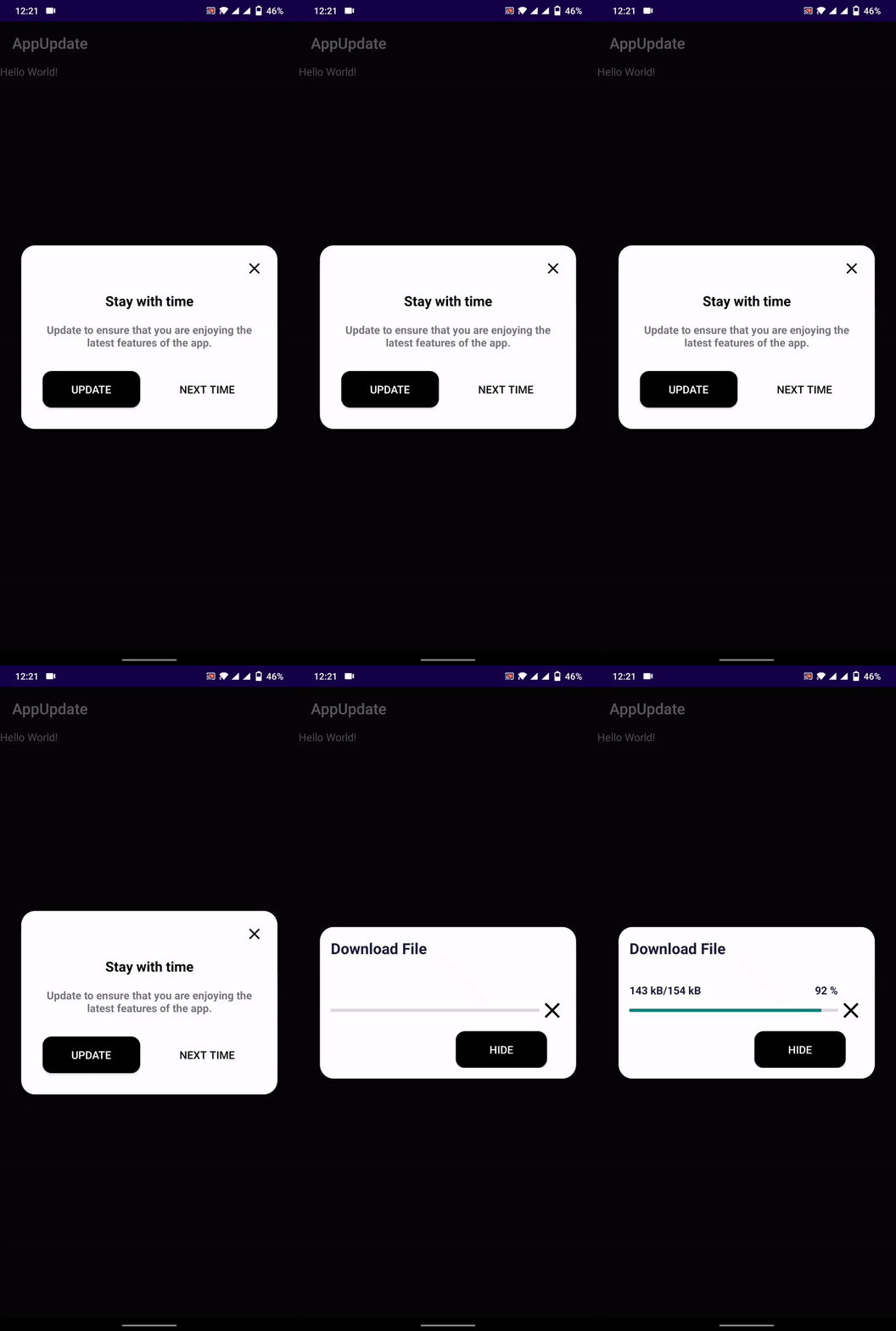
alt text

Properties

context → BuildContext
url → String
titleText → String
contentText → String
confirmText → String
cancelText → String
elevation → double
rootNavigator → bool
allowSkip → bool
backgroundDownload → bool
callBack → Function(String, int, String, int String)
controller → UpdaterController
delay → Duration
enableResume → bool

UpdateStatus

UpdateStatus.Checking
UpdateStatus.Pending
UpdateStatus.Available
UpdateStatus.Dowloading
UpdateStatus.Paused
UpdateStatus.Resume
UpdateStatus.Cancelled
UpdateStatus.Completed
UpdateStatus.DialogDismissed
UpdateStatus.Failed

Json Structure

versionCode → int
versionName → String
minSupport → int
contentText → String
url → String 
{
  "versionCode":3,
  "versionName":"1.0.0",
  "contentText":"Please update your app",
  "minSupport":2,
  "url":"/*App Download Url*/"
}
versionCode:   //Specify new version code
versionName:   //specify version name
minSuppor:     //specify minimum supported version to force update
contentText:   //specify content text, if contentText is not defined in app then this will be use
url:          //App file download link

⚙ Setup

Android
  • Add REQUEST_INSTALL_PACKAGES permission to open and install apk file
<uses-permission android:name="android.permission.REQUEST_INSTALL_PACKAGES" />

📙 How To Use

Inside pubspec.yaml file

# Specify version code using +VersionCode
version: 1.0.0+1  #Like here the VersionCode is 1
    //Controller
    UpdaterController controller = UpdaterController(
        listener: (UpdateStatus status) {
            print('Listener: $status');
        },
        onChecked: (bool isAvailable) {
            print(isAvailable);
        },
        progress: (current, total) {
            print('Progress: $current -- $total');
        },
        onError: (status) {
            print('Error: $status');
        },
    );


    Updater updater = Updater(
        context: context,
        controller: controller,
        url: 'JSON_FILE_URL',
        titleText: 'Update available',
        // backgroundDownload: false,
        // allowSkip: false,
        contentText:
            'Update your app to the latest version to enjoy new feature.',
        callBack: (UpdateModel model) {

          print(model.versionName);
          print(model.versionCode);
          print(model.contentText);
          
        },
        
        enableResume: false,
    );
    updater.check();

    
    
    //To cancel the download
    //controller.cancel();


    //To pause the download
    //controller.pause();

    //To resume the download
    //controller.resume();


カテゴリー

依存関係

依存関係一覧 4 件

ソースリポジトリ

このパッケージを使用しているプロジェクト

データはまだありません。