パッケージ、リポジトリ、アプリカテゴリを検索

パッケージ詳細v1.0.2

use_optimistic

ジェネリックな状態を楽観的に更新し、その後非同期に `accept`、`acceptAs`、または `reject` で解決するための使いやすいフックです。

AndroidiOSWebmacOSWindowsLinux
30日間ダウンロード
10
いいね数
5
Pub ポイント
160

パッケージをインストール

flutter pub add use_optimistic

パッケージ概要

公開情報に基づく選定ガイドです。参考としてご利用ください。

Flutter/Dart パッケージで、状態を楽観的に更新するための簡単なフックを提供します。開発者は UI に変更を即座に反映でき、その後 accept、acceptAs、または reject メソッドを使用して非同期に処理できます。フォーム送信、トグル、またはサーバーの確認前にユーザー体験を向上させるために即時フィードバックが必要な任意のアクションに最適です。このフックは状態遷移をスムーズに管理し、複数のプラットフォームをサポートしています。

用途

  • リアルタイムフォームの更新
  • 即時フィードバック付きのアクションを切り替えます
  • 楽観的UIを伴う非同期操作
  • ロールバック機能を備えたデータ送信
  • ユーザーインタラクションのシミュレーション

主な機能

  • 楽観的な状態更新
  • accept/acceptAs/reject のサポート
  • 最小限のボイラープレートでシンプルな API
  • クロスプラットフォーム互換性
  • 組み込みの状態管理
  • 既存のフックとの簡単な統合

適している対象

  • 即時のUIフィードバックを求めている開発者
  • 一時的な状態変更を必要とするプロジェクト
  • 頻繁な非同期インタラクションを持つアプリ
  • UXの応答性を重視するチーム
  • 関数型ウィジェットを使用するFlutterアプリ

注意事項

  • 非同期状態処理の理解が必要です
  • バックアップがない場合、重要なデータには適していません
  • 拒否時に適切なエラー処理が必要です
  • 明確なユーザーのフィードバックメカニズムと併用するのが最適です
  • 複雑なワークフローには追加の論理が必要になる可能性があります

元の README

関連するソースリポジトリの README 原文のスナップショットです。最新の内容はリポジトリをご覧ください。

Flutter hook: useOptimistic 🪝

An easy-to-use hook to optimistically update generic state and then resolve it later (async or sync) by accept, acceptAs, or reject-ing.


Documentation
  • Full example of using this hook to manage integer state.
  • GitHub repo found here.
  • Package found here.

Documentation is largely found in the package itself via doc-comments (i.e. hover over package functions in your editor and it'll tell you what they do). First, however, view the above full example to get started.

Simple usage

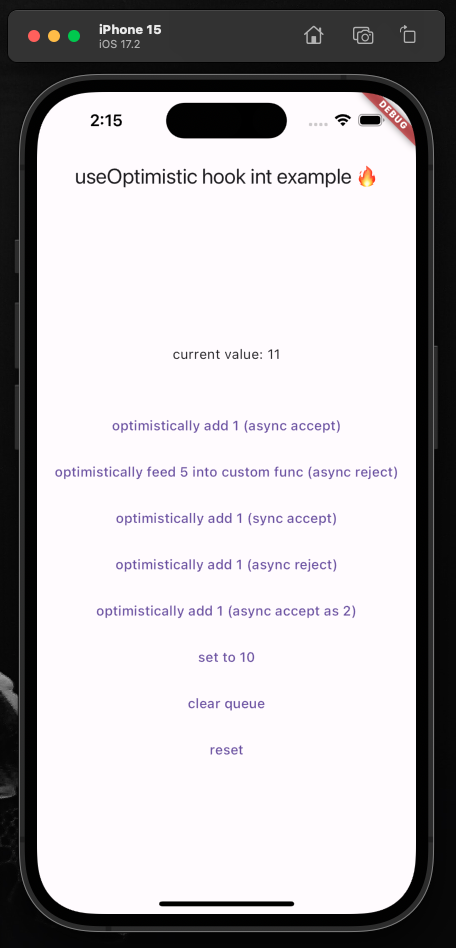
demo image

Initialize the hook:

  final UseOptimistic<int> useOptimistic = UseOptimistic<int>(initialState: 0)

Ensure your widget listens to its state changes:

@override
void initState() {
  super.initState();
  useOptimistic.addListener(() => setState(() => debugPrint("state changed to: ${useOptimistic.state}")));
}

Ensure the hook will be disposed when your widget is:

@override
void dispose() {
  super.dispose();
  useOptimistic.dispose();
}

Update your state optimistically:

TextButton(
  onPressed: () async {

    Resolver r = useOptimistic.fn(
      1, // the [newValue] to be passed to functions below
      todo: (currentState, newValue) => currentState + newValue,
      undo: (currentState, oldValue) => currentState - oldValue,
    );

    // simulating an API call
    await Future.delayed(const Duration(seconds: 1));

    // three mutually exclusive ways to deal with result
    r.acceptAs(2); // [undo] original function, then [todo] with new value
    r.accept(); // accept the original optimistic update
    r.reject(); // reject the original optimistic update and [undo] original function

  },
  child: const Text("optimistically add 1"),
),

You can call useOptimistic.fn( ... ) multiple times with different todo and undo functions and it'll execute the proper todo/undo associated with fn at the moment you called it. This means you can call multiple separate useOptimistic.fn( ... )s safely together. It does not mean you can have a single fn like this (pseudo-code): useOptimistic.fn( if x todo: () => {...} else todo: () => {...} ) that has conditionally rendered todo/undo functions.

Listen to the state:

Text("current value: ${useOptimistic.state}"),
Extra
  • The package is always open to improvements, [suggestions](mailto:me@matthewtrent.me), and additions!
  • I'll look through GitHub PRs and Issues as soon as I can.

analytics

カテゴリー

依存関係

依存関係一覧 1 件

ソースリポジトリ

このパッケージを使用しているプロジェクト

データはまだありません。