パッケージ、リポジトリ、アプリカテゴリを検索

パッケージ詳細v1.3.0

video_player_web_hls

video_player の Web プラットフォーム実装で、Chrome および他のブラウザでの HLS をサポートしています。

Web
30日間ダウンロード
3.3万
いいね数
79
Pub ポイント
150

パッケージをインストール

flutter pub add video_player_web_hls

パッケージ概要

公開情報に基づく選定ガイドです。参考としてご利用ください。

Chrome およびその他の現代のブラウザ向けに、HLS(HTTP Live Streaming)サポートを追加する video_player パッケージのウェブプラットフォーム実装です。Flutter ウェブアプリケーションで HLS ストリームをスムーズに再生できるようにし、コアの video_player 機能を拡張して、アダプティブストリーミングプロトコルに対応させます。このパッケージは、ネイティブのHLSサポートが限られているか一貫性がない可能性があるウェブ環境専用に設計されています。

用途

  • Flutter Web アプリで HLS ストリームを再生する
  • ライブ動画コンテンツのストリーミング
  • アダプティブビットレートストリーミングをサポート
  • 既存の video_player ワークフローとの統合
  • クロスブラウザHLS互換性を有効にする

主な機能

  • Web上のHLSストリーミングサポート
  • Chrome および最新ブラウザの互換性
  • video_player とのシームレスな統合
  • アダプティブビットレート再生
  • 軽量で焦点を当てた実装

適している対象

  • Web プラットフォームをターゲットとする Flutter 開発者
  • HLS動画再生を必要とするアプリ
  • アダプティブストリーミングを使用するプロジェクト
  • 動画を中心としたウェブ体験を開発する開発者
  • Web上で信頼できるHLSサポートが必要なチーム

注意事項

  • ウェブプラットフォームのみに限定
  • 互換性のあるブラウザが必要(例:Chrome)
  • 外部のHLS.jsライブラリに依存しています
  • 複雑なストリーミング構成には追加の設定が必要になる場合があります
  • モバイルまたはデスクトッププラットフォームには適していません

元の README

関連するソースリポジトリの README 原文のスナップショットです。最新の内容はリポジトリをご覧ください。

video_player_web_hls

Version

Supports hls on chrome and other browsers.

Usage

...
dependencies:
  ...
  video_player_web_hls: ^0.1.1
  video_player: ^0.10.10

  ...

Add

 <script src="https://cdn.jsdelivr.net/npm/hls.js@latest"  type="application/javascript"></script>

in index.html above

 <script src="main.dart.js" type="application/javascript"></script>

dart:io

The Web platform does not suppport dart:io, so attempts to create a VideoPlayerController.file will throw an UnimplementedError.

Autoplay

Playing videos without prior interaction with the site might be prohibited by the browser and lead to runtime errors. See also: https://goo.gl/xX8pDD.

Supported Formats

Different web browsers support different sets of video codecs.

Video codecs?

Check MDN's Web video codec guide to learn more about the pros and cons of each video codec.

What codecs are supported?

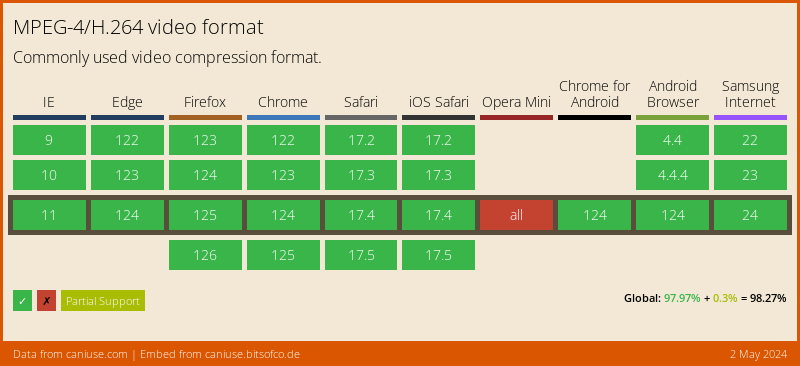
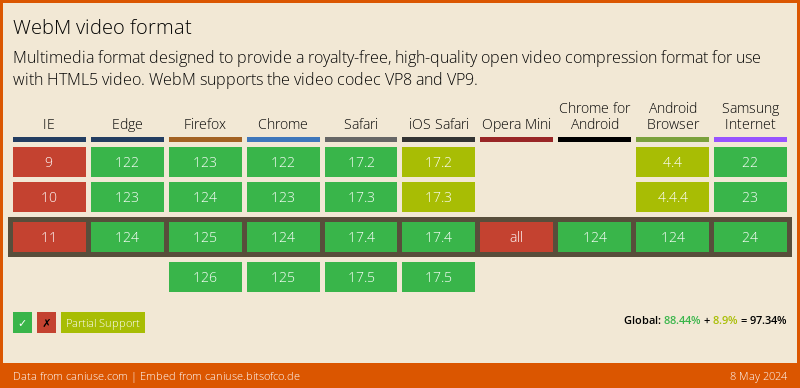
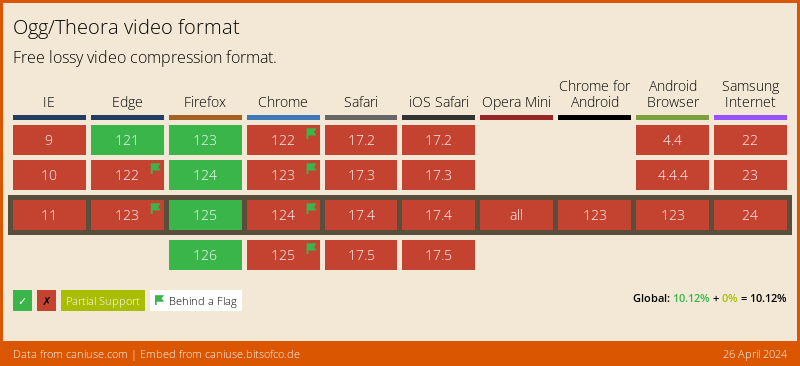
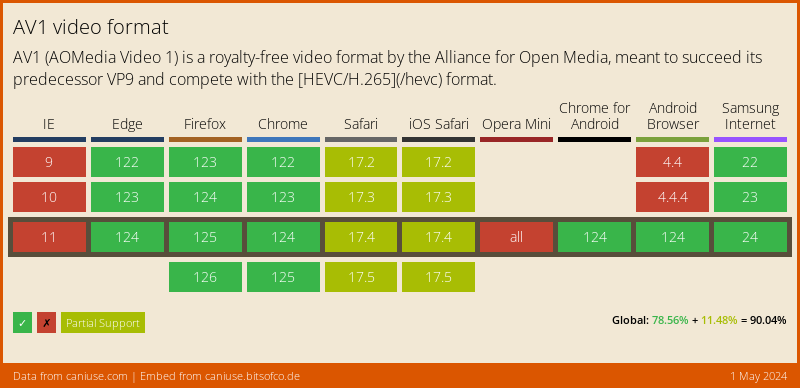
Visit caniuse.com: 'video format' for a breakdown of which browsers support what codecs. You can customize charts there for the users of your particular website(s).

Here's an abridged version of the data from caniuse, for a Global audience:

MPEG-4/H.264

Data on Global support for the MPEG-4/H.264 video format

WebM

Data on Global support for the WebM video format

Ogg/Theora

Data on Global support for the Ogg/Theora video format

AV1

Data on Global support for the AV1 video format

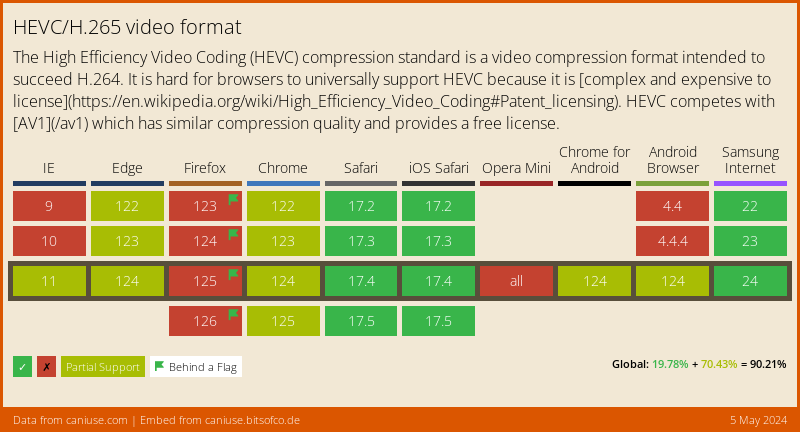
HEVC/H.265

Data on Global support for the HEVC/H.265 video format

Example

import 'package:video_player/video_player.dart';
import 'package:flutter/material.dart';

void main() => runApp(VideoApp());

class VideoApp extends StatefulWidget {
  @override
  _VideoAppState createState() => _VideoAppState();
}

class _VideoAppState extends State<VideoApp> {
  VideoPlayerController _controller;

  @override
  void initState() {
    super.initState();
    _controller = VideoPlayerController.network(
        'https://test-streams.mux.dev/x36xhzz/x36xhzz.m3u8')
      ..initialize().then((_) {
        // Ensure the first frame is shown after the video is initialized, even before the play button has been pressed.
        setState(() {});
      });
  }

  @override
  Widget build(BuildContext context) {
    return MaterialApp(
      title: 'Video Demo',
      home: Scaffold(
        body: Center(
          child: _controller.value.initialized
              ? AspectRatio(
                  aspectRatio: _controller.value.aspectRatio,
                  child: VideoPlayer(_controller),
                )
              : Container(),
        ),
        floatingActionButton: FloatingActionButton(
          onPressed: () {
            setState(() {
              _controller.value.isPlaying
                  ? _controller.pause()
                  : _controller.play();
            });
          },
          child: Icon(
            _controller.value.isPlaying ? Icons.pause : Icons.play_arrow,
          ),
        ),
      ),
    );
  }

  @override
  void dispose() {
    super.dispose();
    _controller.dispose();
  }
}

カテゴリー

依存関係

依存関係一覧 3 件

  • http^1.0.0
  • video_player_platform_interface^6.2.0
  • web>=1.0.0 <2.0.0

ソースリポジトリ

このパッケージを使用しているプロジェクト