



A Flutter package for trimming videos
Features
- Customizable video trimmer.
- Supports two types of trim viewer, fixed length and scrollable.
- Video playback control.
- Retrieving and storing video file.
Also, supports conversion to GIF.
NOTE: Versions 5.0.0 and above uses a native video trimmer without the overhead of FFmpeg. Have a look at the Changelog for breaking changes if you are below version 5.0.0.
Following image shows the structure of the TrimViewer. It consists of the Duration on top (displaying the start, end, and scrubber time), TrimArea consisting of the thumbnails, and TrimEditor which is an overlay that let's you select a portion from the video.

Example
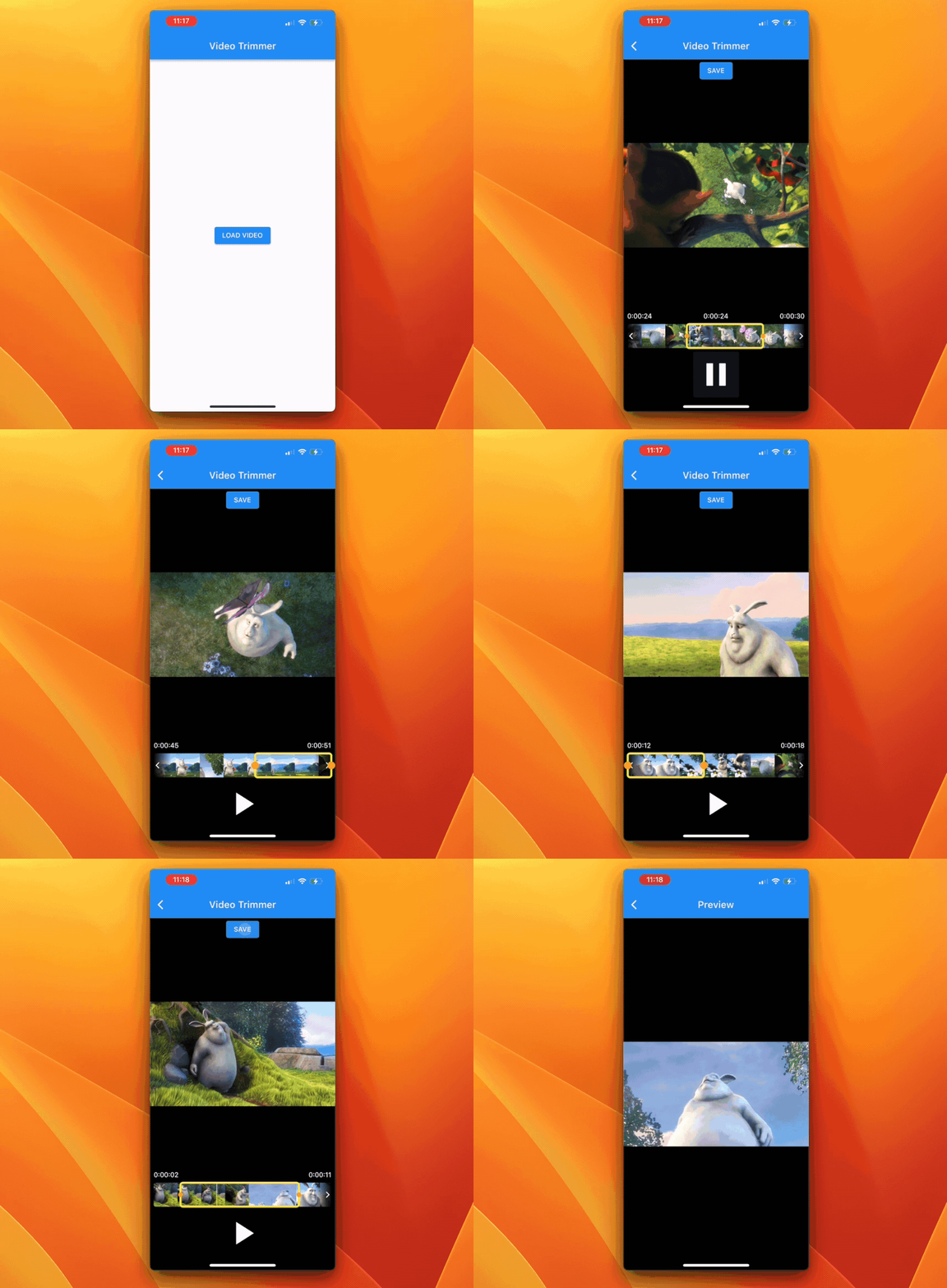
The example app running on an iPhone 13 Pro device:
Usage
Add the dependency video_trimmer to your pubspec.yaml file:
For using main version of FFmpeg package:
dependencies:
  video_trimmer: ^5.0.0
Android configuration
No additional configuration is needed for using on Android platform. You are good to go!
iOS configuration
Functionalities
Loading input video file
final Trimmer _trimmer = Trimmer();
await _trimmer.loadVideo(videoFile: file);
Saving trimmed video
Returns a string to indicate whether the saving operation was successful.
await _trimmer
    .saveTrimmedVideo(startValue: _startValue, endValue: _endValue)
    .then((value) => setState(() => _value = value));
Video playback state
Returns the video playback state. If true then the video is playing, otherwise it is paused.
await _trimmer.videoPlaybackControl(
  startValue: _startValue,
  endValue: _endValue,
);
Widgets
Display a video playback area
VideoViewer(trimmer: _trimmer)
Display the video trimmer area
TrimViewer(
  trimmer: _trimmer,
  viewerHeight: 50.0,
  viewerWidth: MediaQuery.of(context).size.width,
  maxVideoLength: const Duration(seconds: 10),
  onChangeStart: (value) => _startValue = value,
  onChangeEnd: (value) => _endValue = value,
  onChangePlaybackState: (value) =>
      setState(() => _isPlaying = value),
)
Example
Before using this example directly in a Flutter app, don't forget to add the video_trimmer & file_picker packages to your pubspec.yaml file.
You can try out this example by replacing the entire content of main.dart file of a newly created Flutter project.
import 'dart:io';

import 'package:file_picker/file_picker.dart';
import 'package:flutter/material.dart';
import 'package:video_trimmer/video_trimmer.dart';

void main() => runApp(MyApp());

class MyApp extends StatelessWidget {
  @override
  Widget build(BuildContext context) {
    return MaterialApp(
      title: 'Video Trimmer',
      theme: ThemeData(
        primarySwatch: Colors.blue,
      ),
      home: HomePage(),
    );
  }
}

class HomePage extends StatelessWidget {
  @override
  Widget build(BuildContext context) {
    return Scaffold(
      appBar: AppBar(
        title: Text("Video Trimmer"),
      ),
      body: Center(
        child: Container(
          child: ElevatedButton(
            child: Text("LOAD VIDEO"),
            onPressed: () async {
              FilePickerResult? result = await FilePicker.platform.pickFiles(
                type: FileType.video,
                allowCompression: false,
              );
              if (result != null) {
                File file = File(result.files.single.path!);
                Navigator.of(context).push(
                  MaterialPageRoute(builder: (context) {
                    return TrimmerView(file);
                  }),
                );
              }
            },
          ),
        ),
      ),
    );
  }
}

class TrimmerView extends StatefulWidget {
  final File file;

  TrimmerView(this.file);

  @override
  _TrimmerViewState createState() => _TrimmerViewState();
}

class _TrimmerViewState extends State<TrimmerView> {
  final Trimmer _trimmer = Trimmer();

  double _startValue = 0.0;
  double _endValue = 0.0;

  bool _isPlaying = false;
  bool _progressVisibility = false;

  Future<String?> _saveVideo() async {
    setState(() {
      _progressVisibility = true;
    });

    String? _value;

    await _trimmer
        .saveTrimmedVideo(startValue: _startValue, endValue: _endValue)
        .then((value) {
      setState(() {
        _progressVisibility = false;
        _value = value;
      });
    });

    return _value;
  }

  void _loadVideo() {
    _trimmer.loadVideo(videoFile: widget.file);
  }

  @override
  void initState() {
    super.initState();

    _loadVideo();
  }

  @override
  Widget build(BuildContext context) {
    return Scaffold(
      appBar: AppBar(
        title: Text("Video Trimmer"),
      ),
      body: Builder(
        builder: (context) => Center(
          child: Container(
            padding: EdgeInsets.only(bottom: 30.0),
            color: Colors.black,
            child: Column(
              mainAxisAlignment: MainAxisAlignment.center,
              mainAxisSize: MainAxisSize.max,
              children: <Widget>[
                Visibility(
                  visible: _progressVisibility,
                  child: LinearProgressIndicator(
                    backgroundColor: Colors.red,
                  ),
                ),
                ElevatedButton(
                  onPressed: _progressVisibility
                      ? null
                      : () async {
                          _saveVideo().then((outputPath) {
                            print('OUTPUT PATH: $outputPath');
                            final snackBar = SnackBar(
                                content: Text('Video Saved successfully'));
                            ScaffoldMessenger.of(context).showSnackBar(
                              snackBar,
                            );
                          });
                        },
                  child: Text("SAVE"),
                ),
                Expanded(
                  child: VideoViewer(trimmer: _trimmer),
                ),
                Center(
                  child: TrimViewer(
                    trimmer: _trimmer,
                    viewerHeight: 50.0,
                    viewerWidth: MediaQuery.of(context).size.width,
                    maxVideoLength: const Duration(seconds: 10),
                    onChangeStart: (value) => _startValue = value,
                    onChangeEnd: (value) => _endValue = value,
                    onChangePlaybackState: (value) =>
                        setState(() => _isPlaying = value),
                  ),
                ),
                TextButton(
                  child: _isPlaying
                      ? Icon(
                          Icons.pause,
                          size: 80.0,
                          color: Colors.white,
                        )
                      : Icon(
                          Icons.play_arrow,
                          size: 80.0,
                          color: Colors.white,
                        ),
                  onPressed: () async {
                    bool playbackState = await _trimmer.videoPlaybackControl(
                      startValue: _startValue,
                      endValue: _endValue,
                    );
                    setState(() {
                      _isPlaying = playbackState;
                    });
                  },
                )
              ],
            ),
          ),
        ),
      ),
    );
  }
}
License
Copyright (c) 2025 Souvik Biswas
Permission is hereby granted, free of charge, to any person obtaining a copy
of this software and associated documentation files (the "Software"), to deal
in the Software without restriction, including without limitation the rights
to use, copy, modify, merge, publish, distribute, sublicense, and/or sell
copies of the Software, and to permit persons to whom the Software is
furnished to do so, subject to the following conditions:
The above copyright notice and this permission notice shall be included in all
copies or substantial portions of the Software.
THE SOFTWARE IS PROVIDED "AS IS", WITHOUT WARRANTY OF ANY KIND, EXPRESS OR
IMPLIED, INCLUDING BUT NOT LIMITED TO THE WARRANTIES OF MERCHANTABILITY,
FITNESS FOR A PARTICULAR PURPOSE AND NONINFRINGEMENT. IN NO EVENT SHALL THE
AUTHORS OR COPYRIGHT HOLDERS BE LIABLE FOR ANY CLAIM, DAMAGES OR OTHER
LIABILITY, WHETHER IN AN ACTION OF CONTRACT, TORT OR OTHERWISE, ARISING FROM,
OUT OF OR IN CONNECTION WITH THE SOFTWARE OR THE USE OR OTHER DEALINGS IN THE
SOFTWARE.

