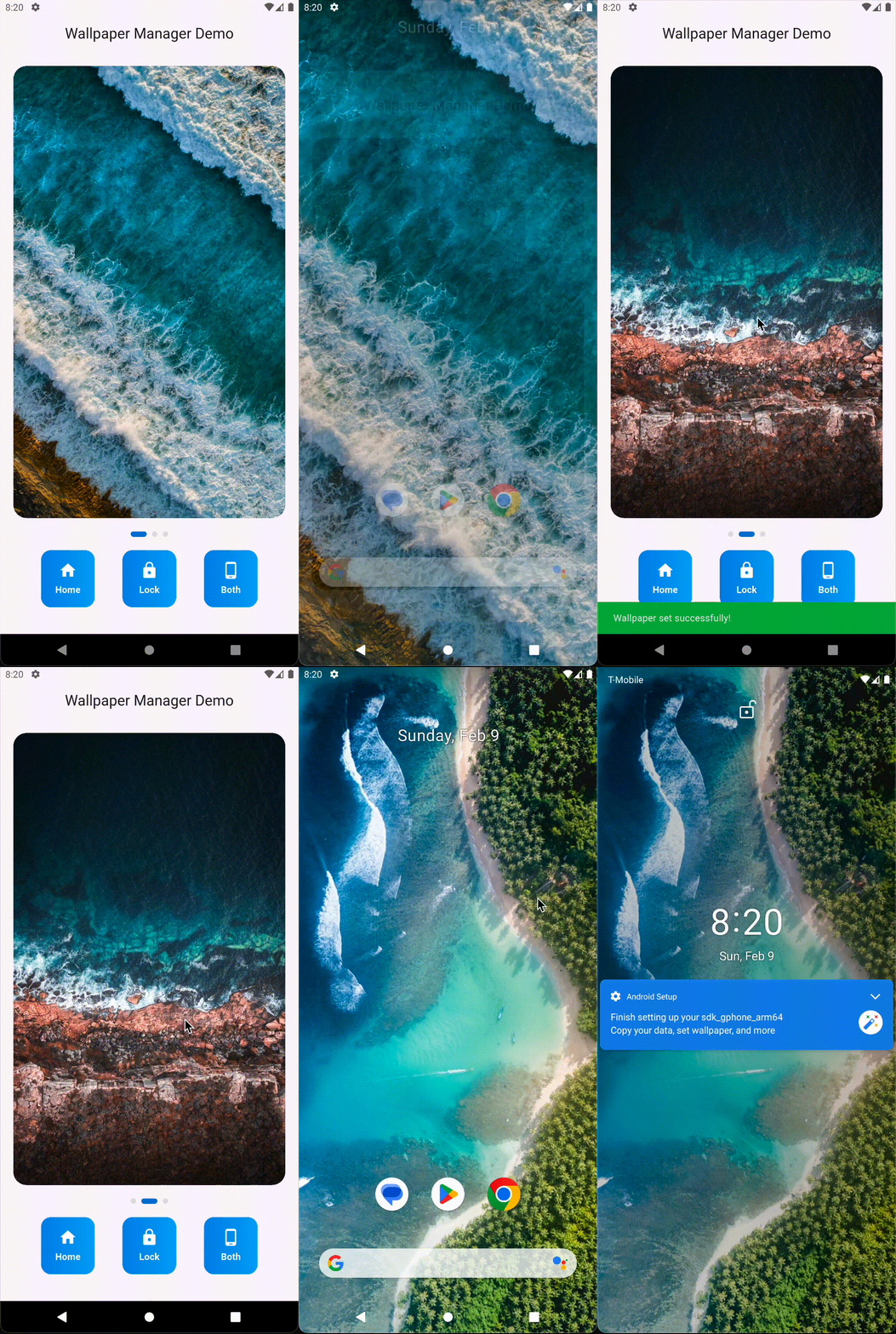
A powerful Flutter plugin that enables you to programmatically set wallpapers. This plugin maintains smooth performance even with high-resolution wallpapers. Easily customize home screen, lock screen, or both screens with just a few lines of code!
Features ✨
Set wallpapers on home screen, lock screen, or both 🏠
Efficient image processing using isolates to prevent UI blocking 🚀
Handles large image files without lag or freezing 💪
Comprehensive error handling and validation ✅
Simple and intuitive API 🎯
Demo 📱
A simple demonstration of setting wallpapers without any lag or freezing
You can set wallpapers for different screens using the following constants:
// Create instancefinal wallpaperManager = WallpaperManagerFlutter();
// Available options for wallpaper location: homeScreen, lockScreen & bothScreens// Example: Set wallpaper on home screentry {
File imageFile = File('path_to_your_image.jpg');
bool result = await wallpaperManager.setWallpaper(
imageFile,
WallpaperManagerFlutter.homeScreen,
);
if (result) {
print('Wallpaper set successfully! 🎉');
}
} catch (e) {
print('Error setting wallpaper: $e ❌');
}
Error Handling 🛡️
The plugin includes comprehensive error handling. Here are some common errors you might encounter:
File does not exist
Invalid location value
Platform-specific errors
Always wrap the setWallpaper call in a try-catch block to handle potential errors gracefully.
Platform Support 📱
Platform
Support
Notes
Android
✅
Full support for home screen, lock screen, and both screens
iOS
❌
Not supported due to iOS system security restrictions.
Note: Requires Android 7.0 (API level 24) or higher.
Contributing 🤝
Contributions are welcome! If you have a bug fix or new feature, please create a pull request. For major changes, please open an issue first to discuss what you would like to change.
License 📄
This project is licensed under the MIT License - see the LICENSE file for details.
Support ❤️
If you find this plugin helpful, please give it a star ⭐ on GitHub and consider following me for more useful Flutter plugins!
For any issues, feature requests, or questions, please create an issue on GitHub.