パッケージ、リポジトリ、アプリカテゴリを検索

wifi_hunter のカバー
パッケージ詳細v1.1.1+2

wifi_hunter

周囲のすべてのWiFi APから情報を収集するためのFlutterパッケージ。

Android
30日間ダウンロード
18
いいね数
27
Pub ポイント
150

パッケージをインストール

flutter pub add wifi_hunter

パッケージ概要

公開情報に基づく選定ガイドです。参考としてご利用ください。

wifi_hunter は、Android デバイス上の近隣の Wi-Fi アクセスポイントをスキャンして情報を取得するための Flutter パッケージです。開発者が利用可能なネットワーク(SSID、信号強度、MAC アドレスなど)を検出でき、リアルタイムでのネットワーク可視性を提供します。ネットワーク診断や位置ベースのサービス、セキュリティ評価に最適で、Android の Wi-Fi スキャン API を活用しています。適切な権限が必要であり、Android プラットフォームでのみ動作します。

用途

  • ネットワークの発見
  • 位置ベースのサービス
  • セキュリティ監査
  • デバイス接続モニタリング
  • Wi-Fi信号分析

主な機能

  • リアルタイムのWi-Fiスキャン
  • SSID および MAC アドレスの取得
  • 信号強度検出
  • Android専用のサポート
  • シンプルなAPI統合

適している対象

  • Androidアプリ開発者
  • ネットワーク診断ツール
  • IoTデバイス管理
  • セキュリティ研究者
  • 位置認識アプリケーション

注意事項

  • Android の権限が必要です
  • Androidプラットフォームに限定
  • プライバシーに配慮したデータアクセス
  • バックグラウンドスキャンの制限
  • iOS 対応なし

元の README

関連するソースリポジトリの README 原文のスナップショットです。最新の内容はリポジトリをご覧ください。

wifi_hunter

A flutter package to hunt down info from all WiFi APs around you.

version BSD License PRs Welcome

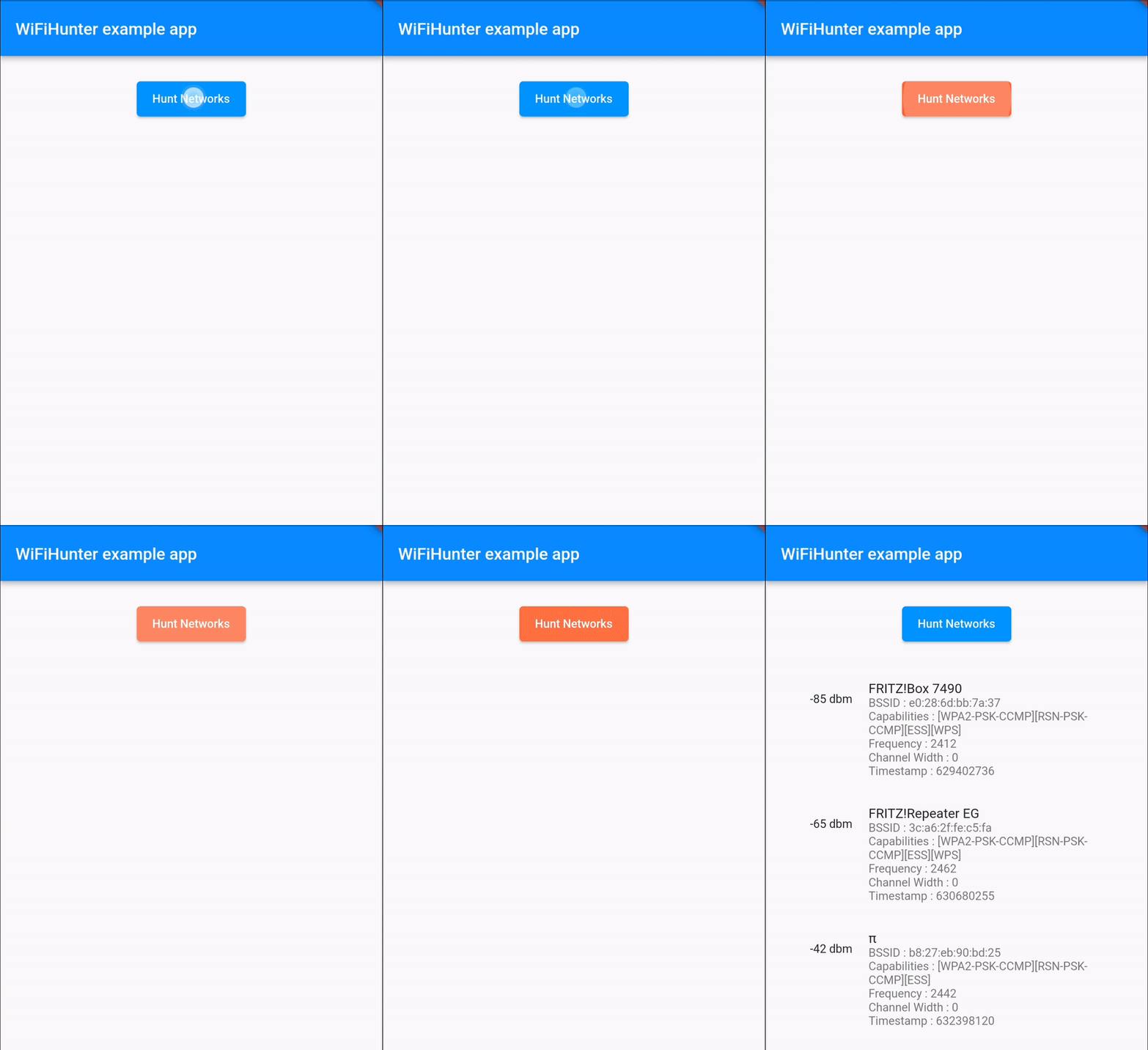
Demonstration

demo.gif

Getting Started


import 'package:flutter/material.dart';
import 'package:flutter/services.dart';
import 'dart:async';

import 'package:wifi_hunter/wifi_hunter.dart';
import 'package:wifi_hunter/wifi_hunter_result.dart';

void main() {
  runApp(const MyApp());
}

class MyApp extends StatefulWidget {
  const MyApp({Key? key}) : super(key: key);

  @override
  State<MyApp> createState() => _MyAppState();
}

class _MyAppState extends State<MyApp> {
  WiFiHunterResult wiFiHunterResult = WiFiHunterResult();
  
  Future<void> huntWiFis() async {
    try {
      wiFiHunterResult = (await WiFiHunter.huntWiFiNetworks)!;
    } on PlatformException catch (exception) {
      print(exception.toString());
    }
    
    for (var i = 0; i < wiFiHunterResult.results.length) {
      print(wiFiHunterResult.results[i].ssid);
      print(wiFiHunterResult.results[i].bssid);
      print(wiFiHunterResult.results[i].capabilities);
      print(wiFiHunterResult.results[i].frequency);
      print(wiFiHunterResult.results[i].level);
      print(wiFiHunterResult.results[i].channelWidth);
      print(wiFiHunterResult.results[i].timestamp);
    }

    if (!mounted) return;
  }

  @override
  Widget build(BuildContext context) {
    return MaterialApp(
      home: Scaffold(
      appBar: AppBar(
        title: const Text('WiFiHunter example app'),
      ),
      body: ElevatedButton(
        onPressed: () => huntWiFis(),
        child: const Text('Hunt Networks')
      )
    );
  }
}


Functionality and Features

Here is what infos you can get by using this package :

  • String[] SSIDs

  • String[] BSSIDs

  • String[] Signal strength

  • int[] Frequencies

  • int[] Capabilities

  • int[] Channel widths

  • long[] Timestamps (of information retrieval)

    ... of all WiFi APs in reach.

Running the sample

When running the sample app, make sure you've granted it the location permissions available in the system preferences, as there is currently no permission dialog implemented in the example app.
The permission settings are available under Settings > Apps > wifi_hunter_example > Permissions > Location > Allow only while using the app

Android WiFi Scan Throttling

Starting with Android 8.0 and up, the operating system severely limits the number of WiFi scans.
Please keep this limit in mind when implementing your scan issuing logic.
Find out more about these limits on developer.android.com.

Debugging

You can get a good overview of pretty much all related log entries by searching for wifi in the Logcat output.

カテゴリー

ソースリポジトリ

このパッケージを使用しているプロジェクト

データはまだありません。