パッケージ、リポジトリ、アプリカテゴリを検索

パッケージ詳細v1.1.0

zoom_tap_animation

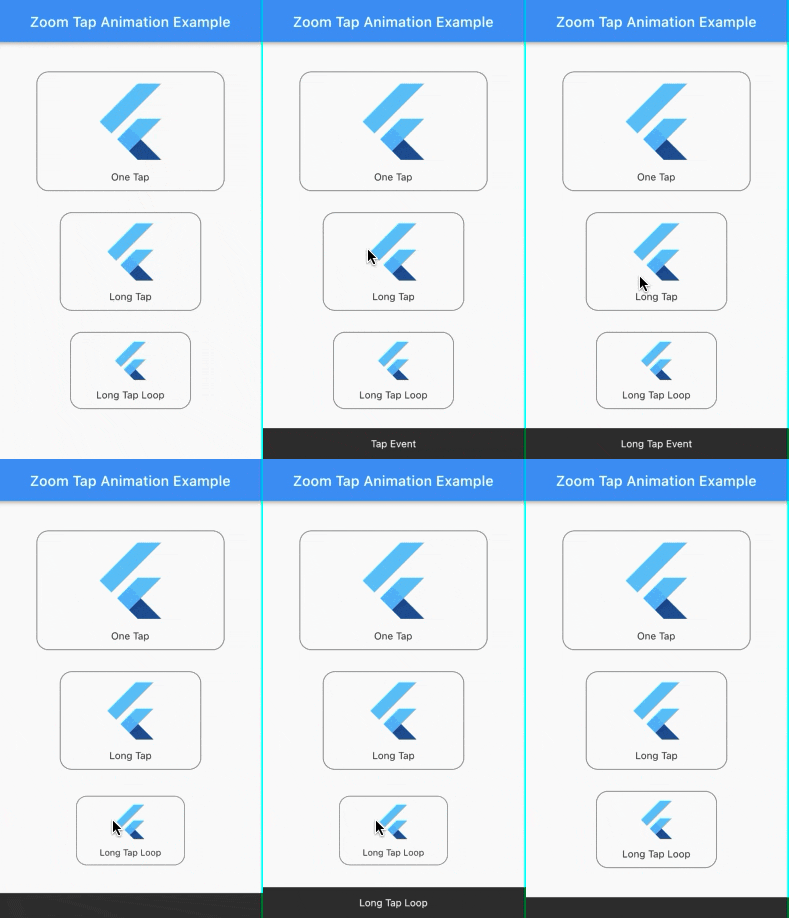
ズームタップアニメーションを使用すると、今日のタブ内のApp Storeのアイテムと同様の効果を実現できます。あるアイテムを長押しすると、拡大してから縮小します。

AndroidiOSWebmacOSWindowsLinux
30日間ダウンロード
5450
いいね数
139
Pub ポイント
140

パッケージをインストール

flutter pub add zoom_tap_animation

パッケージ概要

公開情報に基づく選定ガイドです。参考としてご利用ください。

Zoom Tap Animation は、ユーザーがアイテムを長押ししたときにダイナミックなズームインおよびズームアウト効果を生成するFlutterパッケージです。App StoreのTodayタブで見られるインタラクティブな動作を模倣しています。タッチ操作時の視覚フィードバックを提供することで、ユーザーの関与を高めます。アニメーションは滑らかでカスタマイズ可能であり、ボタン、カード、または任意のインタラクティブUI要素に適しています。パフォーマンスとクロスプラットフォーム互換性を重視して構築されており、Android、iOS、Web、macOS、Windows、Linuxでスムーズに動作します。

用途

  • インタラクティブなアプリアイコン
  • アニメーションカードタップ
  • 強化されたボタンフィードバック
  • 今日のタブスタイルインターフェース
  • ユーザー参加要素
  • タッチ操作のハイライト

主な機能

  • 長押しでズームがトリガーされる
  • スムーズなズームインとズームアウト
  • クロスプラットフォーム対応
  • カスタマイズ可能なアニメーション期間
  • 既存のウィジェットとの簡単な統合
  • 軽量でパフォーマンスに優れる

適している対象

  • 魅力的なタッチエフェクトを求める開発者
  • UIデザイナーがインタラクティビティを向上させています
  • ジェスチャーによるナビゲーションを持つアプリ
  • App Store風のアニメーションを必要とするプロジェクト
  • 複数のプラットフォームをターゲットとするFlutterアプリ

注意事項

  • 最適なタイミングのために調整が必要になる場合があります
  • 静的または非インタラクティブなコンテンツには適していません
  • 明確な視覚的ターゲットと併用するのが最適です
  • 適切に管理されない場合、他のジェスチャーと競合する可能性があります
  • タップ/長押しトリガーに制限

元の README

関連するソースリポジトリの README 原文のスナップショットです。最新の内容はリポジトリをご覧ください。

pub package

Zoom Tap Animation

Zoom Tap Animation is is a package that allows you to make an zoom animation effect similar to App Store's (ios app) items in Today tab, when you long tap on some item, it start to zoom in then it zoom out when you release it.

Screenshots:

Source of idea

The idea is inspired from App Store app in Today tab where you can long tap on some item and it start to zoom in then zoom out as shown in the screenshot below.

Example:

Check out the example project in the example folder.

Installation:

add the package to your dependencies
dependencies:
  zoom_tap_animation: ^1.1.0
import 'package:zoom_tap_animation/zoom_tap_animation.dart';

Usage:

default use of ZoomTapAnimation widget
ZoomTapAnimation(
      onTap: (){},
      child: YOUR_WIDGET
);
and you can also define custom parameters
ZoomTapAnimation(
      child: YOUR_WIDGET,
      onTap: (){},
      onLongTap: (){},
      enableLongTapRepeatEvent: false,
      longTapRepeatDuration: const Duration(milliseconds: 100),
      begin: 1.0,
      end: 0.93,
      beginDuration: const Duration(milliseconds: 20),
      endDuration: const Duration(milliseconds: 120),
      beginCurve: Curves.decelerate,
      endCurve: Curves.fastOutSlowIn
);
also you can use ZoomTapAnimation with your custom gestures
ZoomTapAnimation(
      child: GestureDetector(
      onTap: () {},
      onLongPress: (){},
      onDoubleTap: (){},
      // you can add more gestures...
      child: Container(color: Colors.yellow, width: 100.0, height: 100.0),
      ),
);
parameters
parameter description default
child your child widget that you want to put the zoom effect on.
onTap what should happen when you tap on the widget. null
onLongTap what should happen when you long tap on the widget. null
enableLongTapRepeatEvent option to enable long tap loop which repeat every onTap event (in case onLongTap is specified, it repeats the onLongTap event). false
longTapRepeatDuration the duration between every onTap/onLongTap loop event. const Duration(milliseconds: 100)
begin the size of widget you want to begin with. 1.0
end the size of widget you want to begin with. 0.93
beginDuration the duration of the begin zoom in animation. const Duration(milliseconds: 20)
endDuration the duration of the end zoom in animation. const Duration(milliseconds: 120)
beginCurve the curve animation type of the begin zoom in animation. Curves.decelerate
endCurve the curve animation type of the end zoom in animation. Curves.fastOutSlowIn

カテゴリー

ソースリポジトリ

このパッケージを使用しているプロジェクト