패키지, 저장소 및 앱 카테고리 검색

animate_gradient 표지
패키지 상세v0.0.4

animate_gradient

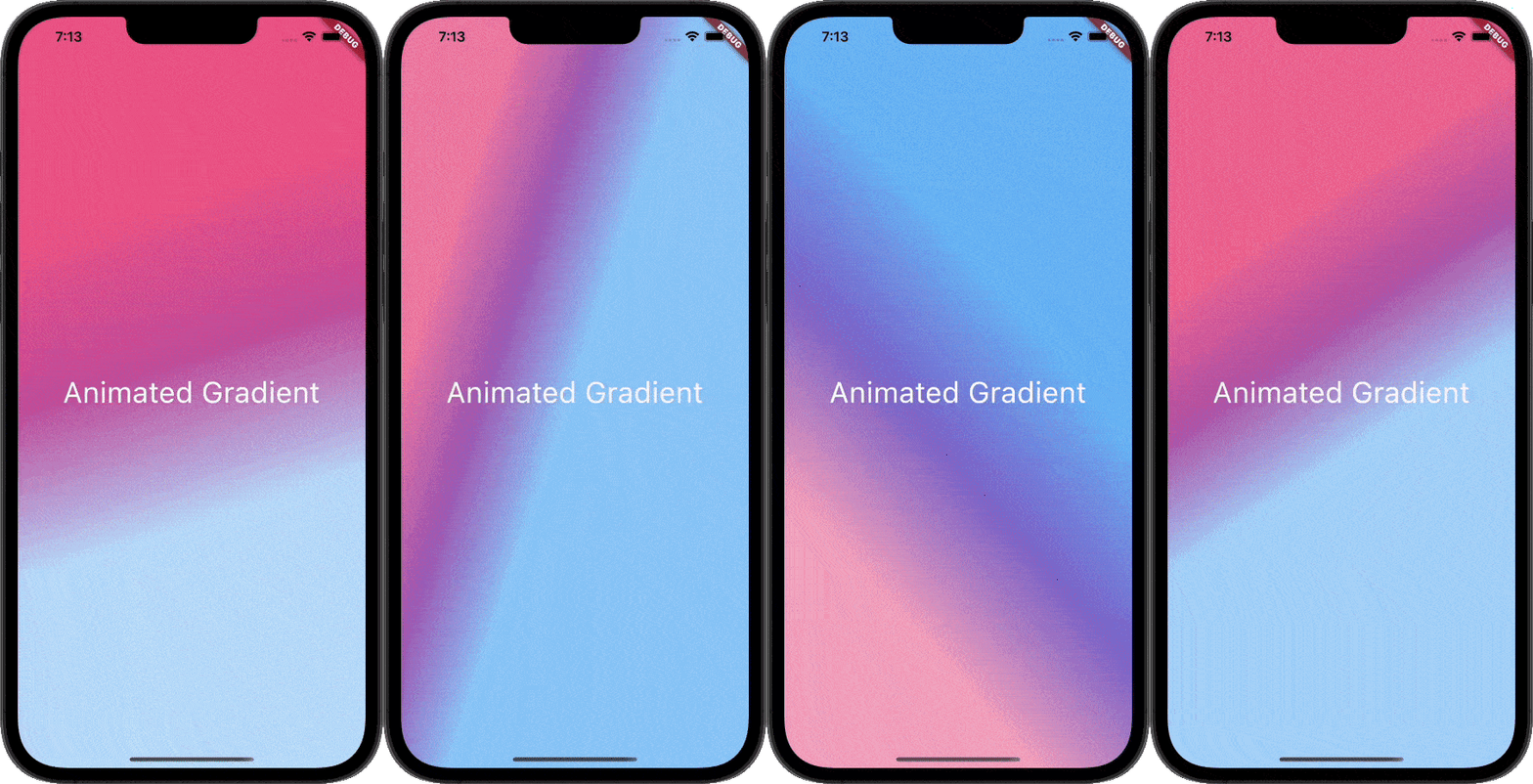
이 패키지를 사용하면 번거로움 없이 애니메이션 그라데이션을 만들 수 있습니다. 주 색상과 보조 색상을 전달하기만 하면 됩니다.

AndroidiOSWebmacOSWindowsLinux
30일 다운로드
6.4천
좋아요
215
Pub 점수
160

패키지 설치

flutter pub add animate_gradient

패키지 개요

공개 정보를 바탕으로 생성한 선택 가이드입니다.

Animate Gradient는 애니메이션 그라데이션 생성을 간편하게 만드는 Flutter 패키지입니다. 주 색상과 보조 색상을 제공하기만 하면 다양한 UI 요소에서 부드럽고 동적인 그라데이션 전환을 쉽게 생성할 수 있습니다. Android, iOS, Web, macOS, Windows, Linux 등 여러 플랫폼을 지원하여 크로스플랫폼 앱에 적합합니다. 패키지는 내부적으로 애니메이션 로직을 처리해 반복 코드를 줄이고 기존 프로젝트에 빠르게 통합할 수 있게 해줍니다. 현대적이고 시각적으로 매력적인 인터페이스에 완벽합니다.

사용 사례

  • 동적 앱 배경 만들기
  • 스플래시 화면 개선
  • 색 전환을 사용하여 UI 요소 애니메이션화
  • 인터랙티브 버튼 디자인
  • 시각적으로 매력적인 온보딩 흐름 만들기

주요 기능

  • 간단한 색상 기반 구성
  • 부드러운 그라디언트 애니메이션
  • 크로스 플랫폼 호환성
  • 최소한의 설정 필요
  • 내장 애니메이션 처리

적합한 대상

  • Flutter 초보자
  • UI/UX 디자이너
  • 크로스 플랫폼 앱 개발자
  • 시각적인 매력이 필요한 앱

고려 사항

  • 색과 속도 외에 사용자 정의가 제한되어 있음
  • 저사양 기기에서 성능에 영향을 미칠 수 있습니다
  • 복잡한 그라디언트 패턴에 적합하지 않습니다

원본 README

연결된 소스 저장소의 README 원문 스냅샷입니다. 최신 내용은 저장소에서 확인하세요.

Animate Gradient

pub Animated-Gradient

This Package lets you make animated gradients without any hassle. Just pass the primary and secondary colors and you're done. You can do amazing effects using the alignments. For More info read the docs below.

Usage

Create your first animated gradient.

The only two required arguments are the primaryColors and secondaryColors.

| primaryColors length must greater or equal to 2.| | secondaryColors length must be equal to primaryColors length.|

    import 'package:animate_gradient/animate_gradient.dart';

     AnimateGradient(
        primaryColors: const [
          Colors.pink,
          Colors.pinkAccent,
          Colors.white,
        ],
        secondaryColors: const [
          Colors.blue,
          Colors.blueAccent,
          Colors.white,
        ],
        child: YourWidget(),
      ),
drawing
Play with alignments.

Alignments are optional. You can pass any of the following alignments.

primaryBegin primaryEnd secondaryBegin secondaryEnd

With this in place, you can have some crazy effects.

   import 'package:animate_gradient/animate_gradient.dart';

    AnimateGradient(
       primaryBegin: Alignment.topLeft,
       primaryEnd: Alignment.bottomLeft,
       secondaryBegin: Alignment.bottomLeft,
       secondaryEnd: Alignment.topRight,
       primaryColors: const [
         Colors.pink,
         Colors.pinkAccent,
         Colors.white,
       ],
       secondaryColors: const [
         Colors.white,
         Colors.blueAccent,
         Colors.blue,
       ],
       child: YourWidget(),
     ),
drawing
Alternatively! Use AlignemntGeometry for better control

With the apps built in rtl format normal Alignments cannot always work. So, you can use AlignemntGeometry instead.

primaryBegin --> primaryBeginGeometry

primaryEnd --> primaryEndGeometry

secondaryBegin --> secondaryBeginGeometry

secondaryEnd --> secondaryEndGeometry

With this, you also have an additional property textDirectionForGeometry. This will be used to resolve the AlignmentGeometry

   import 'package:animate_gradient/animate_gradient.dart';

    AnimateGradient(
      primaryBeginGeometry: const AlignmentDirectional(0, 1),
      primaryEndGeometry: const AlignmentDirectional(0, 2),
      secondaryBeginGeometry: const AlignmentDirectional(2, 0),
      secondaryEndGeometry: const AlignmentDirectional(0, -0.8),
      textDirectionForGeometry: TextDirection.rtl,
       primaryColors: const [
         Colors.pink,
         Colors.pinkAccent,
         Colors.white,
       ],
       secondaryColors: const [
         Colors.white,
         Colors.blueAccent,
         Colors.blue,
       ],
       child: YourWidget(),
     ),
drawing

Please note that AlignmentGeometry will be given more priority over Alignment

Available properties

Property Type Description
primaryColors List Starting colors of the animation.
secondaryColors List Ending colors of the animation.
primaryBegin Alignment? Starting Alignment of primaryColors.
primaryEnd Alignment? Ending Alignment of primaryColors.
secondaryBegin Alignment? Starting Alignment of secondaryColors.
secondaryEnd Alignment? Ending Alignment of secondaryColors.
primaryBeginGeometry AlignmentGeometry? Starting AlignmentGeometry of primaryColors.
primaryEndGeometry AlignmentGeometry? Ending AlignmentGeometry of primaryColors.
secondaryBeginGeometry AlignmentGeometry? Starting AlignmentGeometry of secondaryColors.
secondaryEndGeometry AlignmentGeometry? Ending AlignmentGeometry of secondaryColors.
textDirectionForGeometry TextDirection? TextDirection that will be used to resolve AlignmentGeometry
duration Duration? Duration between the transition.
controller AnimationController?
You can pass your own animation controller and use that

to control animation however you want.
animateAlignments bool? If you want to animate alignments.
reverse bool? If you want to reverse the animation.
repeat bool? If you want to repeat the animation.
curve Curve? The curve to use for the animation.
child Widget? You can pass your widget.

Author

This plugin is developed by Vikas Kumar.

카테고리

소스 저장소

이 패키지를 사용하는 프로젝트

아직 데이터가 없습니다.