패키지, 저장소 및 앱 카테고리 검색

app_bar_with_search_switch 표지
패키지 상세v1.8.6

app_bar_with_search_switch

AppBar를 검색 필드로 전환할 수 있는 확장입니다.

AndroidiOSWebmacOSWindowsLinux
30일 다운로드
598
좋아요
59
Pub 점수
150

패키지 설치

flutter pub add app_bar_with_search_switch

패키지 개요

공개 정보를 바탕으로 생성한 선택 가이드입니다.

표준 앱 바와 검색 필드 사이를 원활하게 전환할 수 있도록 AppBar 기능을 확장하는 플러터 패키지입니다. 앱 바 내에서 탐색 모드와 검색 모드를 전환할 수 있는 깔끔하고 인터랙티브한 방식을 제공하여 자주 검색 작업이 필요한 앱의 사용자 경험을 향상시킵니다. 이 패키지는 가볍고 기존 UI에 쉽게 통합할 수 있습니다. Android, iOS, Web, macOS, Windows, Linux 등 모든 주요 플랫폼을 지원합니다.

사용 사례

  • 모바일 및 웹 앱에서 동적 검색 바 구현
  • 요청 시 검색을 통한 직관적인 탐색 만들기
  • 콘텐츠 집약형 애플리케이션에서 사용자 경험 향상
  • 최소한의 UI 변경으로 반응형 인터페이스 구축하기
  • 상단 앱 바에서 검색에 빠르게 접근할 수 있도록 설정

주요 기능

  • 앱 바와 검색 모드 사이를 한 번의 클릭으로 전환
  • 사용자 지정 가능한 검색 필드 보기
  • 플랫폼별 동작을 지원합니다
  • 경량이며 통합이 쉬움
  • 부드러운 전환을 위한 내장 애니메이션

적합한 대상

  • 자주 검색이 필요한 앱을 개발하는 개발자
  • 우아한 검색 통합을 찾는 UI 디자이너
  • 다수의 운영 체제를 대상으로 하는 크로스 플랫폼 앱 개발자
  • 최소한의 기능적 검색 인터페이스를 필요로 하는 앱

고려 사항

  • 패키지 외부에서 검색 로직을 수동으로 처리해야 합니다
  • 사용자 정의 테마를 위해 추가 스타일링이 필요할 수 있습니다
  • 앱 바 수준의 검색 기능에 제한됨
  • 복잡한 검색 워크플로에 적합하지 않습니다
  • 완전한 호환성을 위해 Flutter의 Material 또는 Cupertino 위젯에 의존합니다

원본 README

연결된 소스 저장소의 README 원문 스냅샷입니다. 최신 내용은 저장소에서 확인하세요.

AppBar with search switch

Content

Intro

An AppBar that can switch into search field.

The AppBarWithSearchSwitch is a replacement class for AppBar, essentially, it returns two different app bars based on whether search is active.

Note: version 1.5+ is lightweight version of this package, version 2.0+ uses SpeechToText package for speech recognition.

This is complete rewrite of flutter_search_bar with support of these features:

Features

Quick overview

Use appBarBuilder parameter to build default AppBar with:

The appBarBuilder is the only required parameter, all other parameters are optional!

Use one of these callbacks to get text from TextField:

Also, there are callbacks for:

This widget support almost all properties of AppBar, but:

  • leading and title properties are now expect - Widget Function(context)?:

    • this is made in order to access AppBarWithSearchSwitch.of(context) methods in them,
    • don't change them unless it necessary and use templates if you need to change these properties.
  • preferredSize here is a method, you should set it via toolbarWidth and toolbarHeight.

Here is a list of all other new properties(without mentioned above) with their default values:

Examples

Online example here: https://alexqwesa.github.io/app_bar_with_search_switch/.

Full example of Stateful widget is here: https://pub.dev/packages/app_bar_with_search_switch/example.

Full example of Stateless widget is here: (github).

Full example of Stateless widget with 10000 elements searched in place and with search button outside of app bar is here: (github).

Full example of Stateless widget there android back button will close search is here: (github).

And the fragment of example code is here:

  //...
  @override
  Widget build(BuildContext context) {
    return Scaffold(
      //
      // *** The Widget AppBarWithSearchSwitch
      //
      appBar: AppBarWithSearchSwitch(
        onChanged: (text) {
          // update you provider here
          // searchText.value = text;
        }, // onSubmitted: (text) => searchText.value = text,
        appBarBuilder: (context) {
          return AppBar(
            title: Text('Example '),
            actions: [
              AppBarSearchButton(),
              // or
              // IconButton(onPressed: AppBarWithSearchSwitch.of(context)?startSearch, icon: Icon(Icons.search)),
            ],
          );
        },
      ),
      // search in body by any way you want, example:
      body: AppBarOnEditListener(builder: (context) { return /* your code here */ ;} ),
    );
  }

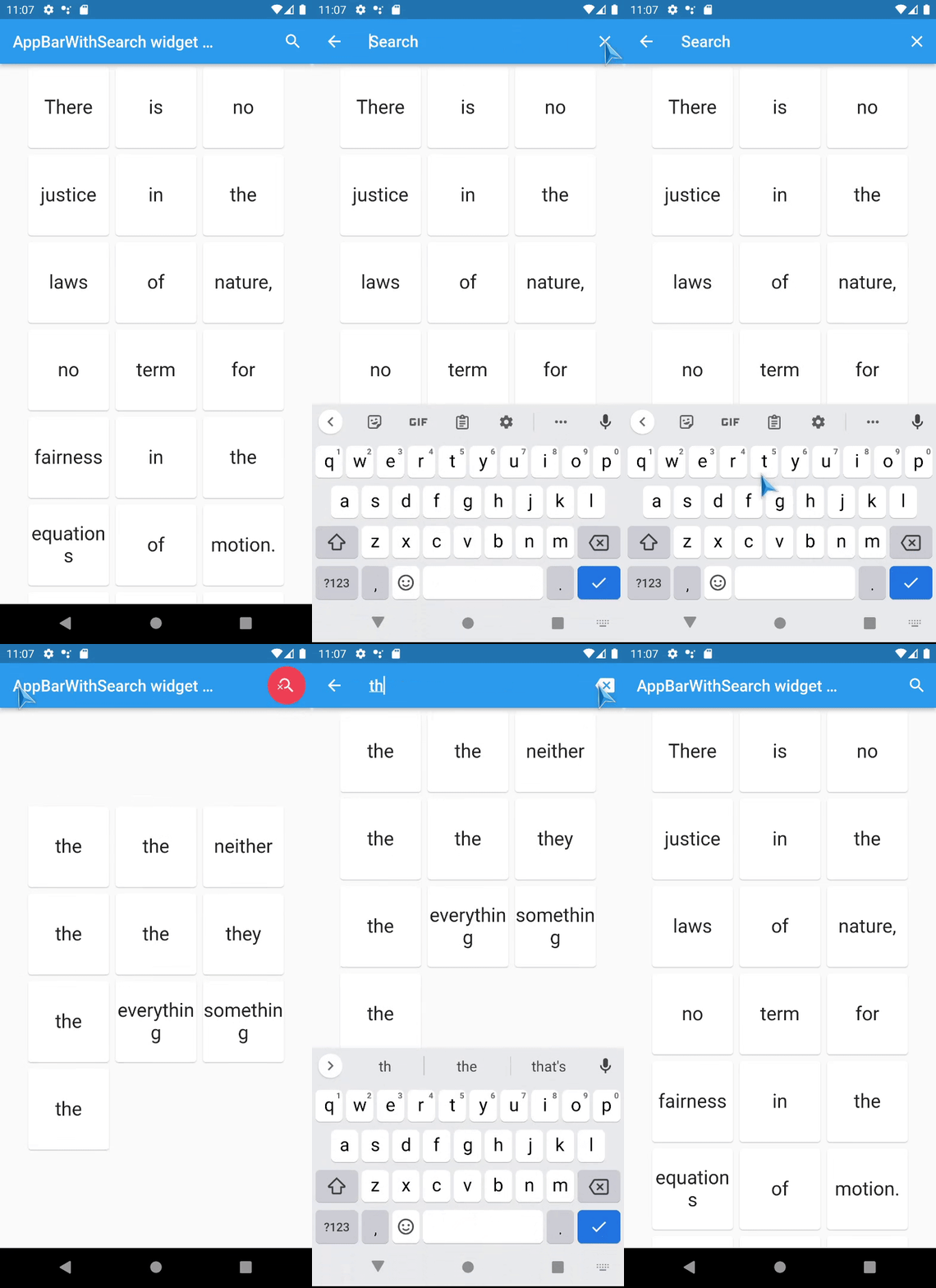
Screenshots

TODO

  • [x] Add speech to text support - done in version 2.0+,
  • [x] Animation for Search app bar activation - done in versions 1.5+
  • [ ] don't use shared default ValueNotifier and TextEditingController ?

FAQ

How to activate search field (isSearchMode=true) of AppBarWithSearchSwitch from somewhere far away?

  • If it is inside the same Scaffold or its children, then:

    1. use AppBarWithSearchFinder,
    2. call AppBarWithSearchFinder.of(context)?.triggerSearch() inside.
  • If it is outside of Scaffold, use customIsSearchModeNotifier,

    1. Initialise variable of type ValueNotifier somewhere up in the widget tree,
    2. Set customIsSearchModeNotifier property of AppBarWithSearchSwitch with this variable,
    3. Set value of this ValueNotifier to true to show Search AppBar,
    4. (Note: currently, if you stop search via this variable(by setting it false), clearOnClose will not work, and callBack onClose will not be called), so use GlobalKey if you need them.

How to make android back button close search? (instead of going to previous screen or exit app)

  1. Initialise variable searchText and isSearchMode of type ValueNotifier somewhere up in the widget tree,
  2. Assign these variables to customIsSearchModeNotifier, customTextNotifier,
  3. Wrap WillPopScope widget over Scaffold, and define parameter onWillPop as in example below:
... // inside a widget
  final isSearchMode = ValueNotifier<bool>(false);
  final searchText = ValueNotifier<String>(''); 

  @override
  Widget build(BuildContext context) {

    return WillPopScope(
      onWillPop: () async { // android back button handler
        if (searchText.value != '') {
          isSearchMode.value = false;
          searchText.value = ''; 
          return false;
        }
        return true;
      },
      child: Scaffold(
        //
        // *** The Widget AppBarWithSearchSwitch
        //
        appBar: AppBarWithSearchSwitch(
          customIsSearchModeNotifier: isSearchMode,
          customTextNotifier: searchText,
          appBarBuilder: (context) {
            return AppBar(
... // you code here

How to add autocompletion to search field?

... // inside a widget
  @override
  Widget build(BuildContext context) {

    return Scaffold(
        appBar: AppBarWithSearchSwitch(
          title:  (context) {
                return Autocomplete<String>(
                  optionsBuilder: (TextEditingValue textEditingValue) {
                    // your code here
                  },
                ); 
          }
          appBarBuilder: (context) {
            return AppBar(
... // you code here

Can it be used with old flutter sdk versions?

The release 1.3.5 is a special release with support of old flutter sdk, it tested with flutter 2.10.0

Known issues

카테고리

소스 저장소

이 패키지를 사용하는 프로젝트