arabic_font 패키지는 여러 플랫폼에서 앱에 아랍어 폰트를 쉽게 통합할 수 있도록 해주는 Flutter 유틸리티입니다. 사용자 정의 아랍어 글꼴을 로드하고 사용하는 과정을 단순화하여 Flutter 프로젝트에서 올바른 렌더링과 텍스트 방향성을 보장합니다. Android, iOS, Web, macOS, Windows, Linux를 지원하며, 원활한 구현이 가능해 아랍어 사용자를 대상으로 하는 다국어 앱 개발에 이상적입니다. 이 패키지는 폰트 일관성과 아랍 문자의 정확한 시각적 표현을 유지함으로써 타이포그래피와 사용자 경험을 향상시킵니다.
사용 사례
모바일 앱에 아랍어 폰트 추가하기
웹 앱에서 오른쪽에서 왼쪽으로 텍스트 지원
다국어 플러터 애플리케이션 만들기
문화적으로 적절한 타이포그래피를 통한 UI 디자인 향상
다양한 플랫폼 간에 일관된 아랍어 텍스트 렌더링 보장
주요 기능
pub add를 통한 간편한 통합
RTL 텍스트 레이아웃 지원
크로스 플랫폼 호환성
사전 구성된 아랍어 글꼴 자산
사용자 정의 글꼴을 위한 간단한 구성
적합한 대상
아랍어 앱을 개발하는 개발자
아랍어 타이포그래피에 집중하는 디자이너
RTL 언어 지원이 필요한 프로젝트
중동 시장을 대상으로 하는 Flutter 앱
다국어 사용자 인터페이스를 개발하는 팀
고려 사항
자산에 폰트 파일이 포함되어야 합니다
복잡한 스크립트에 대해 추가 구성이 필요할 수 있습니다
폰트 라이선스는 검증되어야 합니다
원격 소스에서 동적 폰트 로드에 적합하지 않습니다
런타임 사용자 정의 없이 정적 폰트 임베딩에 국한
원본 README
연결된 소스 저장소의 README 원문 스냅샷입니다. 최신 내용은 저장소에서 확인하세요.
arabic_font:
A Flutter package allows you to add arabic fonts in your flutter projects
import'package:arabic_font/arabic_font.dart';
Text(
'تجربة الخط',
/// Add ArabicTextStyle in style of text
style: ArabicTextStyle(
/// Select The type of font by useing ArabicFont
arabicFont: ArabicFont.dubai,
/// you can use any Parameters of TextStyle /// EX: fontSize:
fontSize:25
),
);
To Change the font in the entire application:
import'package:arabic_font/arabic_font.dart';
ThemeData(
///Add this Class in your ThemeData after fontFamily
fontFamily: ArabicThemeData.font(
/// Select The type of font
arabicFont: ArabicFont.dinNextLTArabic
),
///Add this Class in your ThemeData after package
package: ArabicThemeData.package,
),
Note:
If The Font doesn't Change , just stop the project and run it again
Parameters of the ArabicTextStyle:
/// Use ArabicFont then select type of font/// EX: ArabicFont.dubaifinalString arabicFont;
/// TextStyle Parametersbool inherit = true,
/// the color of textColor? color,
/// The color to use as the background for the text./// If background is specified, this value must be null. The backgroundColor property is shorthand for background: Paint()..color = backgroundColor./// In merge, apply, and lerp, conflicts between backgroundColor and background specification are resolved in background's favor - i.e. if background is specified in one place, it will dominate color in another.Color? backgroundColor,
///The size of glyphs (in logical pixels) to use when painting the text.///During painting, the fontSize is multiplied by the current textScaleFactor to let users make it easier to read text by increasing its size./// getParagraphStyle will default to 14 logical pixels if the font size isn't specified here.double? fontSize,
/// The typeface thickness to use when painting the text (e.g., bold).FontWeight? fontWeight,
/// The typeface variant to use when drawing the letters (e.g., italics).FontStyle? fontStyle,
/// The amount of space (in logical pixels) to add between each letter./// A negative value can be used to bring the letters closer.double? letterSpacing,
/// The amount of space (in logical pixels) to add at each sequence of/// white-space (i.e. between each word). A negative value can be used to/// bring the words closer.double? wordSpacing,
/// The common baseline that should be aligned between this text span and its/// parent text span, or, for the root text spans, with the line box.TextBaseline? textBaseline,
/// The height of this text span, as a multiple of the font size.////// When [height] is null or omitted, the line height will be determined/// by the font's metrics directly, which may differ from the fontSize./// When [height] is non-null, the line height of the span of text will be a/// multiple of [fontSize] and be exactly `fontSize * height` logical pixels/// tall.////// For most fonts, setting [height] to 1.0 is not the same as omitting or/// setting height to null because the [fontSize] sets the height of the EM-square,/// which is different than the font provided metrics for line height. The/// following diagram illustrates the difference between the font-metrics/// defined line height and the line height produced with `height: 1.0`/// (which forms the upper and lower edges of the EM-square):////// 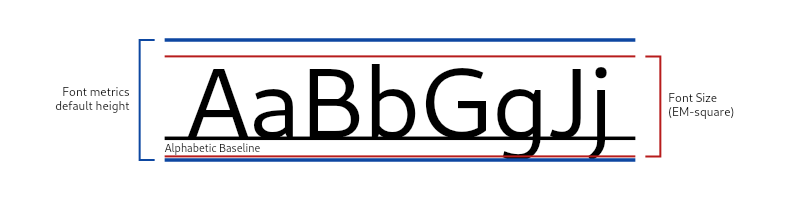////// Examples of the resulting line heights from different values of `TextStyle.height`:////// 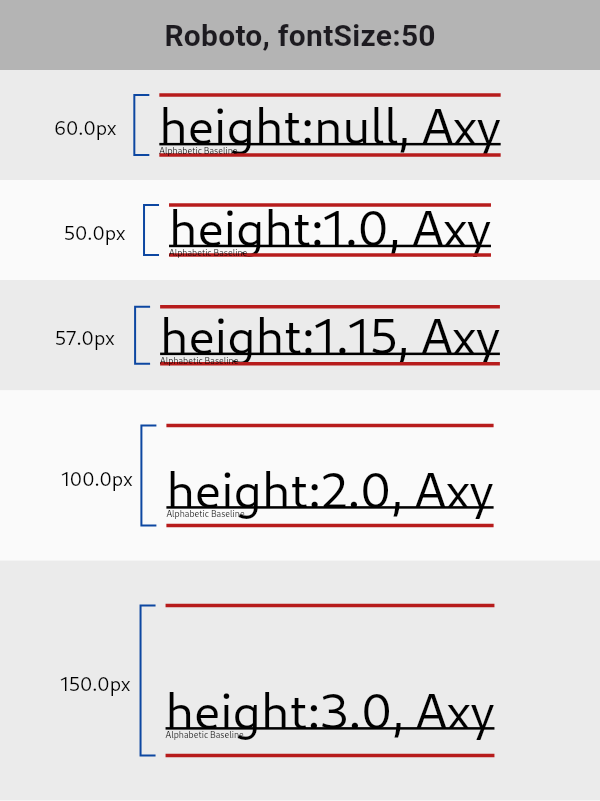////// See [StrutStyle] and [TextHeightBehavior] for further control of line/// height at the paragraph level.double? height,
/// How the vertical space added by the [height] multiplier should be/// distributed over and under the text.////// When a non-null [height] is specified, after accommodating the glyphs of/// the text, the remaining vertical space from the allotted line height will/// be distributed over and under the text, according to the/// [leadingDistribution] property. See the [TextStyle] class's documentation/// for an example.////// When [height] is null, [leadingDistribution] does not affect the text/// layout.////// Defaults to null, which defers to the paragraph's/// `ParagraphStyle.textHeightBehavior`'s [leadingDistribution]./// TextLeadingDistribution? leadingDistribution,
/// The locale used to select region-specific glyphs.////// This property is rarely set. Typically the locale used to select/// region-specific glyphs is defined by the text widget's [BuildContext]/// using `Localizations.localeOf(context)`. For example [RichText] defines/// its locale this way. However, a rich text widget's [TextSpan]s could/// specify text styles with different explicit locales in order to select/// different region-specific glyphs for each text span.Locale? locale,
/// The paint drawn as a foreground for the text.////// The value should ideally be cached and reused each time if multiple text/// styles are created with the same paint settings. Otherwise, each time it/// will appear like the style changed, which will result in unnecessary/// updates all the way through the framework.////// If [color] is specified, this value must be null. The [color] property/// is shorthand for `Paint()..color = color`.////// In [merge], [apply], and [lerp], conflicts between [color] and [foreground]/// specification are resolved in [foreground]'s favor - i.e. if [foreground] is/// specified in one place, it will dominate [color] in another.Paint? foreground,
/// The paint drawn as a background for the text.////// The value should ideally be cached and reused each time if multiple text/// styles are created with the same paint settings. Otherwise, each time it/// will appear like the style changed, which will result in unnecessary/// updates all the way through the framework.////// If [backgroundColor] is specified, this value must be null. The/// [backgroundColor] property is shorthand for/// `background: Paint()..color = backgroundColor`.////// In [merge], [apply], and [lerp], conflicts between [backgroundColor] and/// [background] specification are resolved in [background]'s favor - i.e. if/// [background] is specified in one place, it will dominate [backgroundColor]/// in another.Paint? background,
/// A list of [Shadow]s that will be painted underneath the text.////// Multiple shadows are supported to replicate lighting from multiple light/// sources.////// Shadows must be in the same order for [TextStyle] to be considered as/// equivalent as order produces differing transparency.List<Shadow>? shadows,
List<FontFeature>? fontFeatures,
List<FontVariation>? fontVariations,
/// The decorations to paint near the text (e.g., an underline).////// Multiple decorations can be applied using [TextDecoration.combine].TextDecoration? decoration,
/// The color in which to paint the text decorations.Color? decorationColor,
/// The style in which to paint the text decorations (e.g., dashed).TextDecorationStyle? decorationStyle,
/// The thickness of the decoration stroke as a multiplier of the thickness/// defined by the font.////// The font provides a base stroke width for [decoration]s which scales off/// of the [fontSize]. This property may be used to achieve a thinner or/// thicker decoration stroke, without changing the [fontSize]. For example,/// a [decorationThickness] of 2.0 will draw a decoration twice as thick as/// the font defined decoration thickness.////// {@tool snippet}/// To achieve a bolded strike-through, we can apply a thicker stroke for the/// decoration.////// ```dart/// const Text(/// 'This has a very BOLD strike through!',/// style: TextStyle(/// decoration: TextDecoration.lineThrough,/// decorationThickness: 2.85,/// ),/// )/// ```/// {@end-tool}////// {@tool snippet}/// We can apply a very thin and subtle wavy underline (perhaps, when words/// are misspelled) by using a [decorationThickness] < 1.0.////// ```dart/// const Text(/// 'oopsIforgottousespaces!',/// style: TextStyle(/// decoration: TextDecoration.underline,/// decorationStyle: TextDecorationStyle.wavy,/// decorationColor: Colors.red,/// decorationThickness: 0.5,/// ),/// )/// ```/// {@end-tool}////// The default [decorationThickness] is 1.0, which will use the font's base/// stroke thickness/width.double? decorationThickness,
/// A human-readable description of this text style.////// This property is maintained only in debug builds.////// When merging ([merge]), copying ([copyWith]), modifying using [apply], or/// interpolating ([lerp]), the label of the resulting style is marked with/// the debug labels of the original styles. This helps figuring out where a/// particular text style came from.////// This property is not considered when comparing text styles using `==` or/// [compareTo], and it does not affect [hashCode].String? debugLabel,
/// How visual text overflow should be handled.TextOverflow? overflow,
Parameters of the ArabicThemeApp:
///### Use ArabicFont then select type of font/// EX: ArabicFont.dubaifinalString arabicFont;
staticconstString package='arabic_font';