Auto Store Translate는 Flutter/Dart 패키지로, Apple App Store 및 Google Play Store용 앱 메타데이터(제목, 설명, 키워드 등)의 번역과 등록을 자동화합니다. 번역 서비스와 통합하여 다국어 메타데이터 업데이트를 관리함으로써 현지화 워크플로우를 간소화합니다. 글로벌 시장에 앱을 효율적으로 출시하고자 하는 개발자를 위한 것으로, 수작업을 줄이고 다국어 앱 목록에서 오류를 최소화합니다. 이 패키지는 Android, iOS, macOS, Windows, Linux 플랫폼을 지원합니다.
사용 사례
앱 스토어 메타데이터 로컬라이제이션 자동화
국제 앱 출시 간소화
수동 번역 작업 감소
다중 언어의 메타데이터 업데이트
CI/CD 파이프라인과의 통합
주요 기능
자동 메타데이터 번역
App Store 및 Play Store 지원
다중 플랫폼 호환성
번역 API와의 통합
CI/CD 준비된 워크플로우
적합한 대상
글로벌 앱 출판사
다국어 앱을 관리하는 개발 팀
CI/CD 자동화 애호가
로컬라이제이션 전문가
고려 사항
번역 서비스를 위한 API 키가 필요합니다
외부 번역 제공자의 품질에 따라 달라짐
번역된 콘텐츠의 수동 검토가 필요할 수 있습니다
메타데이터에 한정되며 앱 UI 또는 콘텐츠는 포함되지 않음
플랫폼별 메타데이터 제약 조건
원본 README
연결된 소스 저장소의 README 원문 스냅샷입니다. 최신 내용은 저장소에서 확인하세요.
Auto Store Translate
A library that automates translation/registration of metadata (title, description, etc.) in the App Store/Play Store.
playstore & appstore translated screenshot
How to Use?
1. Setup the config file
dependencies:auto_store_translate:
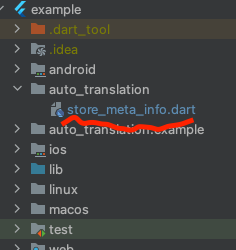
2. Create a dart file in your project and paste the code below.
create dart file in your project
project path > auto_translation > store_meta_info.dart please fill in all the information below.
import'package:auto_store_translate/auto_store_translate.dart';
/// write your store info here.MyStoreInfo myStoreInfo = MyStoreInfo(
// Play Store Title 30 characters or less
playStoreTitle: "",
// Play Store Short Description 80 characters or less
playStoreShortDescription: "",
// Play Store Long Description 4000 characters or less
playStoreFullDescription: '''
''',
// Play Store Translation Start Language
playStoreStartLanguage: "en",
// Play Store Title Translation
translatePlayStoreName: true,
// App Store Title 30 characters or less
appStoreTitle: "",
// App Store Subtitle 30 characters or less
appStoreSubTitle: "",
// App Store Description 4000 characters or less
appStringDescription: '''
''',
// App Store Keywords 100 characters or less , separated by commas, SEO
appStoreKeywords: "",
// App Store Translation Start Language
appStoreStartLanguage: "en",
// App Store Title Translation
translateAppStoreName: true,
// Whether to display the first letter of the App Store title in uppercase
onlyFirstCharacterUpperAppName: true,
// App Store Update Notes
releaseNote: "fix small bug :)",
// Home Page URL
homepageLink: "",
// Privacy Policy URL
policyPageLink: "",
);
main() {
AutoStoreTranslate.translateStoreInfo(
myStoreInfo: myStoreInfo,
// google translate api key
googleTranslateApiKey: "INPUT_YOUR_GOOGLE_TRANSLATE_API_KEY",
// true: translate only title, false: translate title + all
onlyAppNameTranslate: false);
}
It works even if you don't put the Google Translate api key, but you will soon reach the free limit.
For a guide to getting the Google Translate api key, please refer to this document.
3. Run the code above and wait for the translation to complete.
4. you will see the translated folder in the project.
5. Set up fastlane for each android/ios and register the information in the play store/app store.


 playstore & appstore translated screenshot