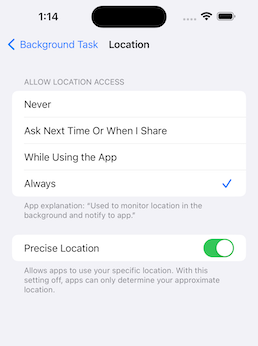
background_task 패키지는 플러터 애플리케이션이 백그라운드에서도 작업(특히 위치 업데이트)을 수행할 수 있도록 합니다. 안드로이드 및 iOS를 위한 것으로, 사용자 이동 추적과 같은 지속적인 기능을 중단 없이 유지할 수 있게 해줍니다. 네이티브 플랫폼 기능과 통합되어 백그라운드 상태에서도 신뢰성 있는 실행을 보장합니다. 실시간 위치 모니터링 또는 주기적인 데이터 수집이 필요한 앱에 특히 유용합니다. 이 솔루션은 최소한의 오버헤드로 구축되었으며, 전용 네이티브 구현을 통해 두 플랫폼 모두를 지원합니다.
Enable developers to continue processing even when the application transitions to the background, we have created a package that allows processing to continue using location updates.This package was created with reference to background_location.
Can be used when you want to run the program periodically in the background.
Monitor and notify the distance walked and steps.
Notification of destination arrival.
Tracking location information (sending it to a server).
Usage
// Monitor notifications of background processes.// However, Cannot be used while the app is in task kill.BackgroundTask.instance.stream.listen((event) {
// Implement the process you want to run in the background.// ex) Check health data.
});
// Start background processing with location updates.awaitBackgroundTask.instance.start();
// Stop background processing and location updates.awaitBackgroundTask.instance.stop();
// Define callback handler at the top level.@pragma('vm:entry-point')
voidbackgroundHandler(Location data) {
// Implement the process you want to run in the background.// ex) Check health data.
}
voidmain() {
WidgetsFlutterBinding.ensureInitialized();
BackgroundTask.instance.setBackgroundHandler(backgroundHandler); // 👈 Set callback handler.runApp(constMyApp());
}
To get the latest location information in a task-killed status, set the app to Always.
This is an implementation for when you want to stop using the application when it is killed.
final status = awaitPermission.location.request();
final statusAlways = awaitPermission.locationAlways.request();
if (status.isGranted && statusAlways.isGranted) {
awaitBackgroundTask.instance.start();
}
Setup
pubspec.yaml
dependencies:background_task:
iOS: Info.plist
<key>NSLocationAlwaysAndWhenInUseUsageDescription</key><string>Used to monitor location in the background and notify to app.</string><key>NSLocationAlwaysUsageDescription</key><string>Used to monitor location in the background and notify to app.</string><key>NSLocationWhenInUseUsageDescription</key><string>Used to monitor location in the background and notify to app.</string><key>UIBackgroundModes</key><array><string>fetch</string><string>location</string></array>
To use an external package (shared_preference etc..) in callback handler, register DispatchEngine in AppDelegate.