biometric_signature 패키지는 안드로이드, iOS, macOS 및 윈도우에서 Flutter 앱에 하드웨어 기반 생체 인증을 가능하게 합니다. Secure Enclave, StrongBox 및 Windows Hello와 같은 보안 하드웨어 구성 요소를 활용하여 암호화 서명을 안전하게 생성합니다. 이는 민감한 작업이 생체 인식으로 보호되며 플랫폼별 신뢰할 수 있는 실행 환경을 통해 높은 보안성을 유지함을 보장합니다. 강력한 로컬 인증 및 디지털 서명 기능을 필요로 하는 애플리케이션에 이상적입니다.
사용 사례
생체 인식을 통한 안전한 로그인
디지털 서명 생성
보호된 데이터 액세스
금융 앱을 위한 인증
앱 수준 암호화 키 관리
주요 기능
세이프 엔클레이브 및 스트롱박스 사용
Windows Hello를 지원합니다
하드웨어 기반 암호 서명
크로스 플랫폼 생체 인증
필요한 최소한의 네이티브 코드
적합한 대상
금융 및 은행 앱
엔터프라이즈 아이덴티티 시스템
안전한 문서 서명
민감한 사용자 데이터를 처리하는 앱
고보안 인증 워크플로우
고려 사항
호환되는 기기 하드웨어가 필요합니다
지원되는 플랫폼에 한정
추가 권한이 필요할 수 있습니다
운영체제 수준의 생체 인식 서비스에 의존합니다
낮은 보안 사용 사례에 적합하지 않습니다
원본 README
연결된 소스 저장소의 README 원문 스냅샷입니다. 최신 내용은 저장소에서 확인하세요.
biometric_signature
Stop just unlocking the UI. Start proving the identity.
Standard biometric integrations typically return only a boolean indicating whether authentication succeeded.
biometric_signature provides a complete biometric solution:
Cryptographic Proof (Core Feature): Generates a verifiable cryptographic signature using a private key stored in hardware (Secure Enclave / StrongBox). This allows your backend to mathematically verify the user's identity, preventing replay attacks and API hooks.
Simple Authentication: Supports standard biometric prompts (returning success/failure) for local UI gating or quick re-authentication, with full support for Android biometric strength levels and device credentials.
Even if an attacker bypasses or hooks biometric APIs, your backend will still reject the request because the attacker cannot forge a hardware-backed signature without the private key.
Features
Cryptographic Proof Of Identity: Hardware-backed RSA (Android) or ECDSA (all platforms) signatures that your backend can independently verify.
Decryption Support:
RSA: RSA-OAEP with a SHA-256 main digest (Android native, iOS/macOS via wrapped software key). The MGF1 digest differs by platform — see Encrypting a payload.
Hardware Security: Uses Secure Enclave (iOS/macOS) and Keystore/StrongBox (Android).
Hybrid Architectures:
Android Hybrid EC: Hardware EC signing + software ECIES decryption. Software EC private key is AES-wrapped using a Keystore/StrongBox AES-256 master key that requires biometric authentication for every unwrap.
iOS/macOS Hybrid RSA: Software RSA key for both signing and decryption, wrapped using ECIES with Secure Enclave EC public key. Hardware EC is only used for wrapping/unwrapping.
Named Key Aliases: Manage multiple independent key pairs per app (e.g., one for auth, one for payment signing) via optional keyAlias parameter.
Key Overwrite Protection: Prevent accidental key replacement with failIfExists option.
Key Invalidation: Keys can be bound to biometric enrollment state (fingerprint/Face ID changes).
Device Credentials: Optional PIN/Pattern/Password fallback on Android.
Simple Prompt (No Crypto): Verify user presence without key operations. Supports device-credential fallback and Android biometric strength selection.
Security Architecture
Key Modes
The plugin supports different operational modes depending on the platform:
Software RSA-2048 key for both signing and decryption
RSA private key wrapped using ECIES with Secure Enclave EC public key
Hardware EC key is only used for wrapping/unwrapping the RSA key
Wrapped RSA key stored in Keychain as kSecClassGenericPassword
Per-operation biometric authentication required to unwrap RSA key
Workflow Overview
Enrollment
User authenticates → hardware generates a signing key.
Hybrid modes additionally generate a software decryption key, which is then encrypted using secure hardware.
Signing
Biometric prompt is shown
Hardware unlocks the signing key, and a verifiable signature is produced.
Decryption
A biometric prompt is shown again.
Hybrid modes unwrap the software private key using hardware-protected AES-GCM, then decrypt the payload.
Backend Verification
The backend verifies signatures using the registered public key.
Verification must not be performed on the client.
Backend Verification
Perform verification on the server. Below are reference implementations.
Node.js
const crypto = require('crypto');
functionverifySignature(publicKeyPem, payload, signatureBase64) {
const verify = crypto.createVerify('SHA256');
verify.update(payload); // The original string you sent to the plugin
verify.end();
// Returns true if validreturn verify.verify(publicKeyPem, Buffer.from(signatureBase64, 'base64'));
}
Python
from cryptography.hazmat.primitives import hashes
from cryptography.hazmat.primitives.asymmetric import padding
from cryptography.hazmat.primitives import serialization
import base64
defverify_signature(public_key_pem_str, payload_str, signature_base64_str):
public_key = serialization.load_pem_public_key(public_key_pem_str.encode())
signature = base64.b64decode(signature_base64_str)
try:
# Assuming RSA (For EC, use ec.ECDSA(hashes.SHA256()))
public_key.verify(
signature,
payload_str.encode(),
padding.PKCS1v15(),
hashes.SHA256()
)
returnTrueexcept Exception:
returnFalse
To get started with Biometric Signature, follow these steps:
Add the package to your project by including it in your pubspec.yaml file:
dependencies:biometric_signature:^13.0.0
Android
iOS
macOS
Windows
Support
SDK 23+
13.0+
10.15+
10+
Minimum Flutter SDK: 3.24.5 (Dart 3.5.0).
Required Android build configuration
The plugin transitively depends on androidx.biometric:1.4.0-alpha05, whose AAR
metadata enforces minCompileSdk = 35. Flutter 3.24.5 ships with
flutter.compileSdkVersion = 34 and flutter.ndkVersion = "23.1.7779620" by
default, which are below what this plugin (and other modern AndroidX libraries)
need. Your app's android/app/build.gradle.kts therefore needs to override
those values explicitly:
Dependency 'androidx.biometric:biometric:1.4.0-alpha05' requires librariesand applications that depend on it to compile against version 35 or laterof the Android APIs.
The plugin itself compiles against compileSdk = 35 and ships a buildscript
pinned to AGP 8.6.0. AGP 8.6.0 is one minor above Flutter 3.24.5's
maxKnownAndSupportedAgpVersion (8.4.0), which produces a verbose-only trace
log — the build succeeds normally on default Flutter 3.24.5 tooling.
compileSdk = 35 is a floor for consumers, not a ceiling — your app can
compile and target SDK 36 or 37 against this plugin without changes.
Android Gradle Plugin 9 (built-in Kotlin)
AGP 9 supplies the Kotlin toolchain itself ("built-in Kotlin") and removes
kotlinOptions {} from the Android extension, so a plugin that unconditionally
applies kotlin-android fails to configure. This plugin picks the right path at
configuration time and is verified on:
WARNING: Your app uses the following plugins that apply Kotlin Gradle Plugin(KGP): biometric_signature
This warning is safe to ignore. It comes from Flutter searching the plugin's
android/build.gradle for a literal apply plugin: "kotlin-android" line — it
does not reflect what actually runs. That line is guarded by a runtime check and
is skipped under built-in Kotlin, but it has to stay in the file verbatim:
without it, Flutter applies KGP to the plugin itself, which breaks the default
AGP 9 build.
iOS Integration
This plugin works with Touch ID or Face ID. To use Face ID in available devices,
you need to add:
<dict><key>NSFaceIDUsageDescription</key><string>This app is using FaceID for authentication</string></dict>
to your Info.plist file.
Android Integration
Activity Changes
This plugin requires the use of a FragmentActivity instead of Activity. Update your MainActivity.kt to extend FlutterFragmentActivity:
import io.flutter.embedding.android.FlutterFragmentActivity

class MainActivity : FlutterFragmentActivity() {
}
Permissions
Update your project's AndroidManifest.xml file to include the
USE_BIOMETRIC permission.
This plugin works with Touch ID on supported Macs. To use Touch ID, you need to:
Add the required entitlements to your macOS app.
Open your macOS project's entitlements file (typically located at macos/Runner/DebugProfile.entitlements and macos/Runner/Release.entitlements) and ensure it includes:
Replace com.yourdomain.yourapp with your actual bundle identifier.
Ensure CocoaPods is properly configured in your macos/Podfile. The plugin requires macOS 10.15 or later:
platform :osx, '10.15'
Windows Integration
Windows Integration
This plugin uses Windows Hello (Windows.Security.Credentials.KeyCredentialManager) for biometric authentication on Windows 10 and later. Keys are typically backed by the device's TPM (Trusted Platform Module) for hardware-grade security.
Platform Limitations:
Key Type: Windows Hello only supports RSA-2048 keys (ECDSA requests are automatically promoted to RSA).
Authentication: Windows Hello always authenticates during key creation (enforceBiometric is effectively always true).
Configuration: setInvalidatedByBiometricEnrollment and useDeviceCredentials arguments are ignored on this platform.
Decryption: Not supported. The Windows Hello API is designed primarily for authentication (signing) and does not expose general decryption capabilities for these keys.
No additional configuration is required. The plugin will automatically use Windows Hello when available.
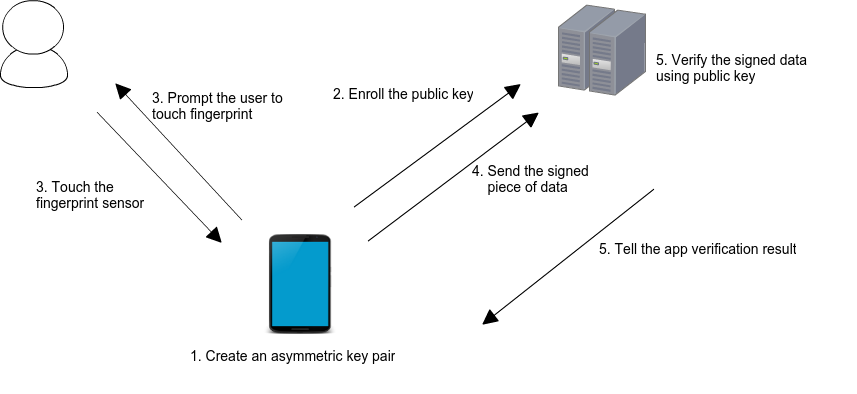
This package simplifies server authentication using biometrics. The following image from Android Developers Blog illustrates the basic use case:
When a user enrolls in biometrics, a key pair is generated. The private key is securely stored on the device, while the public key is sent to a server for registration. To authenticate, the user is prompted to use their biometrics, unlocking the private key. A cryptographic signature is then generated and sent to the server for verification. If the server successfully verifies the signature, it returns an appropriate response, authorizing the user.
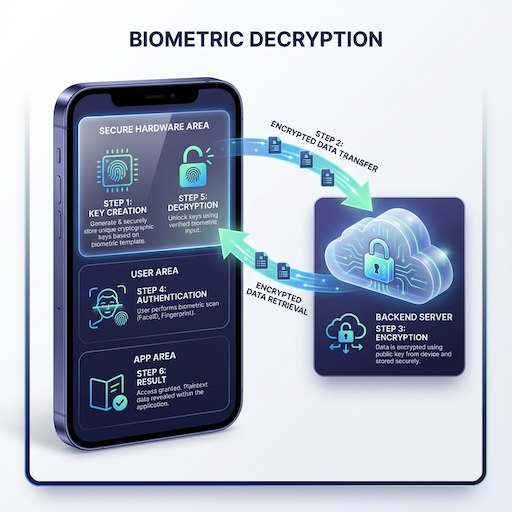
Biometric Decryption
The plugin also supports secure decryption, ensuring that sensitive data transmitted from the server can only be accessed by the authenticated user on their specific device.
Key Creation: The device generates a key pair (EC or RSA) in secure hardware.
Registration: The public key is sent to the backend server.
Encryption: The server encrypts the sensitive payload using the public key.
Authentication: The encrypted payload is sent to the device. The user must authenticate biometrically to proceed.
Decryption: Once authenticated, the secure hardware uses the private key to decrypt the payload, revealing the plaintext data to the app.
Encrypting a payload
Step 3 above has to match the scheme the device decrypts with. For RSA keys that is OAEP with a
SHA-256 main digest on every platform — but the MGF1 digest differs, because each platform's
crypto API fixes it:
Platform
Scheme
Main digest
MGF1 digest
Label
Android
RSA-OAEP
SHA-256
SHA-1
empty
iOS / macOS
RSA-OAEP
SHA-256
SHA-256
empty
Android Keystore applies SHA-1 for MGF1, while Apple's SecKeyAlgorithm.rsaEncryptionOAEPSHA256 uses SHA-256 for both digests. From v12.1.1 the plugin states Android's
parameters explicitly instead of inheriting the provider default, and pins SHA-1 on the key itself
where the platform allows it (API 35+), so a backend can rely on the values above rather than on
whatever the device happens to default to. Select the MGF1 digest from the client platform you
issued the public key to:
RSA-2048 with a SHA-256 OAEP digest leaves 190 bytes of plaintext capacity; wrap a symmetric key
rather than the payload itself if you need more.
For EC keys the payload is encrypted with ECIES (eciesEncryptionStandardX963SHA256AESGCM) on all
platforms, so no per-platform branch is needed. iOS/macOS keys created with SignatureType.rsa use
the hybrid architecture and still decrypt RSA-OAEP payloads — encrypt against the RSA key returned
in decryptingPublicKey.
Keys created before v11.0.0 authorise PKCS#1 v1.5 instead of OAEP. The plugin still falls back to
PKCS#1 v1.5 for those, so existing ciphertext keeps working, but new keys should use OAEP.
Class: BiometricSignaturePlugin
This class provides methods to manage and utilize biometric authentication for secure server interactions. It supports both Android and iOS platforms.
On setInvalidatedByBiometricEnrollment: the default is true on every platform that
supports it — a key created without the flag is bound to the biometric set enrolled at
creation time, and enrolling or removing a fingerprint/face permanently invalidates it. Your
app must then create a new key and re-enroll its public key with the server; use
getKeyInfo(checkValidity: true) to detect this before signing. Pass false to opt out and
keep keys usable across enrollment changes.
It maps to KeyGenParameterSpec.Builder.setInvalidatedByBiometricEnrollment(...) on Android
(API 23 has no such setter, so keys there are always invalidated) and selects
.biometryCurrentSet vs .biometryAny on the Secure Enclave key for iOS/macOS. It is ignored
on Windows, and ignored when requireAuthentication is false — a key with no
user-authentication constraint is not tied to the enrolled biometric set.
final result = await biometricSignature.createKeys(
keyAlias: 'payment_key', // Optional: named alias
keyFormat: KeyFormat.pem,
promptMessage: 'Authenticate to create keys',
config: CreateKeysConfig(
signatureType: SignatureType.rsa,
enforceBiometric: true,
setInvalidatedByBiometricEnrollment: true,
useDeviceCredentials: false,
enableDecryption: true, // Android only
failIfExists: true, // Prevent overwriting existing key
),
);
if (result.code == BiometricError.success) {
print('Public Key: ${result.publicKey}');
} elseif (result.code == BiometricError.keyAlreadyExists) {
print('Key already exists for this alias');
}
Prompts the user for biometric authentication and generates a cryptographic signature over raw binary data. This is ideal for challenge-response authentication flows where a random nonce is generated as raw bytes.
Parameters:
payload: The raw byte data (Uint8List) to sign
keyAlias: Which key to sign with. Defaults to the default alias.
config: CreateSignatureConfig with platform options
signatureFormat: Output format for signature
keyFormat: Output format for public key
promptMessage: Custom authentication prompt
CreateSignatureConfig Options
Option
Platforms
Description
allowDeviceCredentials
Android
Allow PIN/pattern fallback
promptSubtitle
Android
Subtitle for biometric prompt
promptDescription
Android
Description for biometric prompt
cancelButtonText
Android
Cancel button text
Returns: Future<SignatureResult>.
signature: The signed payload.
signatureBytes: The raw signature bytes.
publicKey: The public key.
code: BiometricError code.
final random = Random.secure();
final nonceBytes = Uint8List.fromList(
  List<int>.generate(32, (_) => random.nextInt(256)),
);

final result = await biometricSignature.createSignatureFromBytes(
  payload: nonceBytes,
  keyAlias: 'payment_key',  // Optional: use named key
  promptMessage: 'Please authenticate',
  signatureFormat: SignatureFormat.base64,
  keyFormat: KeyFormat.base64,
  config: CreateSignatureConfig(
    allowDeviceCredentials: false,
  ),
);
Decrypts the given payload using the private key and biometrics.
Parameters:
payload: The encrypted data. See Encrypting a payload for the exact scheme the backend must use.
payloadFormat: Format of encrypted data (PayloadFormat.base64, hex)
keyAlias: Which key to decrypt with. Defaults to the default alias.
config: DecryptConfig with platform options
promptMessage: Custom authentication prompt
DecryptConfig Options
Option
Platforms
Description
allowDeviceCredentials
Android
Allow PIN/pattern fallback
promptSubtitle
Android
Subtitle for biometric prompt
promptDescription
Android
Description for biometric prompt
cancelButtonText
Android
Cancel button text
Note: Decryption is not supported on Windows. On iOS, if a legacy
v2.x-era unwrapped RSA private key exists in the keychain (default alias,
no modern EC key), it is automatically migrated to the Secure Enclave on
the first signing/decryption call. v11.x had a shouldMigrate flag for
this; v12 auto-detects.
Returns: Future<DecryptResult>.
decryptedData: The plaintext string.
code: BiometricError code.
final result = await biometricSignature.decrypt(
  payload: encryptedBase64,
  payloadFormat: PayloadFormat.base64,
  keyAlias: 'payment_key',  // Optional: use named key
  promptMessage: 'Authenticate to decrypt',
  config: DecryptConfig(
    allowDeviceCredentials: false,
  ),
);
deleteKeys({ keyAlias })
Deletes biometric key material for a specific alias from the device's secure storage.
Parameters:
keyAlias: Which key to delete. When null, deletes the default alias only. Other aliases are not affected.
Returns: Future<bool>.
true: Keys were successfully deleted, or no keys existed (idempotent).
false: Deletion failed due to a system error.
Note: This operation is idempotent—calling deleteKeys() when no keys exist will still return true. This allows safe "logout" or "reset" flows without checking key existence first.
// Delete a specific named keyfinal deleted = await biometricSignature.deleteKeys(keyAlias: 'payment_key');
// Delete the default keyfinal defaultDeleted = await biometricSignature.deleteKeys();
deleteAllKeys()
Deletes all biometric key material across all aliases. This is a destructive operation — use deleteKeys() with a specific alias for targeted deletion.
Returns: Future<bool>.
true: All keys were successfully deleted.
false: Deletion failed due to a system error.
final deleted = await biometricSignature.deleteAllKeys();
if (deleted) {
  print('All biometric keys removed across all aliases');
}
biometricAuthAvailable()
Checks if biometric authentication is available on the device and returns a structured response.
Returns: Future<BiometricAvailability>.
canAuthenticate: bool indicating if auth is possible.
hasEnrolledBiometrics: bool indicating if user has enrolled biometrics.
final info = await biometricSignature.getKeyInfo(
  keyAlias: 'payment_key',  // Optional: query named key
  checkValidity: true,
  keyFormat: KeyFormat.pem,
);

if (info.exists && (info.isValid ?? true)) {
  print('Algorithm: ${info.algorithm}, Size: ${info.keySize}');
  print('Hybrid Mode: ${info.isHybridMode}');
}
biometricKeyExists({ keyAlias, checkValidity })
Convenience method that wraps getKeyInfo() and returns a simple boolean.
Parameters:
keyAlias: Which key to check. Defaults to the default alias.
checkValidity: Whether to check key validity. Default is false.
Returns: Future<bool> - true if key exists and is valid.
final exists = await biometricSignature.biometricKeyExists(
  keyAlias: 'payment_key',
  checkValidity: true,
);
simplePrompt({ promptMessage, config })
Performs biometric authentication without performing any cryptographic operation. Useful for quick re-authentication or gating sensitive UI.
SimplePromptConfig Options
Option
Platforms
Description
subtitle
Android
Subtitle for biometric prompt
description
Android
Description for biometric prompt
cancelButtonText
Android
Cancel button text
allowDeviceCredentials
Android/iOS/macOS
Allow PIN/pattern/passcode fallback
biometricStrength
Android
BiometricStrength.strong or BiometricStrength.weak
final result = await biometricSignature.simplePrompt(
  promptMessage: 'Verify your identity',
  config: SimplePromptConfig(
    subtitle: 'Access secure features',
    allowDeviceCredentials: true,
    biometricStrength: BiometricStrength.strong,
  ),
);

if (result.success == true) {
  // Authenticated
} else {
  print('Failed: ${result.code} - ${result.error}');
}
Migration Guide
This section covers breaking changes and migration steps for upgrading between major versions. It assumes familiarity with the plugin’s core concepts (key creation, signing, biometric availability).
Migrating from v5/v6 to v7
v7.0.0 replaced the legacy map-based createSignature() API with typed SignatureOptions.
import'package:biometric_signature/biometric_signature.dart';
// All types exported from single import
Migrating from v9 to v10
v10.0.0 refines error handling and introduces non-cryptographic authentication.
Breaking: BiometricError Changes
Values Added: New error codes were added to cover more edge cases:
BiometricError.securityUpdateRequired
BiometricError.notSupported
BiometricError.systemCanceled
BiometricError.promptError
Impact: If you use exhaustive switch statements (e.g., in Dart 3.0+), you must add cases for these new values.
New Feature: simplePrompt()
v10 adds simplePrompt() for scenarios where you only need to verify the user's presence without cryptographic operations. See the Usage section for details.
Migrating from v10 to v11
v11.0.0 adds named key aliases, key overwrite protection, and internal architecture improvements. (Custom fallback options were also introduced in v11 but removed in v12 — see "Migrating from v11 to v12" below.)
New: Named Key Aliases
All key operations now accept an optional keyAlias parameter:
// Before (v10.2) — single default keyfinal result = await biometricSignature.createKeys(...);
// After (v11.0) — multiple named keysfinal authKey = await biometricSignature.createKeys(keyAlias: 'auth', ...);
final paymentKey = await biometricSignature.createKeys(keyAlias: 'payment', ...);
final result = await biometricSignature.createKeys(
  keyAlias: 'payment',
  config: CreateKeysConfig(failIfExists: true),
);

if (result.code == BiometricError.keyAlreadyExists) {
  // Key already exists — handle accordingly
}
New: deleteAllKeys()
// Delete all keys across all aliasesawait biometricSignature.deleteAllKeys();
New Breaking: BiometricError Values
BiometricError.keyAlreadyExists — returned when failIfExists: true and key exists.
Impact: If you use exhaustive switch statements (e.g., in Dart 3.0+), you must add a case for this new value.
Migrating from v11 to v12
v12.0.0 lowers the minimum Flutter to 3.24.5 so the plugin builds out of the box on a much wider range of host projects. To make this possible, the Android-only custom fallback options feature added in v11 was removed (it required compileSdk = 36 / AGP 8.9.1 via androidx.biometric:1.4.0-alpha06).
Symbols removed:
BiometricFallbackOption class
BiometricError.fallbackSelected
fallbackOptions field on CreateKeysConfig, CreateSignatureConfig, DecryptConfig, SimplePromptConfig
selectedFallbackIndex / selectedFallbackText on SignatureResult, DecryptResult, SimplePromptResult
shouldMigrate field on CreateSignatureConfig and DecryptConfig — the iOS Secure Enclave migration is now auto-detected (issue #65).
If you were rendering Android 15+ custom fallback buttons via fallbackOptions, you can replicate the UX in Flutter: catch the cancel/userCanceled outcome and present your own bottom-sheet listing the alternative actions. The standard cancelButtonText and allowDeviceCredentials flow continues to work everywhere it did before.
shouldMigrate removal — what changed and why
In v11.x and earlier, callers had to opt into the legacy v2.x → Secure Enclave RSA migration by passing shouldMigrate: true on CreateSignatureConfig / DecryptConfig. Two problems:
It misfired against v10+ EC keys. When an app already had an EC key (created via signatureType: SignatureType.ecdsa) and the caller still passed shouldMigrate: true, the iOS code would search for a non-existent legacy RSA key and fail with RSA private key not found in Keychain. Reported as issue #65.
It was a foot-gun. Apps couldn't reliably tell from Dart whether a legacy key existed, so they either always set true (risking #1) or never set it (orphaning legacy keys).
v12 removes the flag. The iOS plugin now checks the keychain itself: a migration is performed only when (a)keyAlias == nil, (b) no modern EC key exists, and (c) a legacy unwrapped RSA private key is actually present. If any of those is false, the call routes straight to the EC path (or, if a wrapped RSA already exists, the hybrid RSA path). Apps no longer need to know or care.
If you were already passing shouldMigrate: false, deleting the line is a no-op. If you were passing shouldMigrate: true, deleting the line is also safe — the auto-detection will run the migration in exactly the same scenarios where it would have succeeded under v11.x, and skip it cleanly in the scenarios where v11.x would have errored.