패키지, 저장소 및 앱 카테고리 검색

패키지 상세v2.4.6

bluetooth_print_plus

bluetooth_print_plus는 블루투스 열전사 프린터용 플러터 플러그인으로, 안드로이드 및 iOS를 지원하며, TSPL/TSC, CPCL, ESC/POS를 지원합니다.

AndroidiOSWebmacOSLinux
30일 다운로드
2.2천
좋아요
65
Pub 점수
135

패키지 설치

flutter pub add bluetooth_print_plus

패키지 개요

공개 정보를 바탕으로 생성한 선택 가이드입니다.

bluetooth_print_plus는 Android 및 iOS에서 블루투스 열전사 프린터와의 통신을 가능하게 하는 Flutter 플러그인입니다. TSPL/TSC, CPCL, ESC/POS 등 다양한 프린터 언어를 지원하여 영수증, 라벨, 티켓 인쇄에 적합합니다. 이 패키지는 인쇄 명령 전송 및 장치 연결 관리를 위한 간단한 API를 제공합니다. 웹, macOS, Linux에서도 호환되지만 비모바일 플랫폼에서는 기능이 제한될 수 있습니다. 신뢰할 수 있는 모바일 인쇄가 필요한 유통, 숙박업, 물류 분야 애플리케이션에 이상적입니다.

사용 사례

  • 소매 앱에서 영수증 인쇄
  • 재고 시스템을 위한 라벨 인쇄
  • 이벤트 관리에서 티켓 생성
  • 모바일 포스 통합
  • 이동 중 문서 인쇄

주요 기능

  • TSPL/TSC, CPCL 및 ESC/POS 언어를 지원합니다
  • 크로스 플랫폼 지원 (Android, iOS, Web, macOS, Linux)
  • 프린트 명령을 보내는 간단한 API
  • 블루투스 장치 탐지 및 페어링
  • 실시간 상태 모니터링

적합한 대상

  • 소매 및 판매점 응용 프로그램
  • 물류 및 창고 관리
  • 이벤트 티켓팅 시스템
  • 모바일 인쇄 솔루션
  • 크로스 플랫폼 인쇄 기능을 구축하는 개발자

고려 사항

  • Android/iOS 플랫폼 외에서는 기능이 제한됩니다
  • 블루투스 접근을 위한 적절한 권한이 필요합니다
  • 프린터 고유의 명령 구문은 테스트가 필요할 수 있습니다
  • 모든 프린터 모델이 모든 언어를 완전히 지원하는 것은 아닙니다
  • 웹 지원은 제한된 블루투스 기능을 가질 수 있습니다

원본 README

연결된 소스 저장소의 README 원문 스냅샷입니다. 최신 내용은 저장소에서 확인하세요.

Bluetooth Print Plus

pub package GitHub stars GitHub forks qq_group tg_group

Introduction

Bluetooth Print Plus is a Bluetooth plugin used to print thermal printers in Flutter, a new mobile SDK to help developers build bluetooth thermal printer apps for iOS and Android.

Important, important, important. First, you need to run the demo to confirm the printer command type ! ! ! now support tspl/tsc、cpcl、esc pos. If this plugin is helpful to you, please give it a like, Thanks.

Buy Me A Coffee/请我喝杯咖啡

Plan

Version plan
1.1.x blue and tsc command, esc print image command
1.5.x support cpcl command
2.x.x improve esc command
3.x.x support zpl command

Features

Android iOS Description
scan :white_check_mark: :white_check_mark: Starts a scan for Bluetooth Low Energy devices.
connect :white_check_mark: :white_check_mark: Establishes a connection to the device.
disconnect :white_check_mark: :white_check_mark: Cancels an active or pending connection to the device.
state :white_check_mark: :white_check_mark: Stream of state changes for the Bluetooth Device.

Usage

Example

To use this plugin :
dependencies:
  flutter:
    sdk: flutter
  bluetooth_print_plus: ^2.4.5
Add permissions for Bluetooth

We need to add the permission to use Bluetooth and access location:

Android

In the android/app/src/main/AndroidManifest.xml let’s add:

<uses-permission android:name="android.permission.BLUETOOTH" />
<uses-permission android:name="android.permission.BLUETOOTH_SCAN" />
<uses-permission android:name="android.permission.BLUETOOTH_CONNECT" />
<uses-permission android:name="android.permission.BLUETOOTH_ADMIN" />
<uses-permission android:name="android.permission.ACCESS_FINE_LOCATION"/>
<uses-permission android:name="android.permission.ACCESS_COARSE_LOCATION"/>
IOS

In the ios/Runner/Info.plist let’s add:

<key>NSBluetoothAlwaysUsageDescription</key>
<string>Need BLE permission</string>
<key>NSBluetoothPeripheralUsageDescription</key>
<string>Need BLE permission</string>
import
import 'package:bluetooth_print_plus/bluetooth_print_plus.dart';
BluetoothPrintPlus useful property
BluetoothPrintPlus.isBlueOn;
BluetoothPrintPlus.isScanning;
BluetoothPrintPlus.isConnected;
listen

late StreamSubscription<bool> _isScanningSubscription;
late StreamSubscription<BlueState> _blueStateSubscription;
late StreamSubscription<ConnectState> _connectStateSubscription;
late StreamSubscription<Uint8List> _receivedDataSubscription;
late StreamSubscription<List<BluetoothDevice>> _scanResultsSubscription;
late List<BluetoothDevice> _scanResults;
  • scan results
/// listen scanResults
_scanResultsSubscription = BluetoothPrintPlus.scanResults.listen((event) {
  if (mounted) {
    setState(() {
      _scanResults = event;
    });
  }
});
  • state
/// listen isScanning
_isScanningSubscription = BluetoothPrintPlus.isScanning.listen((event) {
  print('********** isScanning: $event **********');
  if (mounted) {
    setState(() {});
  }
});

/// listen blue state
_blueStateSubscription = BluetoothPrintPlus.blueState.listen((event) {
  print('********** blueState change: $event **********');
  /// blue state changed, do something...
});

/// listen connect state
_blueStateSubscription = _BluetoothPrintPlus.connectState.listen((event) {
  print('********** connectState change: $event **********');
  /// connect state changed, do something...
});
  • received Data
_BluetoothPrintPlus.receivedData.listen((data) {
  print('********** received data: $data **********');
  /// received data, do something...
});
scan

// begin scan
await BluetoothPrintPlus.startScan(timeout: Duration(seconds: 10));

// get devices
_scanResultsSubscription = BluetoothPrintPlus.scanResults.listen((event) {
  if (mounted) {
    setState(() {
      _scanResults = event;
    });
  }
});
connect

await BluetoothPrintPlus.connect(_device);
disconnect

await BluetoothPrintPlus.disconnect();
print/write

final ByteData bytes = await rootBundle.load("assets/dithered-image.png");

/// write tsc command, for example:
final Uint8List image = bytes.buffer.asUint8List();
await tscCommand.cleanCommand();
await tscCommand.size(width: 76, height: 130);
await tscCommand.cls(); // most after size
await tscCommand.image(image: image, x: 50, y: 60);
await tscCommand.print(1);
final cmd = await tscCommand.getCommand();
if (cmd == null) return;
BluetoothPrintPlus.write(cmd);

/// write cpcl command, for example:
await cpclCommand.cleanCommand();
await cpclCommand.size(width: 76 * 8, height: 76 * 8);
await cpclCommand.image(image: image, x: 10, y: 10);
await cpclCommand.print();
final cmd = await cpclCommand.getCommand();
if (cmd == null) return;
BluetoothPrintPlus.write(cmd);

/// write esc command, for example:
await escCommand.cleanCommand();
await escCommand.print();
await escCommand.image(image: image);
await escCommand.print();
final cmd = await escCommand.getCommand();
if (cmd == null) return;
BluetoothPrintPlus.write(cmd);
Cancel Subscription
@override
void dispose() {
  super.dispose();
  _isScanningSubscription.cancel();
  _blueStateSubscription.cancel();
  _connectStateSubscription.cancel();
  _receivedDataSubscription.cancel();
  _scanResultsSubscription.cancel();
  _scanResults.clear();
  _device = null;
}

Troubleshooting

error:'State restoration of CBCentralManager is only allowed for applications that have specified the "bluetooth-central" background mode'

info.plist add:

<key>NSBluetoothAlwaysUsageDescription</key>
<string>Allow App use bluetooth?</string>
<key>NSBluetoothPeripheralUsageDescription</key>
<string>Allow App use bluetooth?</string>
<key>UIBackgroundModes</key>
<array>
    <string>bluetooth-central</string>
    <string>bluetooth-peripheral</string>
</array>

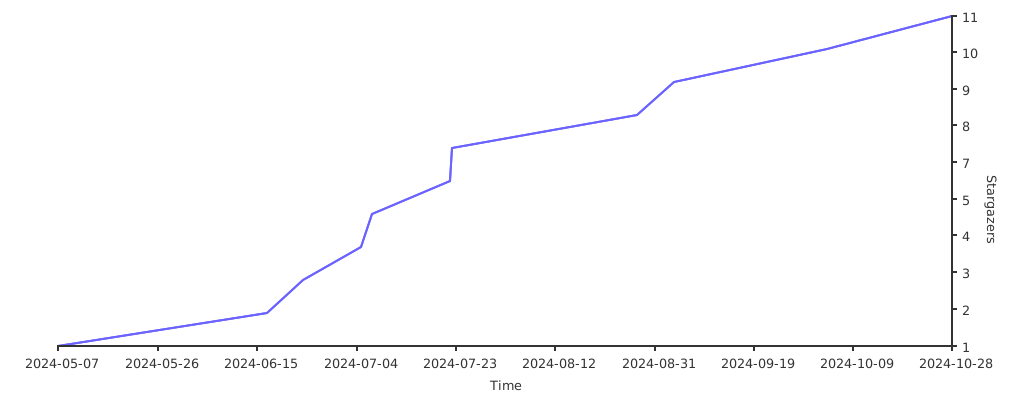
Stargazers over time

Stargazers over time

카테고리

의존성

의존성 목록 1 개

소스 저장소

이 패키지를 사용하는 프로젝트

아직 데이터가 없습니다.