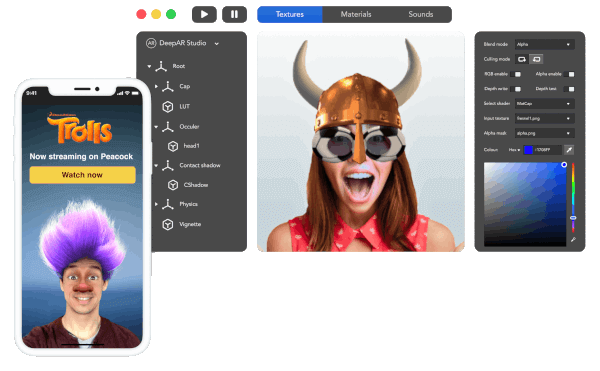
camera_deep_ar는 DeepAR SDK를 사용하여 증강현실(AR) 비디오 및 사진 녹화를 가능하게 하는 Flutter 플러그인입니다. Android와 iOS 플랫폼과 원활하게 통합되어 개발자가 카메라 스트림에 얼굴 필터, 애니메이션 및 가상 객체와 같은 실시간 AR 효과를 추가할 수 있도록 합니다. 이 플러그인은 AR 오버레이와 함께 미디어를 캡처하고 처리하기 위한 간단한 API를 제공함으로써 AR 구현을 간소화합니다. 소셜 앱, 게임 및 인터랙티브 경험에 적합하며 고품질 출력과 부드러운 성능을 지원합니다. DeepAR 엔진 기반으로 제작되어 다양한 기기에서 신뢰할 수 있는 얼굴 추적 및 효과 렌더링을 보장합니다.
사용 사례
소셜 미디어 필터
인터랙티브 게이밍
가상 시착
라이브 AR 스트리밍
사진 편집 앱
주요 기능
실시간 AR 효과
얼굴 및 객체 추적
고품질 비디오 녹화
크로스 플랫폼 지원 (Android 및 iOS)
Flutter와의 간편한 통합
적합한 대상
AR 기능을 갖춘 앱을 개발하는 개발자
소셜 미디어 플랫폼
가상 시착을 갖춘 전자상거래
게임화 기능
고려 사항
DeepAR SDK 라이센스가 필요합니다
장치 리소스 사용량이 더 높을 수 있습니다
DeepAR 전문 지식 없이 제한된 사용자 정의
외부 SDK 업데이트에 따라 달라짐
원본 README
연결된 소스 저장소의 README 원문 스냅샷입니다. 최신 내용은 저장소에서 확인하세요.
camera_deep_ar
A new Flutter plugin for Camera video and Photo Augmented reality recording. This plug-in requires Android SDK 19+ and iOS 10+
Getting Started
Please follow the example on the dev channel https://github.com/mtellect/CameraDeepAR/tree/dev as the dev channel has the recent code updates
You can use Permission_handler, a permissions plugin for Flutter.
Require and add the following permissions in your manifest:
Add this to the proguard-rules.pro
-keepclassmembers classai.deepar.ar.DeepAR{ *; }
for release mode modify and add to your BuildType in your build.gradle
buildTypes {
release {
// TODO: Add your own signing config for the release build.// Signing with the debug keys for now, so `flutter run --release` works.
signingConfig signingConfigs.debug
proguardFiles getDefaultProguardFile('proguard-android.txt'), 'proguard-rules.pro'
}
}
You only need add the permission message on the Info.plist
    <key>NSCameraUsageDescription</key>
    <string>Allows you to capture your best moment</string>
	<key>io.flutter.embedded_views_preview</key>
	<true/>
    <key>NSPhotoLibraryAddUsageDescription</key>
    <string>Allows you to capture your best moment</string>
    <key>NSMicrophoneUsageDescription</key>
    <string>Needs access to your mic to help your record voice notes on chat/message conversations</string>