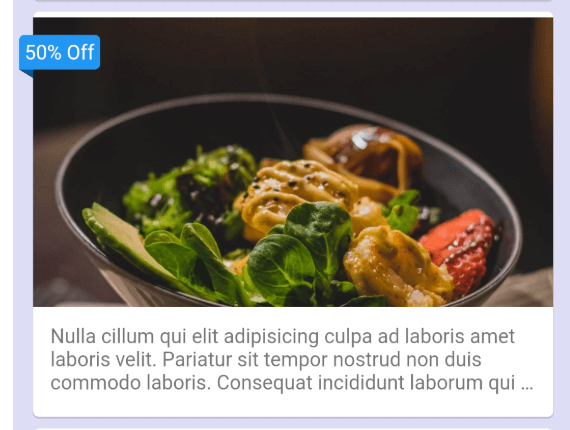
CardBanner는 어떤 다른 위젯에도 쉽게 배너를 배치할 수 있도록 설계된 가벼운 Flutter 위젯입니다. 복잡한 레이아웃 관리 없이 배지, 리본 또는 라벨과 같은 시각적 표시를 UI 요소에 추가하는 간단한 방법을 제공합니다. 배너는 부모 위젯에 대해 상대적으로 위치 지정할 수 있으며 색상, 텍스트 및 정렬 옵션으로 맞춤 설정할 수 있습니다. 다양한 플랫폼에서 앱의 기능, 상태 표시 또는 프로모션 메시지를 강조하는 데 이상적입니다.
사용 사례
카드에 상태 배지 추가하기
프로모션 콘텐츠 강조
항목에 우선순위 태그 표시
UI 요소용 사용자 지정 리본 만들기
시각적 신호를 통한 사용자 피드백 향상
주요 기능
어떤 위젯과도 쉽게 통합
사용자 정의 가능한 배너 텍스트 및 색상
유연한 위치 지정 옵션
여러 플랫폼을 지원합니다
최소한의 보일러플레이트 코드
반응형 디자인 호환성
적합한 대상
UI 중심 앱을 개발하는 개발자
시각적 주석이 필요한 디자이너
상태 표시기 필요 앱
크로스플랫폼 모바일 및 웹 애플리케이션
동적 콘텐츠 태그가 있는 프로젝트
고려 사항
수동 정렬 조정이 필요할 수 있습니다
기본 사용자 정의를 넘어서는 스타일링 제한
복잡한 애니메이션에 적합하지 않습니다
간단하고 정적인 배너와 함께 사용하는 것이 가장 좋습니다
대규모 목록에서 과도하게 사용할 경우 성능에 미치는 영향
원본 README
연결된 소스 저장소의 README 원문 스냅샷입니다. 최신 내용은 저장소에서 확인하세요.
Card Banner
It is simple to add a banner to any widget using card banner.
Features
Highly customizable.
Multi-platform support.
Getting started
Add this line to your pubspec.yaml under the dependencies:
dependencies:
    card_banner: <latest-version>
alternatively, you can use this command:
flutter pub add card_banner
Import statement
import'package:card_banner/card_banner.dart'
Screenshot
Usage
Simple example: Cover the card widget with the card banner and provide the required text. It's done
classMyBannerextendsStatelessWidget{
constMyBanner({super.key});
@overrideWidgetbuild(BuildContext context) {
returnScaffold(
backgroundColor: constColor.fromARGB(255, 221, 222, 245),
body: ListView.builder(
padding: constEdgeInsets.symmetric(horizontal: 10),
itemCount: 8,
itemBuilder: (context, index) {
returnCardBanner(
text: "50% Off",
child: foodCard(),
);
},
),
);
}
CardfoodCard() {
returnCard(
child: ListTile(
contentPadding: EdgeInsets.zero,
title: Image.network(
"https://images.pexels.com/photos/461198/pexels-photo-461198.jpeg",
fit: BoxFit.cover,
),
subtitle: constPadding(
padding: EdgeInsets.all(12.0),
child: Text(
"Nulla cillum qui elit adipisicing culpa ad laboris amet laboris velit. Pariatur sit tempor nostrud non duis commodo laboris. Consequat incididunt laborum qui dolore in velit consequat mollit amet. Proident eu et sint veniam sunt fugiat quis fugiat sunt pariatur do enim in.",
overflow: TextOverflow.ellipsis,
maxLines: 3,
),
),
),
);
}
}