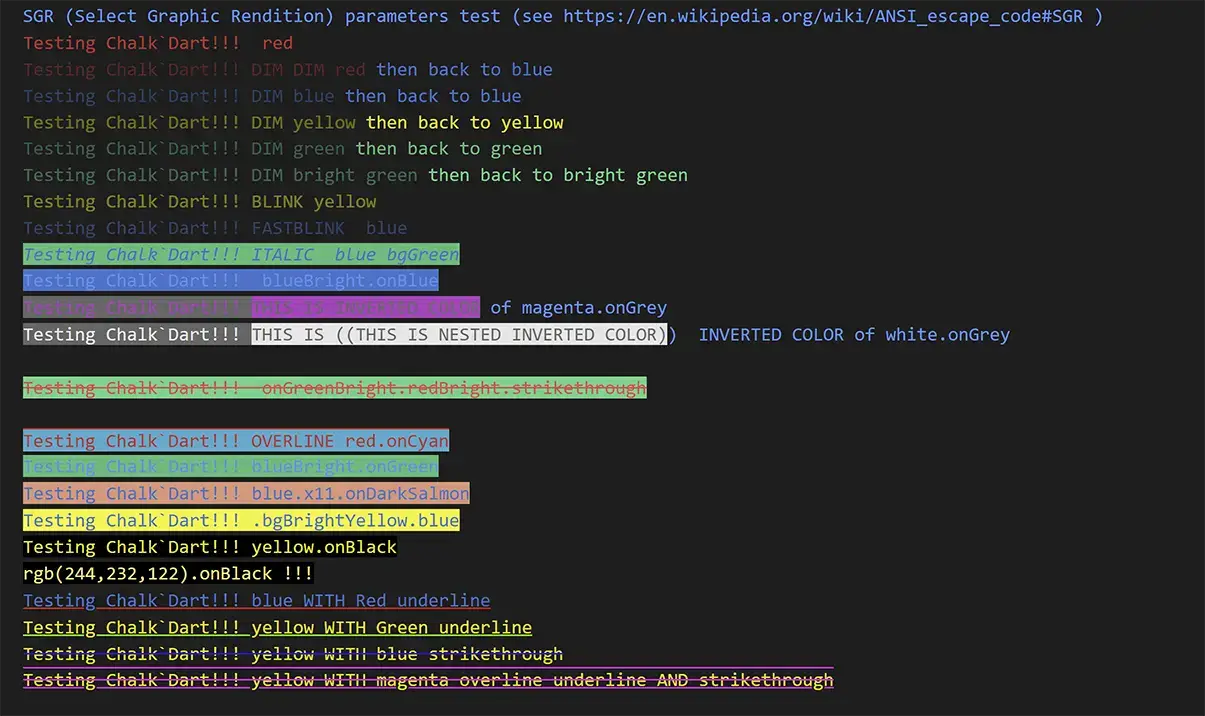
Dart용 콘솔/로깅 텍스트 색상 및 스타일링 라이브러리입니다. '터미널 문자열 스타일링을 올바르게 구현했습니다.' 기본 모드는 콘솔/터미널 표시를 위해 텍스트를 스타일링하는 데 ANSI 코드를 사용합니다. HTML 모드를 활성화하면 모든 텍스트가 HTML을 사용하여 색상과 스타일이 지정되며, ChalkDart를 서버에 색상/스타일이 적용된 로그를 전송하여 브라우저에서 볼 수 있도록 사용할 수 있습니다.
ChalkDart는 기본적으로 ANSI 코드를 사용하여 콘솔 출력에 색상과 스타일을 추가하는 Dart 라이브러리로, 풍부한 터미널 텍스트 포맷팅을 가능하게 합니다. 또한 HTML 모드도 지원하여 스타일이 적용된 로그를 서버로 전송해 브라우저 기반으로 확인할 수 있습니다. CLI 도구 및 디버깅에 이상적이며, 일관되고 크로스플랫폼 스타일링을 통해 로그 메시지의 가독성을 향상시킵니다. 이 패키지는 Flutter 및 비-Flutter Dart 프로젝트에서 여러 플랫폼에 걸쳐 원활하게 통합될 수 있습니다.
사용 사례
CLI 애플리케이션 로깅
색상 출력을 사용한 디버깅
웹 인터페이스로 스타일링된 로그 보내기
명령줄 도구에서 터미널 사용자 경험 개선
개발 중 실시간 콘솔 피드백
HTML를 통한 서버 측 로그 시각화
주요 기능
ANSI 코드 기반 터미널 스타일
브라우저 호환 로그용 HTML 모드
크로스 플랫폼 지원 (Android, iOS, macOS, Windows, Linux)
간단하고 체인 가능한 텍스트 스타일링 API
전경 및 배경 색상 지원
Flutter 및 Dart 앱과의 간편한 통합
적합한 대상
CLI 도구를 개발하는 개발자
읽기 가능한 콘솔 로그가 필요한 팀
스타일링된 서버 측 로깅이 필요한 애플리케이션
브라우저에서 로그를 시각화하는 프론트엔드 개발자
여러 운영 체제를 대상으로 하는 프로젝트
고려 사항
HTML 모드는 서버 사이드 렌더링 또는 클라이언트 처리가 필요합니다
ANSI 코드는 모든 레거시 터미널에서 렌더링되지 않을 수 있습니다
텍스트 스타일링에 국한됨—고급 UI 컴포넌트 없음
플랫폼 고유의 터미널 기능에 의존합니다
그래픽 사용자 인터페이스용이 아님
원본 README
연결된 소스 저장소의 README 원문 스냅샷입니다. 최신 내용은 저장소에서 확인하세요.
Chalk'Dart
TLDR Summary - Easy to use console text coloring and styling using ANSI (and now HTML for web logs as well!)
Any amount of nesting of colors/styles is fully supported:
import'package:chalkdart/chalkstrings.dart';
// nested colors and styling are supportedprint('Hello ${'beautiful'.blue.onGreen.bold} world!'.yellow.onBlue);
ChalkDart 3.1 Performance Update
Version 3.1.0 brings major performance improvements across the board: string extension getters are now 7-10x faster, Chalk getter chains are 4-6x faster, multi-line text processing is 4-6x faster, and hex color parsing is 13x faster. See PERF_RECOMMENDATIONS_AND_IMPROVEMENTS.md for benchmarks and tips on getting the best performance.
For the highest performance (30-90x faster), check out my new quectocolors package — a lightweight, zero-allocation ANSI styling library designed for hot paths and performance-critical code. For ChalkDart string extension users it is essentially a drop in replacement for ChalkDart!
🎉 ChalkDart 3.0 - Now with HTML Output Support!
ChalkDart 3.0 introduces groundbreaking HTML output capabilities, making it the most versatile text styling solution for Dart. HTML output capabilities allows the option of generating colorized/styled output for server/web based logging. While other packages like AnsiColors only handle ANSI terminal output, ChalkDart now offers:
🔥 Now includes support for full ANSI coloring/styling 🌈 while debugging/running Flutter apps within XCode from VSCode on Mac OSX! ANSI styling has never before been available via XCode - but it is now! Upgrade your OSX Flutter logging to the next level with the colored output capabilities made trivial with ChalkDart. 🚀 💥
(XCode support requires the companion "XCode Flutter Color Debugging" VSCode extension). More details found below.
📡 ⚡ 💻 🚀 Now includes a HTML mode so that coloring/styling uses HTML tags rather than ANSI codes, so that ChalkDart can be used to color/style logs
that may be sent to a database/server for viewing within a browser environment. (Honestly, makes ChalkDart the only logical choice for logging packages that wish to
additionally support logging to firebase/files/server as well as traditional ANSI console/terminal support.😉)
Examples of the HTML output produced by example/chalkdart_example.dart:
To see the identical ANSI output of the above examples execute chalkdart_example.dart within VSCode and see output to your debug console or
dart run example/chalkdart_example.dart from your terminal shell that support full color ANSI (I recommend iTerm2 for MacOSX)
Dual Output Modes: Switch seamlessly between ANSI terminal output and HTML output with a single line of code
Complete Styling Solution: Use the same intuitive API for both console and web-based logging
Perfect for Modern Logging: Ideal for systems that need to log to both terminal and web interfaces (e.g., Firebase, web dashboards)
Rich HTML Features: Full CSS styling, customizable fonts, and comprehensive color schemes
String Extensions: Powerful string extension methods for more natural Dart-style coding
Best-in-Class Terminal Support: Superior ANSI support including XCode debugging and VSCode integration. I authored the complete ANSI support available in the VSCode debug terminal, and the "XCode Flutter Color Debugging" VSCode extension, specifically to support all of the capabilities of ChalkDart.
Nominal real world size difference from any other minimal ANSI package, as Dart tree-shaking removes all unused features at build time. The easy of use of ChalkDart, and the ability to nest and combine styles and styled strings in any manner, make the ChalkDart DevX/UX more than make up for a few thousand bytes of compiled size.
Why choose ChalkDart over alternatives?
🎨 Comprehensive Color Support:
Color name autocompletion in IDEs
🔄 Format Flexibility: The only package that can output both ANSI and HTML without changing your code
📱 Better IDE Support: Full support for VSCode, Android Studio, and first ever support for colorized XCode debugging using print and printDebug() (Using the companion "XCode Flutter Color Debugging" VSCode extension)
Intelligent style nesting and combining - Any combination of nesting and styles is seamlessly supported.
Perfect for logging libraries where the logging library can use styling of it's own, but also accept any strings from callers that also have been styled with ChalkDart (also supports nesting of any ANSI codes not generated by ChalkDart).
All 140+ standard CSS/X11 color names (cornflowerBlue, darkSeaGreen, etc.)
RGB, HSL, HWB, LAB color models
HSL color space in particular can be nice for easily increasing the saturation or brightness of colors to indicate
progress or error severity (or hue for making rainbows 🌈.
Hex color codes (#RRGGBB)
True color and legacy ANSI 256-color mode support for less capable terminals
Custom color keyword definition
Disclaimer: I needed to update the readme for 3.0, so I thought I would download Cursor AI and ask it to summarize my pull request adding the html output capabilities. The majority of the text above was written by Cursor - it's quite a ChalkDart promoter - lol- it gave me quite a chuckle. Better than having to take the time to write something up myself - for now at least. It did come up with some valid points though. 😉 (It apparently likes emojis also.. 😆) Cursor also wrote the HTML Output section towards the end summarizing the changes, as well as adding detail to my CHANGELOG.md entry.
vscode debug console
windows terminal
Console/Terminal text coloring and styling library for Dart
'Terminal string styling done right'
I created this for my Dart/Flutter development logging back in 2020, and in 2022 I finally took the time to clean it up and get it released as a package.
In the mean time I added full ANSI support to the Visual Studio Code debugging console and the Dart-Pad console as well. You can use any of the ANSI capabilities of this package within your VSCode debugger to enable colorful, styled logging today. 😊
Check out example/chalkdart_example.dart for some cool examples of what it is capable of.
Check out example/chalkdart_string_example.dart for some cool examples of what it is capable of using the Chalk String extension classes.
If you have used the Chalk.js package within the npm/node.js environment you know how nice and easy it makes text coloring and styling! This ChalkDart version can be used essentially exactly as the js version.
import'package:chalkdart/chalkstrings.dart';
// nested colors and styling are supportedprint('Hello ${'beautiful'.blue.onGreen.bold} world!'.yellow.onBlue);
Chalk comes with an easy to use composable API where you just chain and nest the styles you want.
import'package:chalkdart/chalk.dart';
// Combine styled and normal stringsprint(chalk.blue('Hello') + ' World' + chalk.red('!'));
// Compose multiple styles using the chainable APIprint(chalk.blue.onRed.bold('Hello world!'));
// Pass in multiple argumentsprint(chalk.blue('Hello', 'World!', 'Foo', 'bar', 'biz', 'baz'));
// Nest stylesprint(chalk.red('Hello', chalk.underline.bgBlue('world') + '!'));
// Nest styles of the same type even (color, underline, background)print(chalk.green(
'I am a green line ' +
chalk.blue.underline.bold('with a blue substring') +
' that becomes green again!'
));
// use in multiline string with interpolationprint('''
CPU: ${chalk.red('90%')}
RAM: ${chalk.green('40%')}
DISK: ${chalk.yellow('70%')}
''');
// or with inline calcsprint('''
CPU: ${chalk.red(cpu.totalPercent)}%
RAM: ${chalk.green((ram.used / ram.total * 100))}%
DISK: ${chalk.rgb(255,131,0)((disk.used / disk.total * 100))}%
''');
// Use RGB colors in debug console or terminals that support it.print(chalk.keyword('orange')('Yay for orange colored text!'));
print(chalk.rgb(123, 45, 67).underline('Underlined reddish color'));
print(chalk.hex('#9e9e9e').bold('Bold gray!'));
Alternately using the Chalk String extensions:
import'package:chalkdart/chalkstrings.dart';
//(or include import 'package:chalkdart/chalkstrings_x11.dart'; for use of all x11 colors)// Combine styled and normal stringsprint('Hello'.blue + ' World' + '!'.red);
// Compose multiple styles using the chainable APIprint('Hello world!'.blue.onRed.bold);
// Nest stylesprint(('Hello' + 'world'.underline.bgBlue + '!').red);
// Nest styles of the same type even (color, underline, background)print(('I am a green line ' +
'with a blue substring'.blue.underline.bold +
' that becomes green again!').green
);
// use in multiline string with interpolationprint('''
CPU: ${'90%'.red}
RAM: ${'40%'.green}
DISK: ${'70%'.yellow}
''');
// or with inline calcsprint('''
CPU: ${cpu.totalPercent.toStringAsFixed(2).red}%
RAM: ${(ram.used / ram.total * 100).toStringAsFixed(2).green}%
DISK: ${(disk.used / disk.total * 100).toStringAsFixed(2).rgb(255,131,0)}%
''');
// Use RGB colors in debug console or terminals that support it.print('Yay for orange colored text!'.keyword('orange'));
print('Underlined reddish color'.rgb(123, 45, 67).underline);
print('Bold gray!'.hex('#9e9e9e').bold);
const name = 'Tim Maffett';
print(chalk.green('Hello $name'));
//=> 'Hello Tim Maffett'//or using String extensionsprint('Hello $name'.green);
//=> 'Hello Tim Maffett'
Chain styles and call the last one as a method with a string argument. Order doesn't matter, and later styles take precedent in case of a conflict. This simply means that chalk.red.yellow.green is equivalent to chalk.green.
String interpolation can be ised or multiple arguments can be listed and will be separated by space (or the string specified by joinWith). The arguments can be of any type, Map<>, List<>, Iterable and Functions/Function closures are also supported. By default Lists are joined together with a ' '(space), but the joinWith method can be used to specify a different join string. Up to 15 arguments can be included as arguments to a Chalk object.
Styles
Modifiers
reset - Resets the current color chain.
blink - Make text blink.
rapidblink - Make text blink rapidly.
bold - Make text bold.
dim - Emitting only a small amount of light.
italic - Make text italic.
underline - Make text underline.
doubleunderline - Thicker text underline.
overline - Make text overline.
inverse (or invert)- Inverse background and foreground colors.
hidden - Prints the text, but makes it invisible.
superscript - Make text superscript.
subscript - Make text subscript.
strikethrough - Puts a horizontal line through the center of the text.
visible- Prints the text only when Chalk has a color level > 0. Can be useful for things that are purely cosmetic.
font1-font10 - Changes the font
Some of these ANSI styles are not widely supported within all terminal emulators, but I have added COMPLETE support to the standard Visual Studio Code debug console as well as to the Dart-Pad console. Android Studio also has fairly complete support within it's debug console. See the VSCode section for info on using CSS to map fonts to the font1 through font10.
Colors
The exact RGB values for the base ANSI colors are rendered console/terminal dependent - and can be configured on some terminals such Windows Terminal - more info here
I include original JS Chalk 'xxxxBright' method names for users that may want legacy compatibility with original JS Chalk).
black
red
green
yellow
blue
magenta
cyan
white
brightBlack(alias blackBright, gray, grey)
brightRed(alias redBright)
brightGreen(alias greenBright)
brightYellow(alias yellowBright)
brightBlue(alias blueBright)
brightMagenta(alias magentaBright)
brightCyan(alias cyanBright)
brightWhite(alias whiteBright)
Background colors
They are named by prefixing the color with 'on'. Chalk'Dart favors the 'onXXXXX' style of specifying background colors because the verb 'on' makes chained methods read better as a sentence (it's the Dart way). I include original Chalk 'bgXXXX' method names for users that may prefer that scheme (essentially for legacy compatability with original JS Chalk).
For example 'onBlue' and 'bgBlue' are the same, it is a matter of
users preference on how they want their code to read.
Chalk supports 256 colors and Truecolor (16 million colors) on supported terminal apps.
Colors are downsampled from 16 million RGB values to an ANSI color format that is supported by the terminal emulator (or by specifying {level: n} as a Chalk option). For example, Chalk configured to run at level 1 (basic color support) will downsample an RGB value of #FF0000 (red) to 31 (ANSI escape for red).
Examples:
chalk.hex('#DEADED').underline('Hello, world!')
chalk.keyword('orange')('Some orange text')
chalk.rgb(15, 100, 204).inverse('Hello!')
Background versions of these models are prefixed with bg and the first level of the module capitalized (e.g. keyword for foreground colors and bgKeyword for background colors).
ansi - Example: chalk.ansi(31).bgAnsi(93)('red on yellowBright')
ansi256 - Example: chalk.onAnsi256(194)('Honeydew, more or less')
keyword (X11/CSS/SVG color keywords) - Example: chalk.cornFlowerBlue.onBeige or chalk.keyword('orange').bold('Orange!')
The keyword table can be extended via and the new keywords can be accessed via
Chalk.addColorKeywordHex('myfavorite', 0x6495ED ); // using hex int
chalk.color.myfavorite('This is my favorite color');
Chalk.addColorKeywordHex('my2ndFavorite', '#6A5ACD' );  // or using string
chalk.color.my2ndfavorite('This is my 2nd favorite color');
or
chalk.keyword('myfavorite)('Using the keyword() method');
chalk.color.my2ndfavorite('Thisis my 2nd favorite color');
There are also extension methods for each of the X11/CSS/SVG color names. With that you get code completion for available colors as well as compile time checking of color names.
import'package:chalkdart/chalk.dart';
chalk.cornflowerBlue.onLimeGreen('Hey there!);
// without extension methods you can use the dynamic keyword lookup method:
chalk.color.cornflowerBlue.onLimeGreen('HiAgain!);
// or off x11
chalk.x11.cornflowerBlue.onLimeGreen('Hi Again!);
// or off csscolor
chalk.csscolor.cornflowerBlue.onLimeGreen('HiAgain!);
HTML Output Mode
ChalkDart 3.0.0 introduces HTML output mode, allowing you to generate HTML-styled text instead of ANSI codes. This is particularly useful for logging to web-based systems or creating HTML output.
Basic HTML Usage
import'package:chalkdart/chalk.dart';
// Create a new Chalk instance with HTML output modefinal htmlChalk = Chalk(outputMode: ChalkOutputMode.html);
// Add the stylesheet to your outputprint(htmlChalk.inlineStylesheet());
// Use chalk as normal - it will output HTML instead of ANSI codesprint(htmlChalk.red.bold('This is red and bold text'));
HTML Safety Methods
// Make text safe for HTML displayprint(htmlChalk.blue('Text with <angles> & symbols'.htmlSafeGtLt));
// Preserve spaces in HTML output by converting to print(htmlChalk.green('Text with spaces'.htmlSafeSpaces));
// Alternatively, a simpler approach is to set whitespace preservation in the stylesheet:print(htmlChalk.inlineStylesheet(
whiteSpaceTreatment: ChalkWhitespaceTreatment.preserveNoWrap.css // Preserves spaces without HTML entity conversion
));
print(htmlChalk.green('Text with spaces')); // Spaces will be preserved by CSS// Convert all HTML special characters to entitiesprint(htmlChalk.yellow('Special & characters'.htmlSafeEntities));
// Remove HTML tagsprint(htmlChalk.stripHtmlTags('<span>Remove tags</span>'));
The whiteSpaceTreatment parameter in stylesheet generation is often a better choice for space preservation as it:
Doesn't modify your original text
Applies globally to all output
Uses CSS instead of HTML entities
Is more efficient and readable
Preserves copy/paste functionality better than using
Customizing HTML Output
// Set color scheme for basic ANSI colorsChalk.defaultHtmlBasicANSIColorSet = ChalkAnsiColorSet.darkBackground; // or .lightBackground or .highContrast// Generate custom stylesheetprint(htmlChalk.stylesheet(
colorSetToUse: ChalkAnsiColorSet.darkBackground,
whiteSpaceTreatment: ChalkWhitespaceTreatment.preserve.css,
foregroundColor: '#000000',
backgroundColor: '#ffffff',
font1: '"Your Custom Font", sans-serif'
));
IDE Support
The terminals and debug consoles in current versions of both Android Studio, IntelliJ and
Visual Studio Code support 24bit/16M color ansi codes and most attributes. However, they
both report that they DO NOT support ANSI codes. For this reason Chalk'Dart defaults to
supporting full level 3 (24 bit) ANSI codes.
XCode Support on OSX
Full ANSI coloring/styling support is finally available when debugging or running within XCode via VSCode. XCode has always corrupted and truncated all messages that contained escape sequences (including valid ANSI ones), making colored logging from XCode impossible. I have surmounted this while running within XCode by encoding all ASCII 27 (\x1B) ESC characters as [^ESC} and adding my "XCode Flutter Color Debugging" VSCode extension to VSCode to translate these back so that the ANSI escape sequence can be properly interpreted by VSCode.
The only additional code that needs to be added is setting Chalk.xcodeSafeEsc=true to activate the XCode safe ESC mode within the ChalkDart package.
Once that is done ChalkDart will output the properly encoded escape sequences and this VSCode extension will automatically convert the encoded escape
sequences back to standard ANSI sequences for the VSCode debug console to interpret.
import'package:chalkdart/chalkstrings.dart';
voidmain() {
Chalk.xcodeSafeEsc = true; // activate XCode Safe ESC mode within ChalkDart Packageprint('Hello world!'.yellow.onBlue);
...the rest of your flutter app which will be debugged within VSCode via execution within XCode...
}
When debugging a Flutter app via XCode WITHOUT this extension you would just see something like the following, raw broken ansi sequences AND truncated messages, anytime you attempt to output color:
VSCode
It is possible to set the fonts that VSCode uses in the debug console. More information can be found here.
Browser support
Chrome, Firefox and Edge natively support ANSI escape codes in their respective developer consoles.
From dart web code you can use window.console.log(...) to log messages to the browser's debug console.
Windows
If you're on Windows, do yourself a favor and use Windows Terminal instead of cmd.exe.
Related
chalk-js - The original Chalk library module for javascript which was the inspiration for this (as well as being the basis for this readme as well)!
Charts from chalkdart_example.dart output to windows terminal
chalk.level
Specifies the level of color support.
Color support is automatically detected, but you can override it by setting the level property.
Changing the level applies globally to all Chalk consumers.
Note dart determines VSCode debug console and Android Studio debug console do not support ansi control sequences, when in fact they do, so by default the level is set to 3 (full color/sequence support) as the default, no matter what the console/terminal reports. You must set this yourself if you want a different value.
If you need to change this in a reusable module, create a new instance:
// using constructorvar chalkWithLevel0 = Chalk(level: 0);
// Using the instance accomplishes the same thingvar chalkWithLevel0 = Chalk.instance(level: 0);
// this alternative naming of `instance` is provided for users accustomed to the JS version of Chalkvar chalkWithLevel0 = Chalk.Instance(level: 0);