연결된 소스 저장소의 README 원문 스냅샷입니다. 최신 내용은 저장소에서 확인하세요.
chips_input
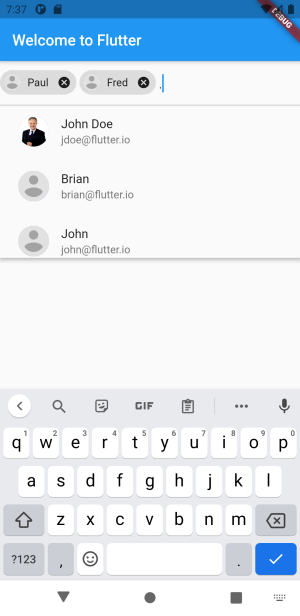
Flutter library for building input fields with InputChips as input options.
Usage
Import
import 'package:chips_input/chips_input.dart' ;
Example
First create some sort of Class that holds the data. You could also use a simple String.
class AppProfile final String name;
final String email;
final String imageUrl;
const AppProfile (this .name, this .email, this .imageUrl);
@override
bool operator ==(Object other) =>
identical (this , other) ||
other is AppProfile &&
runtimeType == other.runtimeType &&
name == other.name;
@override
int get hashCode => name.hashCode;
@override
String toString () {
return name;
}
}
Initialize some data and implement the ChipsInput Widget to your liking.
const mockResults = <AppProfile >[
AppProfile ('John Doe' , 'jdoe@flutter.io' ,
'https://d2gg9evh47fn9z.cloudfront.net/800px_COLOURBOX4057996.jpg' ),
AppProfile ('Paul' , 'paul@google.com' ,
'https://upload.wikimedia.org/wikipedia/commons/7/7c/Profile_avatar_placeholder_large.png' ),
AppProfile ('Fred' , 'fred@google.com' ,
'https://upload.wikimedia.org/wikipedia/commons/7/7c/Profile_avatar_placeholder_large.png' ),
AppProfile ('Brian' , 'brian@flutter.io' ,
'https://upload.wikimedia.org/wikipedia/commons/7/7c/Profile_avatar_placeholder_large.png' ),
AppProfile ('John' , 'john@flutter.io' ,
'https://upload.wikimedia.org/wikipedia/commons/7/7c/Profile_avatar_placeholder_large.png' ),
AppProfile ('Thomas' , 'thomas@flutter.io' ,
'https://upload.wikimedia.org/wikipedia/commons/7/7c/Profile_avatar_placeholder_large.png' ),
AppProfile ('Nelly' , 'nelly@flutter.io' ,
'https://upload.wikimedia.org/wikipedia/commons/7/7c/Profile_avatar_placeholder_large.png' ),
AppProfile ('Marie' , 'marie@flutter.io' ,
'https://upload.wikimedia.org/wikipedia/commons/7/7c/Profile_avatar_placeholder_large.png' ),
AppProfile ('Charlie' , 'charlie@flutter.io' ,
'https://upload.wikimedia.org/wikipedia/commons/7/7c/Profile_avatar_placeholder_large.png' ),
AppProfile ('Diana' , 'diana@flutter.io' ,
'https://upload.wikimedia.org/wikipedia/commons/7/7c/Profile_avatar_placeholder_large.png' ),
AppProfile ('Ernie' , 'ernie@flutter.io' ,
'https://upload.wikimedia.org/wikipedia/commons/7/7c/Profile_avatar_placeholder_large.png' ),
AppProfile ('Gina' , 'fred@flutter.io' ,
'https://upload.wikimedia.org/wikipedia/commons/7/7c/Profile_avatar_placeholder_large.png' ),
];
ChipsInput (
maxChips: 3 ,
initialValue: [mockResults[1 ]],
findSuggestions: (String query) {
if (query.isNotEmpty) {
var lowercaseQuery = query.toLowerCase ();
final results = mockResults.where ((profile) {
return profile.name
.toLowerCase ()
.contains (query.toLowerCase ()) ||
profile.email
.toLowerCase ()
.contains (query.toLowerCase ());
}).toList (growable: false )
..sort ((a, b) => a.name
.toLowerCase ()
.indexOf (lowercaseQuery)
.compareTo (
b.name.toLowerCase ().indexOf (lowercaseQuery)));
return results;
}
return mockResults;
},
onChanged: (data) {
print (data);
},
chipBuilder: (context, state, AppProfile profile) {
return InputChip (
key: ObjectKey (profile),
label: Text (profile.name),
avatar: CircleAvatar (
backgroundImage: NetworkImage (profile.imageUrl),
),
onDeleted: () => state.deleteChip (profile),
materialTapTargetSize: MaterialTapTargetSize .shrinkWrap,
);
},
suggestionBuilder: (context, AppProfile profile) {
return ListTile (
key: ObjectKey (profile),
leading: CircleAvatar (
backgroundImage: NetworkImage (profile.imageUrl),
),
title: Text (profile.name),
subtitle: Text (profile.email),
);
},
)
Instead of the suggestionBuilder you can also pass an optionsViewBuilder for more customization:
optionsViewBuilder: (context, onSelected, options) {
return Align (
alignment: Alignment .topLeft,
child: Material (
elevation: 4.0 ,
child: Container (
height: 200.0 ,
child: ListView .builder (
padding: EdgeInsets .all (8.0 ),
itemCount: options.length,
itemBuilder: (BuildContext context, int index) {
final option = options.elementAt (index);
return GestureDetector (
onTap: () {
onSelected (option);
},
child: ListTile (
key: ObjectKey (option),
leading: CircleAvatar (
backgroundImage: NetworkImage (option.imageUrl),
),
title: Text (option.name),
subtitle: Text (option.email),
),
);
},
),
),
),
);
},
Credit