패키지, 저장소 및 앱 카테고리 검색

christian_picker_image 표지
패키지 상세v2.0.0

christian_picker_image

Android 및 iOS 이미지 라이브러리에서 이미지를 선택하고 카메라로 새 사진을 촬영할 수 있는 Flutter 플러그인입니다.

AndroidiOS
30일 다운로드
131
좋아요
44
Pub 점수
140

패키지 설치

flutter pub add christian_picker_image

패키지 개요

공개 정보를 바탕으로 생성한 선택 가이드입니다.

Christian Picker Image는 Android 및 iOS에서 디바이스 갤러리에서 이미지를 선택하거나 카메라로 새 사진을 촬영할 수 있도록 해주는 Flutter 플러그인입니다. Flutter 애플리케이션 내에서 이미지 입력을 위한 원활한 크로스플랫폼 솔루션을 제공합니다. 플러그인은 네이티브 이미지 선택 기능과 간단한 API를 통합하여 사진 업로드 또는 미디어 수집이 필요한 앱에 쉽게 구현할 수 있게 합니다. 단일 및 다중 이미지 선택을 지원하며, 피커 인터페이스를 사용자 정의할 수 있는 옵션이 있습니다. 복잡한 설정 없이 신뢰성 있는 이미지 처리를 원하는 개발자를 위해 설계되었으며, 다양한 플랫폼 간 미디어 통합을 간소화합니다.

사용 사례

  • 이미지 업로드 양식
  • 사용자 프로필 사진 선택
  • 앱 내 사진 기록
  • 소셜 미디어 콘텐츠 공유
  • 문서 스캔 워크플로우

주요 기능

  • 크로스 플랫폼 지원 (Android 및 iOS)
  • 카메라 및 갤러리 통합
  • 여러 이미지 선택
  • 빠른 구현을 위한 간단한 API
  • 사용자 지정 가능한 피커 UI

적합한 대상

  • 모바일 앱 개발자
  • 사용자 사진 업로드가 필요한 앱
  • 미디어 입력이 필요한 양식
  • 콘텐츠 생성 도구
  • 사용자 인증 흐름

고려 사항

  • 플랫폼별 권한이 필요합니다
  • iOS에 추가 구성이 필요할 수 있습니다
  • 이미지 선택만 가능
  • 내장된 이미지 편집 없음
  • 네이티브 이미지 선택기 동작에 의존합니다

원본 README

연결된 소스 저장소의 README 원문 스냅샷입니다. 최신 내용은 저장소에서 확인하세요.

christian_picker_image

Flutter plugin that allows you to upload multi image picker on iOS & Android.

Getting Started

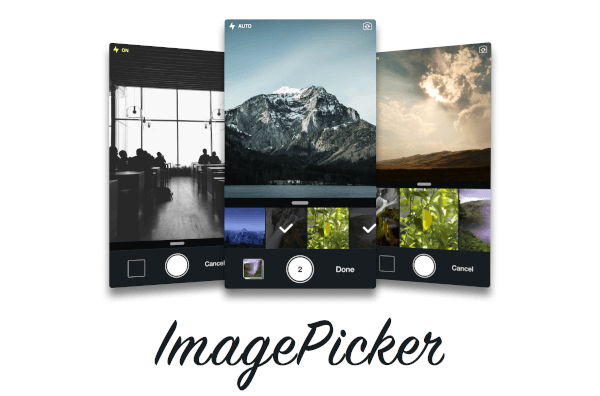
ChristianImagePicker is an all-in-one camera solution for your iOS app. It lets your users select images from the library and take pictures at the same time. As a developer you get notified of all the user interactions and get the beautiful UI for free, out of the box, it's just that simple.

ImagePicker has been optimized to give a great user experience, it passes around referenced images instead of the image itself which makes it less memory consuming. This is what makes it smooth as butter.

Demo

iOS

Add the following keys to your Info.plist file, located in <project root>/ios/Runner/Info.plist:

  • NSPhotoLibraryUsageDescription - describe why your app needs permission for the photo library. This is called Privacy - Photo Library Usage Description in the visual editor.
  • NSCameraUsageDescription - describe why your app needs access to the camera. This is called Privacy - Camera Usage Description in the visual editor. visual editor.
Example
import 'package:christian_picker_image/christian_picker_image.dart';

class MyHomePage extends StatefulWidget {
  @override
  _MyHomePageState createState() => _MyHomePageState();
}

class _MyHomePageState extends State<MyHomePage> {
  
  void takeImage(BuildContext context) async {
    List<File> images  = await ChristianPickerImage.pickImages(maxImages: 5);
    print(images);
    Navigator.of(context).pop();
  }

  Future _pickImage(BuildContext context) async {

    showDialog<Null>(
      context: context,
      barrierDismissible: false,
      builder: (BuildContext context) {
        takeImage(context);
        return Center();
    });

  }

  @override
  Widget build(BuildContext context) {
    return MaterialApp(
      home: Scaffold(
        appBar: AppBar(
          title: const Text('Plugin example app'),
        ),
        body: Text("Christian Picker Image Demo"),
        floatingActionButton: Column(
          mainAxisAlignment: MainAxisAlignment.end,
          children: <Widget>[
            Padding(
              padding: const EdgeInsets.only(top: 16.0),
              child: FloatingActionButton(
                onPressed: () {
                  _pickImage(context);
                },
                tooltip: 'Take a Photo',
                child: const Icon(Icons.photo_library),
              ),
            ),
          ],
        )
      ),
    );
  }

}

카테고리

소스 저장소

이 패키지를 사용하는 프로젝트

아직 데이터가 없습니다.