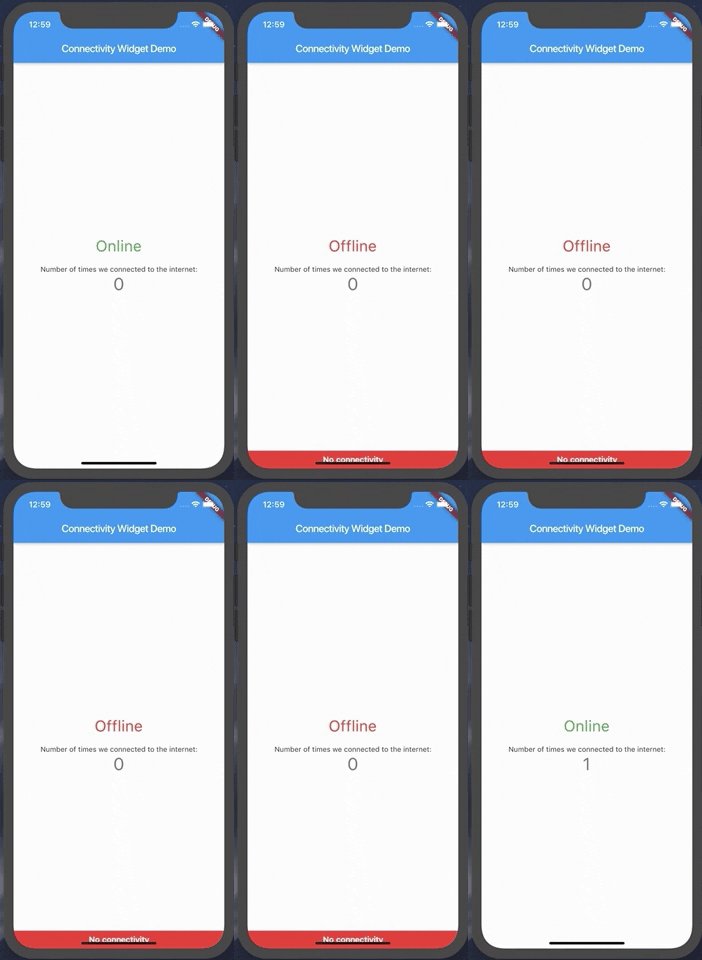
connectivity_widget 패키지는 장치의 현재 인터넷 연결 상태를 표시하는 간단하고 반응형 위젯을 제공합니다. Android, iOS, Web, macOS, Windows, Linux 플랫폼에서 네트워크 가용성을 모니터링하며, 연결 상태가 변경될 때 UI를 실시간으로 업데이트합니다. 통합이 용이하도록 설계되어 개발자가 사용자에게 온라인 또는 오프라인 상태임을 알리기 위해 아이콘이나 텍스트와 같은 시각적 표시를 표시할 수 있습니다. 메시징, 미디어 스트리밍, 데이터 동기화 서비스와 같이 네트워크 상태에 즉각적인 피드백이 필요한 앱에 적합합니다.
사용 사례
실시간 네트워크 상태 표시
오프라인 모드 표시기
연결 변경 시 사용자 경험 향상
네트워크 상태에 따라 앱 기능을 적응시키기
나쁜 연결 상태에서 상태 관리 로드 중
주요 기능
크로스 플랫폼 지원
반응형 UI 업데이트
최소 설정으로 간단한 통합
사용자 정의 가능한 외관
연결 변경 사항의 자동 감지
적합한 대상
실시간 네트워크 인식이 필요한 앱
경량 연결 모니터링을 찾는 개발자
동적 네트워크 피드백이 필요한 UI 컴포넌트
다중 플랫폼 대상 프로젝트
즉시 온라인/오프라인 상태 표시기를 원하는 사용자
고려 사항
모바일 플랫폼에서 적절한 권한이 필요합니다
일시적인 네트워크 상태를 처리하기 위해 추가 로직이 필요할 수 있습니다
특정 네트워크 유형(예: Wi-Fi 대 모바일)을 처리하지 않습니다
연결 상태에 한정되며 대역폭 또는 품질은 포함되지 않음
정확도를 위해 기반 플랫폼 API에 의존합니다
원본 README
연결된 소스 저장소의 README 원문 스냅샷입니다. 최신 내용은 저장소에서 확인하세요.
connectivity_widget
A widget that shows the user if the phone is connected to the internet or not
This is accomplished not only by verifying the status of the mobile network and/or wifi, but also by pinging a remote server and verifying its response.
Using the ConnectivityWidget
The ConnectivityWidget uses a builder function that provides you a isOnline flag to build different screens for offline or online mode.
 ConnectivityWidget(
        builder: (context, isOnline) => Center(
          child: Column(
            mainAxisAlignment: MainAxisAlignment.center,
            children: <Widget>[
              Text("${isOnline ? 'Online' : 'Offline'}", style: TextStyle(fontSize: 30, color: isOnline ? Colors.green : Colors.red),),
              SizedBox(height: 20,),
              Text(
                'Number of times we connected to the internet:',
              ),
              Text(
                '$_counter',
                style: Theme.of(context).textTheme.display1,
              ),
            ],
          ),
        )
It also provides both a onlineCallback and a offlineCallback that are called when the phone changes the connection state to online and offline, respectively.
If there is a need to change the default offline banner, a Widget can be provided to the offlineBanner parameter. Additionally, its visibility can be enabled or disabled by using the showOfflineBanner parameter.
Configurable Parameters:
serverToPing;
timeoutDuration;
debounceDuration;
verifyResponseCallback;
Changing the server to ping and the response verification
By default, the Connectivity Widget checks if there is a connection to http://www.google.com. If you want to check the availability of a custom endpoint, you can set a new endpoint to ping and a callback to verify the response.
ConnectivityUtils.instance.setCallback((response) => response.contains("This is a test!"));
ConnectivityUtils.instance.setServerToPing("https://gist.githubusercontent.com/Vanethos/dccc4b4605fc5c5aa4b9153dacc7391c/raw/355ccc0e06d0f84fdbdc83f5b8106065539d9781/gistfile1.txt");
Using ConnectivityUtils to Listen to Network Changes
This library also provides access to the ConnectivityUtils class in which you can verify the status of the network.
Stream<bool> ConnectivityUtils.instance.isPhoneConnectedStream // gets the current status of the networkFuture<bool> ConnectivityUtils.instance.isPhoneConnected() // future that determines network status
Note on Web:
Although we can verify the status of the connection in web, what happens is that browsers will cache a request to a specific endpoint, so
we cannot verify for certain if the connection is down or if we are using cache, using the methods presented in this package.