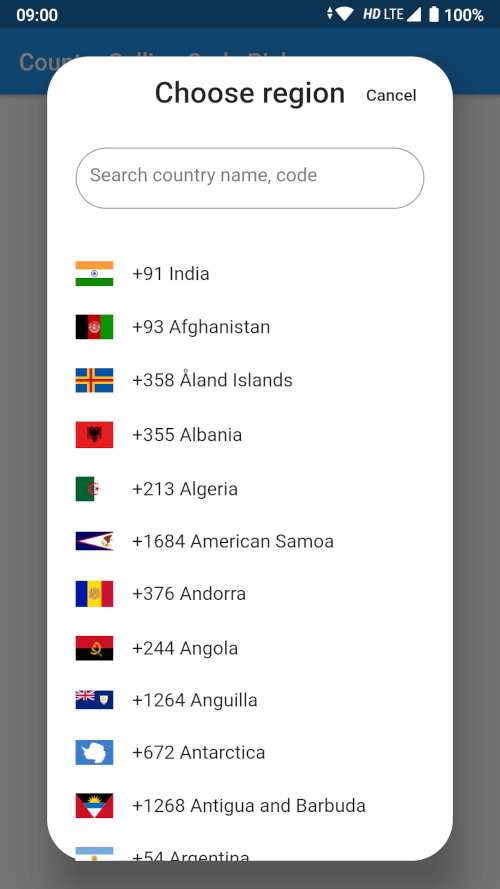
사용자가 국가를 선택하고 해당 국가 코드 및 통화 코드를 가져올 수 있도록 해주는 유연하고 사용자 정의 가능한 Flutter 국가 선택 위젯입니다. 국제 전화번호 입력이 필요한 양식에 원활하게 통합되도록 설계되었으며, 안드로이드와 iOS 플랫폼을 모두 지원합니다. 검색 기능과 국기 표시를 갖춘 직관적인 인터페이스를 제공하여 국가 선택 시 사용자 경험을 향상시킵니다. 가볍고 구현이 쉬워 국제 전화 번호 정보가 정확히 필요할 때 앱에 이상적입니다.
사용 사례
국제 전화번호 입력
사용자 프로필 설정 및 국가 선택
다중 지역 앱 로컬라이제이션
국가 코드 지원이 있는 연락 양식
전화 인증이 필요한 인증 흐름
주요 기능
검색 가능한 국가 목록
국가 국기의 표시
통화 코드 자동 검색
사용자 정의 가능한 UI 테마
국가 코드 및 통화 코드 출력 모두 지원
적합한 대상
국제 전화 입력이 필요한 모바일 앱
사용자 온보딩 흐름
글로벌 전자상거래 플랫폼
메시징 또는 통화 앱
국제 연락처 정보를 포함한 폼
고려 사항
국가 코드 저장을 수동으로 처리해야 합니다
기본 스타일링을 초과한 제한된 사용자 정의
전화번호에 대한 내장 검증 없음
국가 목록에 대한 외부 데이터 소스에 의존합니다
시간대 또는 언어 일치를 위해 추가적인 로직이 필요할 수 있습니다
원본 README
연결된 소스 저장소의 README 원문 스냅샷입니다. 최신 내용은 저장소에서 확인하세요.
Country Calling Code Picker
A searchable country picker for Flutter, ready to use in a dialog, a bottom sheet
or full screen. Gives you the country name, its ISO code, its international
calling code and a bundled flag image for 250 countries and territories.
Pure Dart — no platform channels, no native build setup. It runs on Android,
iOS, web, macOS, Windows and Linux.
class_MyPageStateextendsState<MyPage> {
Country? _selectedCountry;
bool _didInit = false;
@overridevoiddidChangeDependencies() {
super.didChangeDependencies();
if (!_didInit) {
_didInit = true;
_initCountry();
}
}
Future<void> _initCountry() async {
final country = awaitgetDefaultCountry(context);
if (!mounted) return;
setState(() => _selectedCountry = country);
}
}
getDefaultCountry resolves the device region from the platform locale. Pass
fallbackCountryCode to choose what happens when the platform reports a region
that is not in the list:
final country = awaitgetDefaultCountry(context, fallbackCountryCode: 'US');
Bottom sheet
final country = awaitshowCountryPickerSheet(context);
if (country != null) {
setState(() => _selectedCountry = country);
}
Dialog
final country = awaitshowCountryPickerDialog(context);
// Every country, for your own custom picker.finalList<Country> countries = awaitgetCountries(context);
// Or without a BuildContext, e.g. from a repository or a unit test.finalList<Country> countries = awaitgetCountriesFromBundle();
// A single country by ISO code (case insensitive, null when unknown).finalCountry? india = awaitgetCountryByCountryCode(context, 'IN');
// The device region, e.g. 'IN'. Null when the platform reports none.finalString? code = getDeviceCountryCode(context);
Showing a flag
Flag images ship inside this package, so they need the package name:
Or skip the images entirely and use the emoji flag:
Text(country.flagEmoji); // 🇮🇳
CountryPickerWidget options
Parameter
Default
Description
onSelected
null
Called with the tapped Country.
itemTextStyle
TextStyle(fontSize: 16)
Text style of a list item.
searchInputStyle
TextStyle(fontSize: 16)
Text style of the search box.
searchInputDecoration
null
Replaces the search box decoration entirely.
searchHintText
'Search country name, code'
Hint of the search box.
flagIconSize
32
Width of the flag image.
showSeparator
false
Draw a Divider between items.
focusSearchBox
false
Open the keyboard as soon as the picker shows.
showDeviceCountryFirst
true
Move the device's country to the top of the list.
Search matches the country name (accent insensitive, so aland finds Åland),
the ISO code, and the calling code with or without its leading +.
Upgrading from 2.x
Version 3.0.0 requires Dart 3 / Flutter 3.24 or newer.
The flutter_sim_country_code dependency is gone.getDefaultCountry
now reads the device region from the platform locale instead of the SIM card,
which is why the package no longer needs any native code and works on web and
desktop. On a device whose region setting and SIM disagree, the resolved
country can differ from 2.x.
getCountryByCountryCode now really returns null for an unknown code.
It used to throw a StateError. Its match is also case insensitive now.
The country matching the device is still moved to the top of the picker, but
countries that merely share its calling code are no longer removed from the
list — picking the US no longer made Canada disappear.
getDefaultCountry takes an optional fallbackCountryCode.
CountryPickerWidget.focusSearchBox is now actually forwarded by
showCountryPickerSheet and showCountryPickerDialog.