Creator는 깔끔하고 읽기 쉬우며 테스트 가능한 비즈니스 로직을 강조하는 Flutter용 상태 관리 라이브러리입니다. 상태와 UI 간의 관심사 분리를 통해 개발자가 간결하고 유연한 코드를 작성할 수 있도록 하여 유지보수성과 확장성을 촉진합니다. 단순성과 성능에 중점을 두고 있으며, 보일러플레이트를 최소화하면서 반응형 프로그래밍 패턴을 지원합니다. 현대적인 Flutter 실천과 잘 통합되어 소규모 및 대규모 애플리케이션 모두에 적합합니다.
사용 사례
확장 가능한 Flutter 앱 빌드
복잡한 앱 상태 관리
테스트 가능한 비즈니스 로직 작성
상태 업데이트 간소화
재사용 가능한 상태 컴포넌트 만들기
의존성 관리 간소화
주요 기능
최소한의 보일러플레이트
반응형 상태 처리
내장 테스트 지원
관심사의 명확한 분리
Flutter 위젯과의 간편한 통합
여러 플랫폼을 지원합니다
적합한 대상
경량 상태 관리가 필요한 개발자
코드 가독성을 우선시하는 팀
높은 테스트 커버리지를 요구하는 프로젝트
Flutter 초보자들이 상태 관리 배우기
복잡한 비즈니스 로직을 가진 앱
고려 사항
대안 대비 커뮤니티 채택률이 제한적
반응형 프로그래밍에 대한 이해가 필요합니다
고급 사용 사례를 위해 추가 설정이 필요할 수 있습니다
인기 있는 상태 관리 솔루션보다 생태계가 덜 성숙함
원본 README
연결된 소스 저장소의 README 원문 스냅샷입니다. 최신 내용은 저장소에서 확인하세요.
Creator is a state management library that enables concise, fluid, readable, and testable business logic code.
Read and update state with compile time safety:
// Creator creates a stream of data.final counter = Creator.value(0);
When we built our Flutter app, we started with
flutter_bloc. Later we switched to
riverpod. However, we encountered
several issues related to its async providers and realized we wanted a different
mechanism.
So we built Creator. It is heavily inspired by riverpod, but with a simpler
data model, better async support, and a much simpler implementation.
The benefit of using Creator:
Enables concise, fluid, readable, and testable business logic. Sync or async.
Creator's concept is extremely simple. There are only two types of creators:
Creator which creates a stream of T.
Emitter which creates a stream of Future<T>.
Here stream is in its logical term, not the Stream class.
Both Creator and Emitter:
Can depend on other creators, and update its state when others' state changes.
Are loaded lazily and disposed automatically.
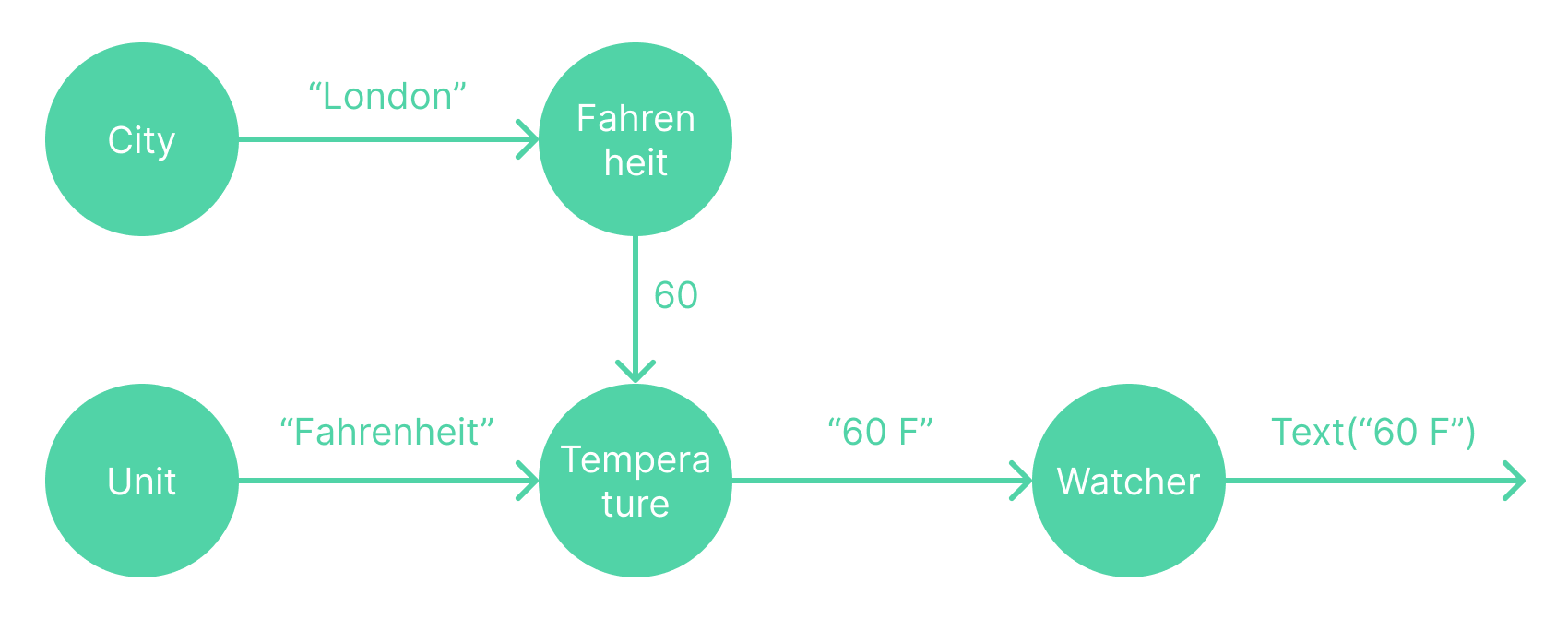
Dependencies form a graph, for example, this is the graph for the weather
example above:
The library simply maintains the graph with an adjacency list and propagates
state changes along the edges.
Usage
Creator
Creator takes a function you write to create a state. The function takes a Ref, which
provides API to interact with the internal graph.
final number = Creator.value(42); // Same as Creator((ref) => 42)finaldouble = Creator((ref) => ref.watch(number) * 2);
Calling watch adds an edge number -> double to the graph, so double's create
function will rerun whenever number's state changes.
The nice part is that creator comes with methods like map, where, reduce, etc. They
are similar to those methods in Iterable or Stream. So double can
simply be:
finaldouble = number.map((n) => n * 2);
You can also read a creator when watch doesn't make sense, for example, inside
a touch event handler.
To update the creator's state, use either set or update:
... ref.set(number, 42);  // No-op if value is the same
... ref.update<int>(number, (n) => n + 10);  // Same as read then set
Note creator determines state change using T.==, so it should work with immutable data.
If T is a class, use const constructor and override == and hashCode. Or use package like equatable.
If T is a list, create a new list rather than update the existing one.
Creator's dependency can be dynamic:
final C = Creator((ref) {
  final value = ref.watch(A);
  return value >= 0 ? value : ref.watch(B);
});
In this example, A -> C always exists, B -> C may or may not exist. The
library will update the graph properly as dependency changes.
Emitter
Emitter works very similar to Creator, but it creates Future<T> instead
of <T>. The main difference is Creator has valid data to begin with, while
Emitter might need to wait for some async work before it yields the first
data.
In practice, Emitter is very useful to deal with data from backend
services, which is async by nature.
final stockCreator = Creator.value('TSLA');
final priceCreator = Emitter<int>((ref, emit) async {
final stock = ref.watch(stockCreator);
final price = awaitfetchStockPrice(stock);
emit(price);
});
Emitter takes a FutureOr<void> Function(Ref ref, void Function(T) emit),
where ref allows getting data from the graph, and emit allows pushing data
back to the graph. You can emit multiple times.
Existing Stream can be converted to Emitter easily with Emitter.stream. It
works both sync or async:
final authCreator = Emitter.stream(
(ref) => FirebaseAuth.instance.authStateChanges());
final userCreator = Emitter.stream((ref) async {
final authId = await ref.watch(
authCreator.where((auth) => auth != null).map((auth) => auth!.uid));
returnFirebaseFirestore.instance.collection('users').doc(authId).snapshots();
});
This example also shows the extension method where and map. With them,
userCreator will only recreate when auth id changes, and ignore changes on other
auth properties.
In some sense, you can think Emitter as a different version of
Stream, which makes combining streams super easy.
Emitter generates Future<T>, so it can be hooked to Flutter's
FutureBuilder for UI. Or you can use Emitter.asyncData, which is a creator
of AsyncData<T>. AsyncData is similar to AsyncSnapshot for future/stream:
CreatorGraph is a InheritedWidget. It holds a Ref object (which holds the
graph) and exposes it through context.ref.
CreatorGraph uses DefaultCreatorObserver by default, which prints logs when
creator state changes. It can be replaced with your own log collection observer.
Watcher
Watcher is a simple StatefulWidget which holds a Creator<void> internally
and calls setState when its dependency changes.
It takes builder function Widget Function(BuildContext context, Ref ref, Widget child). You can use ref to watch other creators. child can
be used optionally if the subtree should not rebuild when dependency changes:
Watcher((context, ref, child) {
final color = ref.watch(userFavoriteColor);
returnContainer(color: color, child: child);
}, child: ExpensiveAnimation()); // this child is passed into the builder above
You can control your widget rebuild precisely with fine grain reactive approach:
Watcher((context, ref, _) {
// Only rebuild when user's name changes.
ref.watch(userCreator.map((user) => user.name));
// Read other user data as needed.final user = ref.read(userCreator);
returnTextButton(onPressed() => print('clicked ${user.id}'), child: Text(user.name));
});
Listen to change
Watching a creator will get its latest state. What if you also want previous
state? Simply call watch(someCreator.change) to get a Change<T>, which is
an object with two properties T? before and T after.
Creator((ref) {
final change = ref.watch(number.change);
return'Number changed from ${change.before} to ${change.after}';
});
For your convenience, Watcher can also take a listener. It can be used to
achieve side effects or run background tasks:
// If builder is null, child widget is directly returned. You can set both// builder and listener. They are independent of each other.Watcher(null, listener: (ref) {
final change = ref.watch(number.change);
print('Number changed from ${change.before} to ${change.after}');
}, child: SomeChildWidget());
Name
Creators can have names for logging purpose. Setting name is recommended for any serious app.
final numberCreator = Creator.value(0, name: 'number');
final doubleCreator = numberCreator.map((n) => n * 2, name: 'double');
Keep alive
By default, creators are disposed when losing all its watchers. This can be
overridden with keepAlive parameter. It is useful if the creator maintains a
connection to backend (e.g. listen to firestore realtime updates).
final userCreator = Emitter.stream((ref) {
returnFirebaseFirestore.instance.collection('users').doc('123').snapshots();
}, keepAlive: true);
To summarize the life cycle of a creator:
It is added to the graph when firstly being watched or set.
It can be removed from the graph manually by Ref.dispose.
If it has watchers, it is automatically removed from the graph when losing all its
watchers, unless keepAlive property is set.
Extension method
Our favorite part of the library is that you can use methods like map,
where, reduce on creators (full list here). They are similar to those methods in
Iterable or Stream.
final numberCreator = Creator.value(0);
final oddCreator = numberCreator.where((n) => n.isOdd);
Note that Creator needs to have valid state at the beginning, while where((n) => n.isOdd) cannot guarantee that. This is why where returns an Emitter
rather than a Creator. Here is the implementation of the where method. It
is quite simple and you can write similar extensions if you want:
extensionCreatorExtension<T> onCreator<T> {
Emitter<T> where(boolFunction(T) test) {
returnEmitter((ref, emit) {
final value = ref.watch(this);
if (test(value)) {
emit(value);
}
});
}
}
You can use extension methods in two ways:
// Define oddCreator explicitly as a stable variable.final oddCreator = numberCreator.where((n) => n.isOdd);
final someCreator = Creator((ref) {
return'this is odd: ${ref.watch(oddCreator)}');
})
// Create "oddCreator" anonymously on the fly.final someCreator = Creator((ref) {
return'this is odd: ${ref.watch(numberCreator.where((n) => n.isOdd))}');
})
If you use the "on the fly" approach, please read next section about creator equality.
Creator equality
The graph checks whether two creators are equal using ==. This
means creator should be defined in global variables, static variables or any
other ways which can keep variable stable during its life cycle.
What happens if creators are defined in local variables on the fly?
final text = Creator((ref) {
finaldouble = Creator((ref) => ref.watch(number) * 2);
return'double: ${ref.watch(double)}';
})
Here double is a local variable, it has different instances whenever text is
recreated. The internal graph could change from number -> double_A -> text to
number -> double_B -> text as the number changes. text still generates
correct data, but there is an extra cost to swap the node in the graph. Because the
change is localized to only one node, the cost can be ignored as long as the
create function is simple.
If needed, an optional List<Object?> args can be set to ask the library to
find an existing creator with the same args in the graph. Now when number
changes, the graph won't change:
final text = Creator((ref) {
// args need to be globally unique. ['text', 'double'] is likely unique.finaldouble = Creator((ref) => ref.watch(number) * 2, args: ['text', 'double']);
return'double: ${ref.watch(double)}';
})
The same applies to using extension methods on the fly:
final text = Creator((ref) {
return'double: ${ref.watch(number.map((n) => n * 2, args: ['text', 'double']))}';
})
Internally, args powers these features:
Async data. userCreator.asyncData is a creator with args [userCreator, 'asyncData'].
Change. number.change is a creator with args [number, 'change'].
Creator group
Creator group can generate creators with external parameter. It is nothing special, but leveraging
the args parameter in previous section.
For example, in Instagram app, there might be multiple profile pages on navigation stack, thus we
need multiple instance of profileCreator.
// Instagram has four tabs: instagram, reels, video, taggedCreator<String> tabCreator(String userId) => Creator.value('instagram', args: ["tab", userId]);
Emitter<Profile> profileCreator(String userId)
=> tabCreator(userId).asyncMap(fetchProfileData, args: ["profle", userId]);
// Now switching tab in user A's profile page will not affect user B.
... ref.watch(profileCreator('userA'));
... ref.set(tabCreator('userA'), 'reels');
Service locator
State management libraries are commonly used as service locators:
If needed, ref can be passed to UserRepo Creator((ref) => UserRepo(ref)).
This allows UserRepo read or set other creators. Do not watch though,
because it might recreate UserRepo.
Error handling
The library will:
For Creator, store exception happened during create and throw it when watch.
For Emitter, naturally use Future.error, so error is returned when watch.
In either case, error is treated as a state change.
This means that errors can be handled in the most natural way, at the place
makes the most sense. Use the weather app above as an example:
// Here we don't handle error, meaning it returns Future.error if network error// occurs. Alternately we can catch network error and return some default value,// add retry logic, convert network error to our own error class, etc.final fahrenheitCreator = cityCreator.asyncMap(getFahrenheit);
// Here we choose to handle the error in widget.Widgetbuild(BuildContext context) {
returnWatcher((context, ref, _) {
try {
returnText(ref.watch(temperatureCreator.asyncData).data ?? 'loading');
} catch (error) {
returnTextButton('Something went wrong, click to retry',
onPressed: () => ref.recreate(fahrenheitCreator));
}
};
}
Testing
Testing creator is quite easy by combining watch, read, set. Use the weather app above as an example:
// No setUp, no tearDown, no mocks. Writing tests becomes fun.test('temperature creator change unit', () async {
final ref = Ref();
expect(await ref.watch(temperatureCreator), "60 F");
ref.set(unitCreator, 'Celsius');
awaitFuture.delayed(constDuration()); // allow emitter to propagateexpect(await ref.watch(temperatureCreator), "16 C");
});
test('temperature creator change fahrenheit value', () async {
final ref = Ref();
expect(await ref.watch(temperatureCreator), "60 F");
ref.emit(fahrenheitCreator, 90);
awaitFuture.delayed(constDuration()); // allow emitter to propagateexpect(await ref.watch(temperatureCreator), "90 F");
});
Simple app shows how the creator library builds the internal graph dynamically.
Starter template
Source code here. An async counter app with login! A minimal template to start a Flutter project with:
Go router for routing
Creator for state management.
Optional Firebase Auth, or your own auth mechanism.
Best practice
Creator is quite flexible and doesn't force a particular style. Best practices
also depend on the project and personal preference. Here we just list a few
things we follow:
Split code into repo files (backend service call), logic files (creator), and UI files (widget).
Keep creator small for testability. Put derived state in derived creators (using map, where, etc).
Read source code
Creator's implementation is surprisingly simple. In fact, the core logic
is less than 500 lines of code.
You can optionally read this
article
first, which describes how we built the first version with 100 lines of code.
Read creator_core library in this order:
graph.dart: a simple implementation of a bi-directed graph using adjacency
list. It can automatically delete nodes which become zero out-degree.
creator.dart: the CreatorBase class and its two sub classes, Creator and Emitter.
Their main job is to recreate state when asked.
ref.dart: manages the graph and provides watch, read, set methods to user.
extension.dart: implement extension methods map, where, etc.
Read creator library in this order:
creator_graph.dart: A simple InheritedWidget which expose Ref through context.
watcher.dart: A stateful widget which holds a Creator<Widget> internally.
FAQ
What's the difference between context.ref vs ref in Creator((ref) => ...)?
They both point to the same internal graph, the only difference is that the
first ref's _owner field is null, while the second ref's _owner field is the
creator itself. This means:
It is the same to read, set or update any creators with either ref. The operation is
passed to the internal graph.
If ref._owner is null, ref.watch(foo) will simply add foo to the graph.
If ref._owner is not null, ref.watch(foo) will also add an edge foo -> ref._owner to the graph.
What's the difference between Creator<Future<T>> vs Emitter<T>?
They are both extended from CreatorBase<Future<T>>, whose state is
Future<T>. However, there are two important differences, which make
Emitter<T> better for async tasks:
Emitter<T> stores T in addition to Future<T>, so that we can log change
of T or populate AsyncData<T> properly.
Emitter<T> notify its watcher when T is emitted, so its watchers can start
their work immediately. Creator<Future<T>> notify its watchers when the future
is started, so its watchers are still blocked until the future is finished.