패키지, 저장소 및 앱 카테고리 검색

패키지 상세v0.4.0+1

crimson

Dart용 빠르고 효율적이며 사용하기 쉬운 JSON 파서 및 직렬화기입니다.

AndroidiOSWebmacOSWindowsLinux
30일 다운로드
72
좋아요
128
Pub 점수
140

패키지 설치

flutter pub add crimson

패키지 개요

공개 정보를 바탕으로 생성한 선택 가이드입니다.

Crimson은 속도와 간결함을 고려하여 설계된 Dart용 고성능 JSON 파서 및 직렬화 도구입니다. 최소한의 부가 코드로 JSON 데이터와 Dart 객체 간에 효율적인 변환을 가능하게 합니다. 성능을 우선시하여 Android, iOS, Web, macOS, Windows, Linux 등 모든 주요 플랫폼을 지원합니다. 깔끔하고 직관적인 API를 제공하여 JSON 작업을 간단하게 만들어주며, 빠른 데이터 처리가 필요한 애플리케이션에 적합합니다. 가벼운 구조로 오버헤드가 낮아 소규모 프로젝트부터 대규모 앱까지 모두 활용할 수 있습니다.

사용 사례

  • API에서 온 JSON 응답 파싱
  • Dart 객체를 JSON으로 직렬화하기
  • 고성능 데이터 처리
  • 크로스플랫폼 앱 개발
  • 실시간 데이터 동기화
  • 경량 데이터 저장

주요 기능

  • 초고속 파싱 및 직렬화
  • 최소한의 보일러플레이트 코드
  • 모든 주요 플랫폼을 지원합니다
  • 간단하고 직관적인 API
  • 낮은 메모리 사용량
  • 내장된 타입 안전성

적합한 대상

  • 성능 중심 애플리케이션
  • 모바일 및 웹 앱
  • API 클라이언트
  • 데이터 집약형 서비스
  • 빠른 JSON 처리를 원하는 개발자
  • 효율성을 우선시하는 프로젝트

고려 사항

  • 명시적인 모델 정의가 필요합니다
  • 제한된 내장 검증
  • 사용자 정의 없이 복잡한 중첩 구조에 적합하지 않음
  • 고급 사용 사례를 위해 추가 설정이 필요할 수 있습니다
  • 구조화된 JSON 데이터에 가장 적합

원본 README

연결된 소스 저장소의 README 원문 스냅샷입니다. 최신 내용은 저장소에서 확인하세요.

Fast, efficient and easy-to-use JSON parser and serializer for Dart.
Crimson does not verify your JSON!

Features

  • 🏎️ Fast: Like really fast. Crimson parses JSON in a single pass.
  • 🌻 Easy to use: Crimson is designed to be easy to learn and use.
  • 💃 Flexible: Crimson can partially parse and serialize JSON.
  • 🥶 Freezed support: Crimson supports freezed classes.
  • 🪶 Lightweight: Crimson is lightweight and has no third-party dependencies.

Usage

After adding Crimson to your pubspec.yaml, you can start annotating your classes with @json and optionally @JsonField():

import 'package:crimson/crimson.dart';

part 'tweet.g.dart';

@json
class Tweet {
  DateTime? createdAt;

  String? tweet;

  int? favoriteCount;
}

Now you just need to run pub run build_runner build to generate the necessary code.

import 'package:crimson/crimson.dart';

void main() {
  final jsonBytes = downloadTweets();

  final crimson = Crimson(jsonBytes);
  final tweets = crimson.readTweetList();

  final writer = CrimsonWriter();
  writer.writeTweetList(tweets);
  final bytes = writer.toBytes();
}

That's it! You can now parse and serialize JSON with ease.

Ignoring JSON fields

Annotate properties with @jsonIgnore to ignore them:

@json
class Tweet {
  DateTime? created_at;

  String? tweet;

  @jsonIgnore
  int? favoriteCount;
}

Renaming JSON fields

Use the @JsonName() annotation to rename individual fields:

@json
class Tweet {
  @JsonName('created_at')
  DateTime? createdAt;

  @JsonName('text', aliases: {'alias1', 'alias2'})
  String? tweet;
}

The same works for enum values:

@json
enum TweetType {
  tweet,

  @JsonName('re-tweet')
  retweet,
}

If you want to rename all fields or enum values, you can use @jsonKebabCase and @jsonSnakeCase:

@jsonKebabCase
class Tweet {
  DateTime? createdAt; // created-at

  String? tweet; // tweet

  int? favoriteCount; // favorite-count
}

@jsonSnakeCase
enum PlaceType {
  country, // country
  largeCity, // large_city
  smallCity, // small_city
}

fromJson and toJson methods

Crimson supports generating a fromJson() constructor and a toJson() extension method for your classes use Uint8List.

Just add the following line to your class. The .toJson() method is generated using an extension.

@json
class Tweet {
  // ...

  factory Tweet.fromJson(Uint8List json) => _$TweetFromJson(json);
}

Alternatively you can use fromBytes() and toBytes(). It's equivalent to fromJson() and toJson().

@json
class Tweet {
  // ...

  factory Tweet.fromBytes(Uint8List bytes) => _$TweetFromBytes(bytes);
}

JSON Pointers

Crimson supports RFC 6901 JSON pointers to access nested JSON fields:

{
  "user": {
    "name": "Simon Choi"
  },
  "tweets": [
    {
      "text": "Hello World!"
    },
    {
      "text": "Hello Crimson!"
    }
  ]
}

We can access the name field of the user object and the text field of the second tweet by providing a JSON pointer:

@json
class Tweet {
  @JsonName('/user/name')
  String? userName;

  @JsonName('/tweets/1/text')
  String? secondTweet;
}

JSON pointers are evaluated at compile time and optimized code is generated so there is no runtime overhead.

Fields using JSON pointers are ignored for serialization.

Important: You can only use a pointer prefix once in a class. For example, you can't use /user and /user/name in the same class.

Custom JSON converters

You can use custom JSON converters to convert between JSON and Dart types using the @JsonConvert() annotation:

@json
class Tweet {
  String? tweet;

  @JsonConvert(fromJson: jsonIntToBool, toJson: boolToJsonInt)
  bool? isFavorite;
}

bool jsonIntToBool(int json) => json >= 1;

int boolToJsonInt(bool value) => value ? 1 : 0;

Freezed Support

Crimson supports classes annotated with @freezed from the freezed package.

import 'package:crimson/crimson.dart';

part 'tweet.g.dart';
part 'tweet.freezed.dart';

@freezed
class Tweet with _$Tweet {
  @json
  const factory Tweet({
    DateTime? created_at,
    @JsonField(name: 'text') String? tweet,
    int? reply_count,
    int? retweet_count,
    int? favorite_count,
  }) = _Tweet;
}

JSON Benchmarks

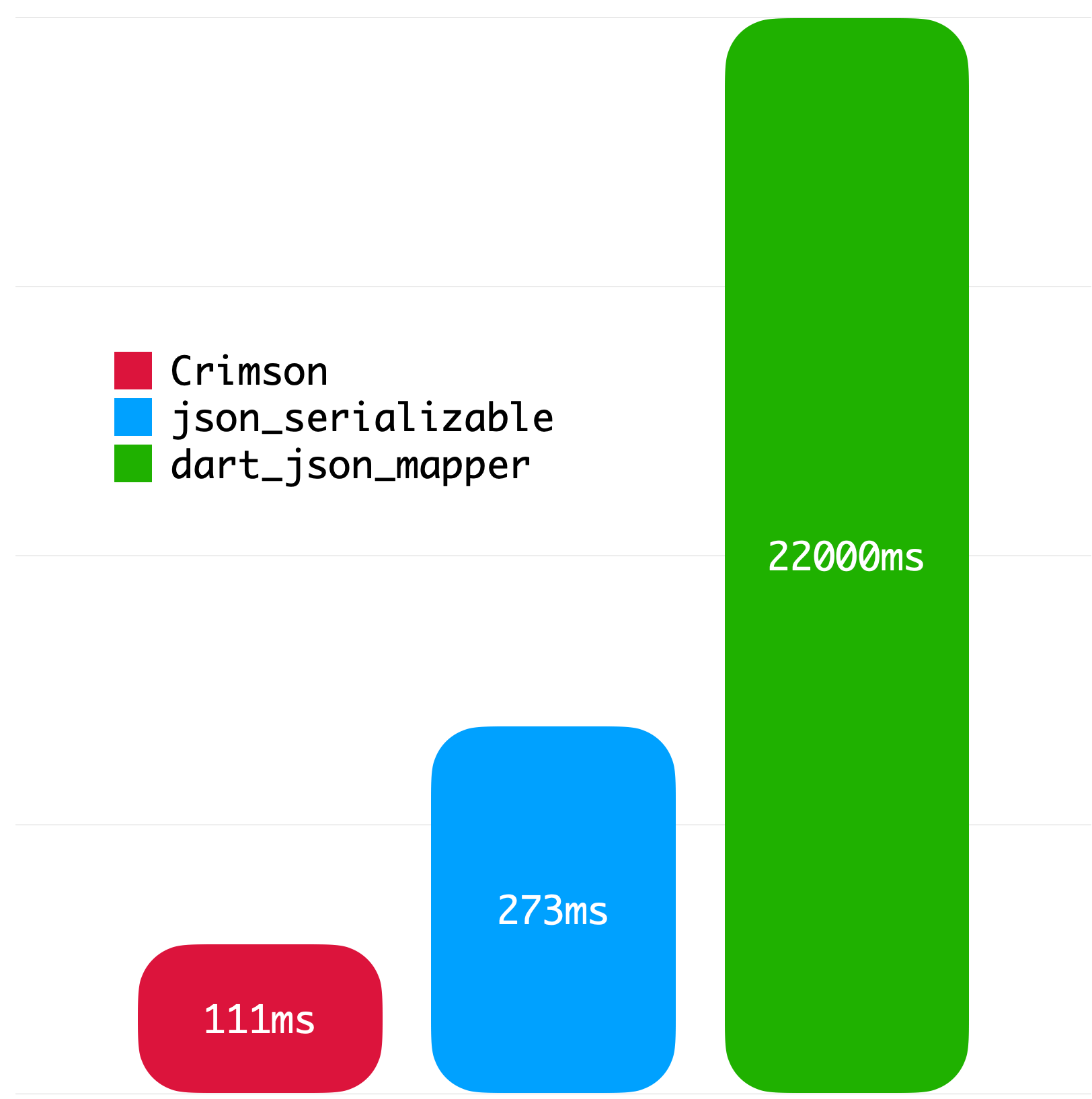
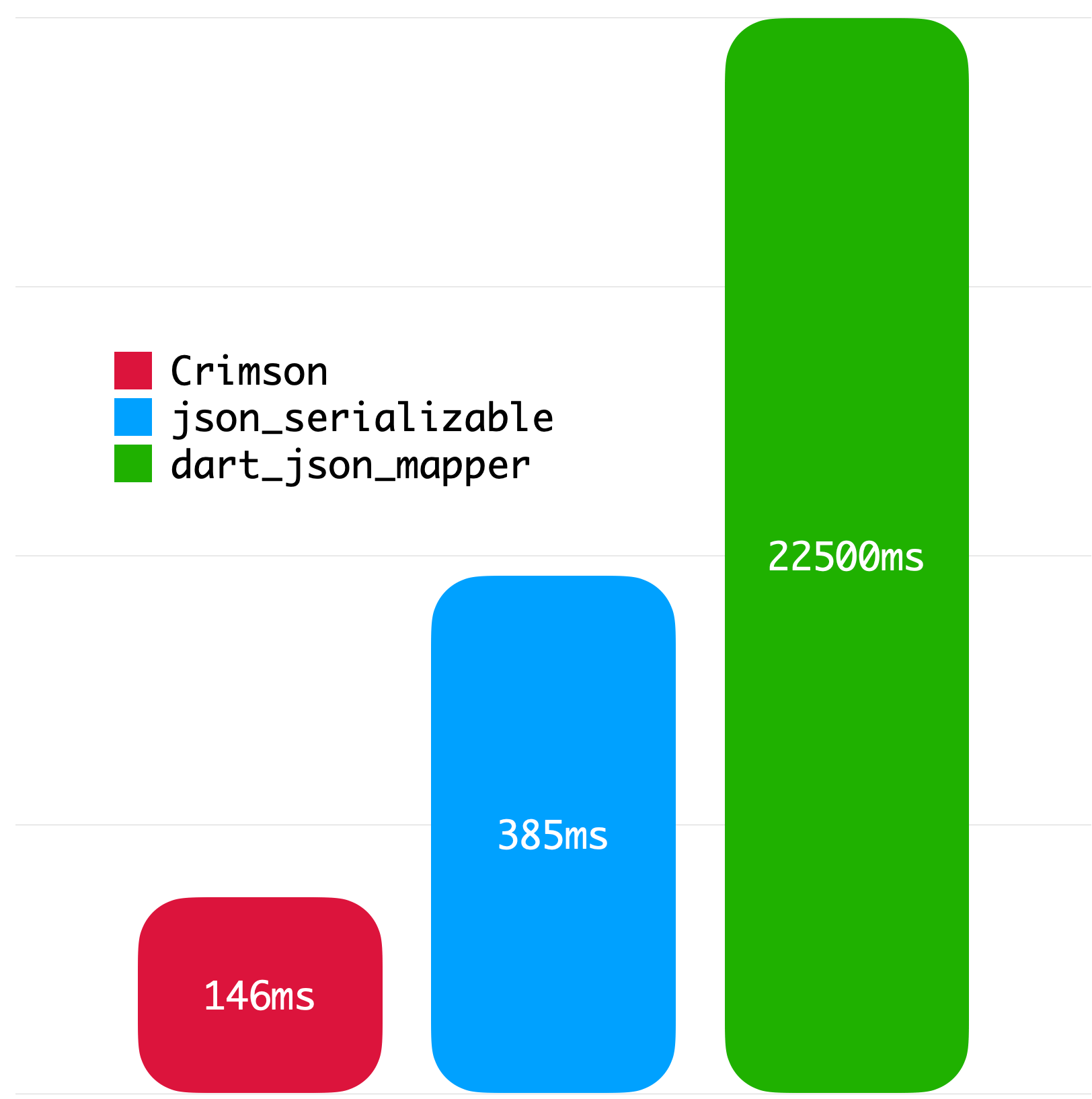
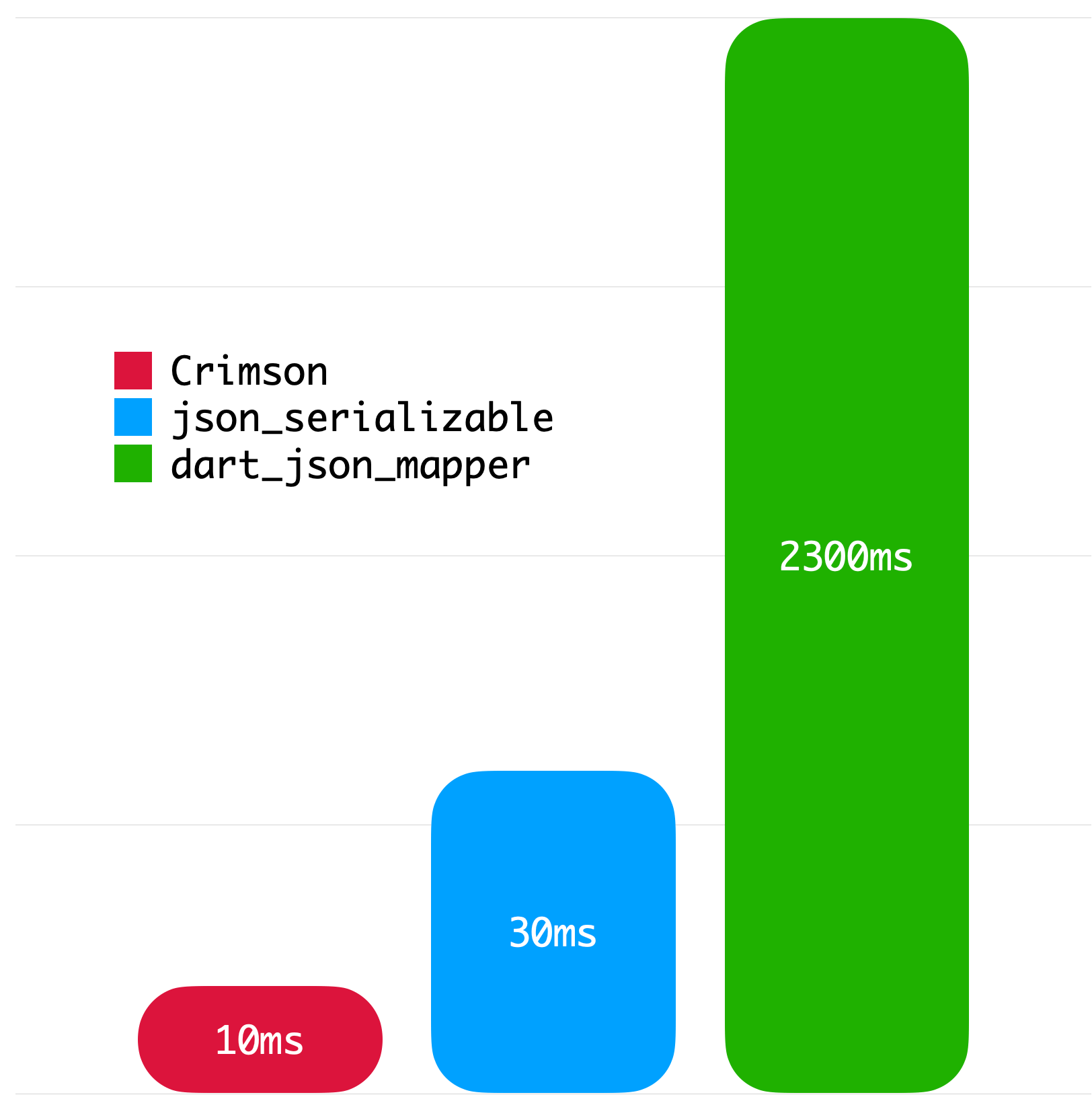
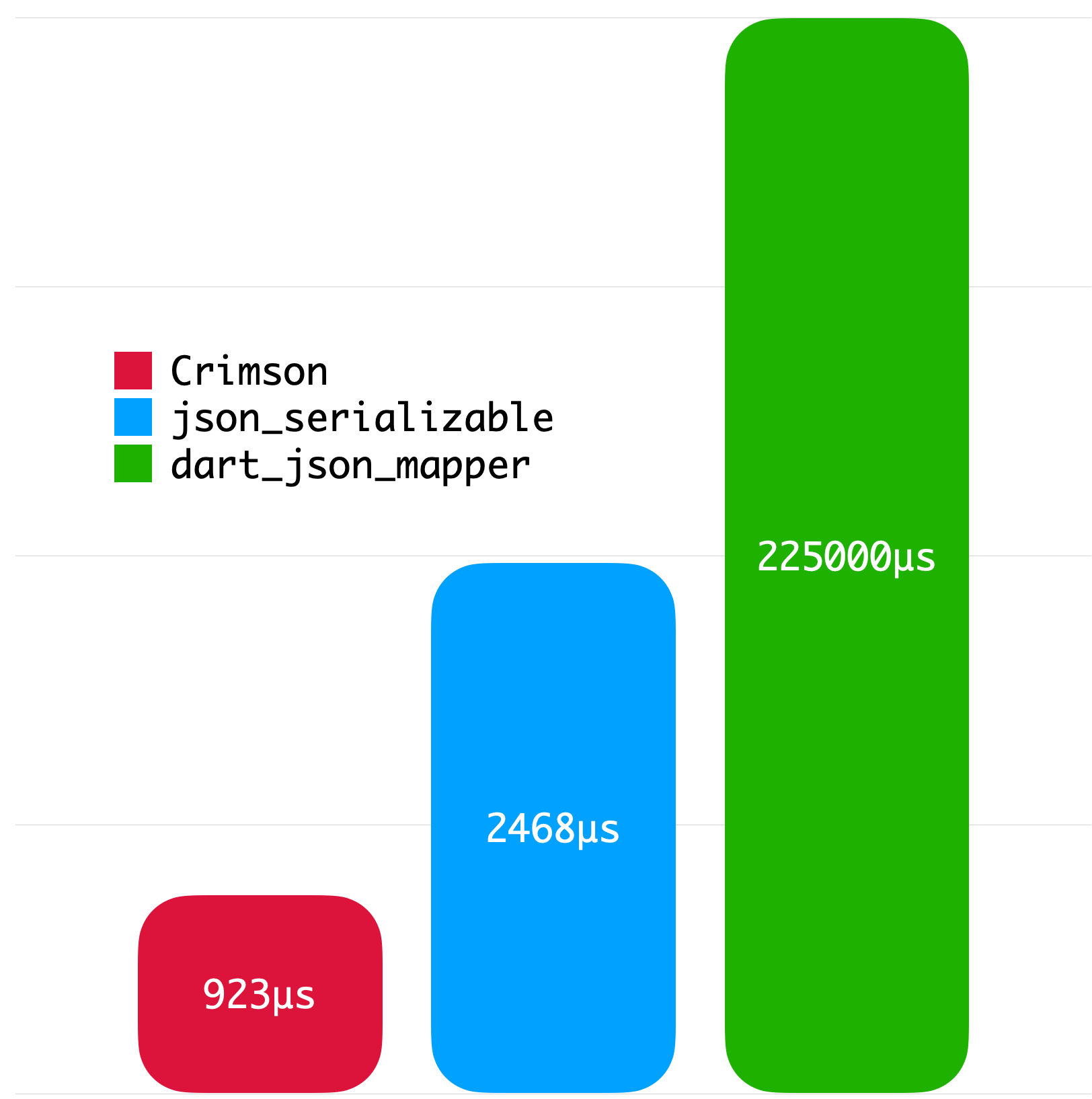
The following benchmarks give you an idea about the JSON parsing performance of Crimson. The benchmarks were run on a MacBook with M1 Pro and 32 GB of RAM using Twitter API data.

Big JSON without whitespace Big JSON with whitespace
Medium JSON without whitespace Small JSON without whitespace
License
Copyright 2023 Simon Choi

Licensed under the Apache License, Version 2.0 (the "License");
you may not use this file except in compliance with the License.
You may obtain a copy of the License at

   http://www.apache.org/licenses/LICENSE-2.0

Unless required by applicable law or agreed to in writing, software
distributed under the License is distributed on an "AS IS" BASIS,
WITHOUT WARRANTIES OR CONDITIONS OF ANY KIND, either express or implied.
See the License for the specific language governing permissions and
limitations under the License.

카테고리

의존성

의존성 목록 3 개

소스 저장소

이 패키지를 사용하는 프로젝트

아직 데이터가 없습니다.