패키지, 저장소 및 앱 카테고리 검색

curved_drawer_fork 표지
패키지 상세v0.0.1+1

curved_drawer_fork

사용하기 쉬운 애니메이션 드로어를 제공하는 Flutter 위젯입니다.

AndroidiOSWebmacOSWindowsLinux
30일 다운로드
6
좋아요
77
Pub 점수
140

패키지 설치

flutter pub add curved_drawer_fork

패키지 개요

공개 정보를 바탕으로 생성한 선택 가이드입니다.

직관적인 탐색을 위한 애니메이션 처리된 곡선 드로어 위젯을 제공하는 플러터 패키지입니다. 원래의 곡선 드로어의 포크로 제작되어 부드러운 애니메이션과 사용자 정의 가능한 디자인으로 사용성을 향상시켰습니다. 현대적이고 시각적으로 매력적인 탐색 경험을 필요로 하는 앱에 이상적입니다. Android, iOS, Web, macOS, Windows, Linux 등 다양한 플랫폼을 지원하여 크로스플랫폼 일관성을 보장합니다. 가볍고 최소한의 설정으로 쉽게 통합할 수 있습니다.

사용 사례

  • 현대적인 앱 탐색 만들기
  • 애니메이션 드로어를 사용한 UI 개선
  • 다양한 플랫폼에서 반응형 레이아웃 만들기
  • 모바일 및 웹 앱에 시각적 매력 추가
  • 스와이프 가능한 사이드 메뉴 구현

주요 기능

  • 부드러운 애니메이션 전환
  • 사용자 정의 가능한 곡선 형태
  • 크로스 플랫폼 지원
  • 기존 Flutter 프로젝트와의 간편한 통합
  • 가볍고 성능이 뛰어남

적합한 대상

  • 애니메이션 탐색을 찾는 개발자
  • 디자인 중심 앱 인터페이스
  • 다중 플랫폼 플러터 애플리케이션
  • UI/UX 향상 프로젝트
  • 상호작용 가능한 사이드 패널이 있는 앱

고려 사항

  • 복잡한 디자인을 위해 추가 스타일링이 필요할 수 있습니다
  • 기본 곡선 매개변수를 초과한 사용자 지정이 제한됨
  • 부모 위젯 레이아웃 제약 조건에 따라 다름
  • 매우 복잡한 탐색 계층 구조에 적합하지 않음
  • 간단한부터 중간 정도로 복잡한 서랍 요구 사항에 가장 적합

원본 README

연결된 소스 저장소의 README 원문 스냅샷입니다. 최신 내용은 저장소에서 확인하세요.

curved_drawer

A Flutter widget that provides an easy to use animated drawer.

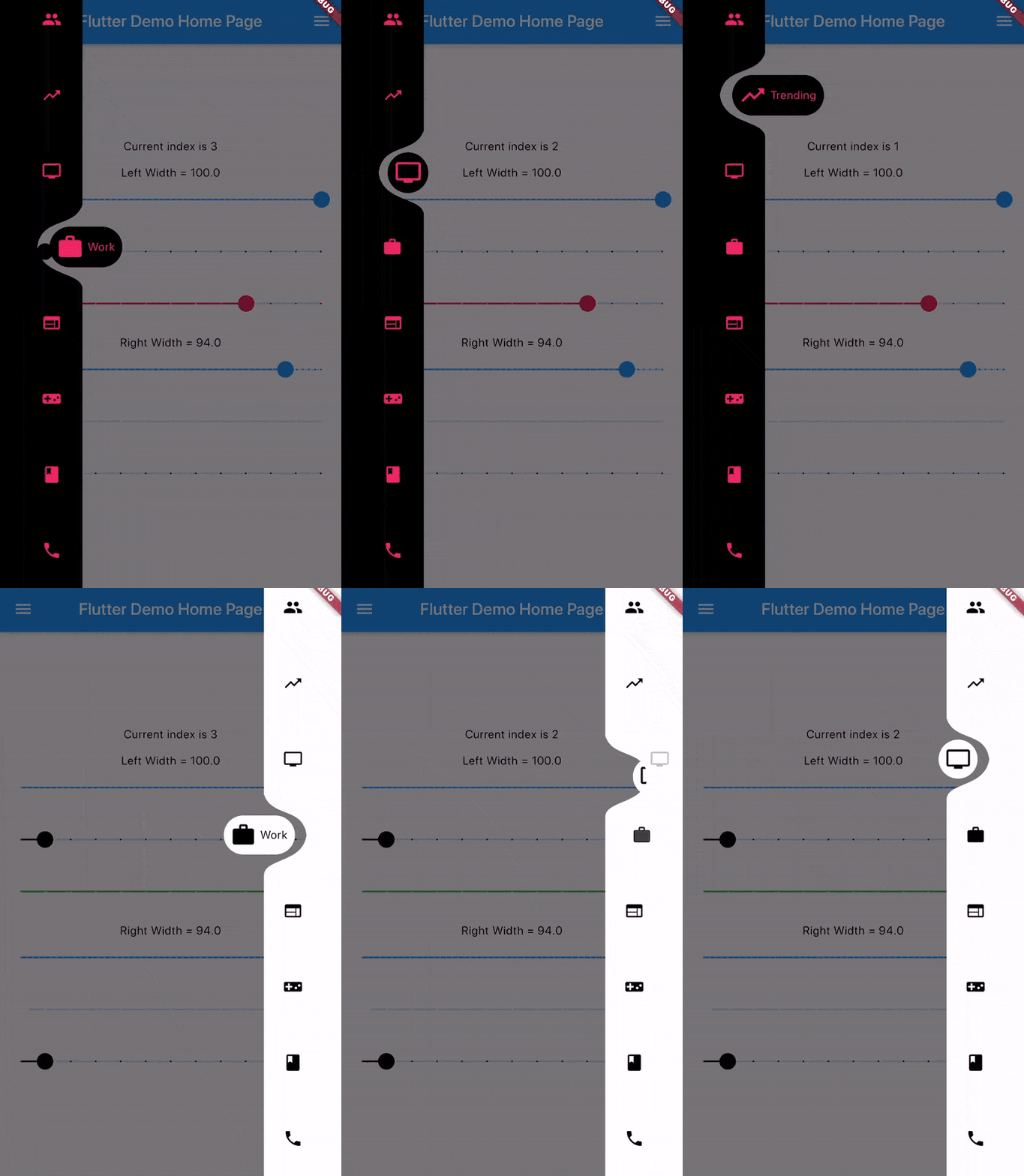
Gif

Add dependency
dependencies:
  curved_drawer: ^0.1.2 #latest version
Simple Implementation
Scaffold(
  drawer: CurvedDrawer(
    color: Colors.white,
    labelColor: Colors.black54,
    width: 75.0
    items: <DrawerItem>[
      DrawerItem(icon: personIcon),
      //Optional Label Text
      DrawerItem(icon: messageIcon, label: "Messages")
    ],
    onTap: (index) {
      //Handle button tap
    },
  ),
  body: Container(),
)
Attributes

items: List of DrawerItems index: Index of selected item - can be used to change current index or to set initial index
color: Color of drawer - default Colors.white buttonBackgroundColor: Background color of floating button - default same as color attribute
backgroundColor: Color of NavigationBar's background - default Colors.transparent onTap: Function handling taps on items
animationCurve: Curves interpolating button change animation - default Curves.easeOutCubic
animationDuration: Duration of button change animation - default Duration(milliseconds: 600)
width: Width of Drawer - default min 50.0, max 100.0 isEndDrawer: Set to true if used as as an end drawer - default is false

카테고리

소스 저장소

이 패키지를 사용하는 프로젝트

아직 데이터가 없습니다.