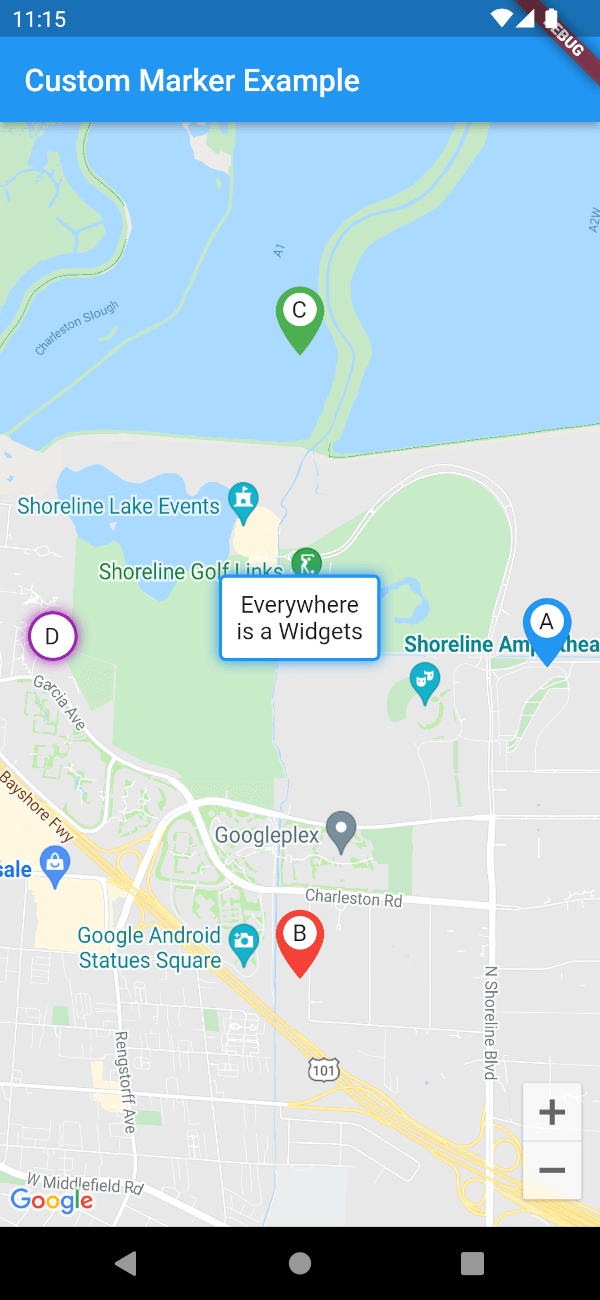
런타임 위젯을 사용자 지정 지도 마커 아이콘으로 사용하거나 바이트 배열 이미지로 변환하여 지도에서 사용할 수 있도록 해주는 플러터 패키지입니다. 안드로이드, iOS, 웹 플랫폼 간에 플러터 위젯을 지도 뷰에 직접 통합할 수 있어 동적이고 상호작용 가능한 마커를 만드는 과정을 단순화합니다. 실시간 데이터 기반의 개인화되거나 애니메이션된 마커가 필요한 애플리케이션에 적합합니다.
사용 사례
사용자 데이터를 기반으로 한 동적 마커 아이콘
애니메이션 또는 상태 기반 지도 핀
지도上的 사용자 정의 UI 요소
실시간 위치 시각화
인터랙티브 지도 오버레이
주요 기능
위젯을 지도 마커로 변환
바이트 배열 출력 지원
크로스 플랫폼 호환성
지도 플러그인과의 간편한 통합
런타임 마커 사용자 정의
적합한 대상
인터랙티브 지도를 개발하는 개발자
실시간 위치 추적 기능이 있는 앱
UI 중심의 위치 정보 기능
사용자 정의 가능한 지도 인터페이스
웹 및 모바일 지도 애플리케이션
고려 사항
복잡한 위젯으로 인한 성능 영향
호환되는 지도 플러그인 필요
지원되는 플랫폼에 제한됨
자주 업데이트될 때의 메모리 사용량
웹에서의 잠재적인 렌더링 불일치
원본 README
연결된 소스 저장소의 README 원문 스냅샷입니다. 최신 내용은 저장소에서 확인하세요.
Custom Map Markers
Not only "Everything is a widget" also "Everywhere is a widget". custom_map_marker is a package that turns runtime widgets into map marker icons.
Features
this package providers the following features:
Ability to create runtime map markers using flutter widgets.
Capture Images of any list of widgets.
Getting started
First, add custom_map_markers as a dependency in your pubspec.yaml file.
dependencies:custom_map_markers:^0.0.1
Usage
Wrap your GoogleMaps widget with CustomGoogleMapMarkerBuilder.
Define each marker and its custom widget in customMarkers
Once custom markers are ready they will be passed as Set<Marer> in builder function.
if you are not willing to use google maps you can use
CustomMapMarkerBuilder that takes List<widgets> instead of List<MarkerData> and returns List<Uint8List> instead of Set<Marker> so you are free to use captured png images as you need.
Notes:
Make sure your marker widget has boundaries.
This package capture a png image of widget markers once they render, if your widget would take more time to render like Image.network you can use screenshotDelay parameter to daley the capture process making sure that your widget is rendered properly before capturing it.
to run project example you have to add a valid google maps key to android/ios directories.