패키지, 저장소 및 앱 카테고리 검색

custom_timer 표지
패키지 상세v0.2.3

custom_timer

컨트롤러와 함께 사용할 수 있는 사용자 정의 가능한 타이머를 생성하는 플러터 패키지입니다.

AndroidiOSWebmacOSWindowsLinux
30일 다운로드
1.1천
좋아요
147
Pub 점수
150

패키지 설치

flutter pub add custom_timer

패키지 개요

공개 정보를 바탕으로 생성한 선택 가이드입니다.

개발자가 고도로 사용자 정의 가능한 타이머를 만들 수 있도록 해주는 플러터 패키지이며, 내장된 컨트롤러 기능을 지원합니다. 실시간 업데이트, 정밀한 타이밍 제어 및 여러 플랫폼에서 플러터 앱에 원활하게 통합할 수 있습니다. 타이머는 전용 컨트롤러를 통해 일시정지, 재개, 리셋 및 모니터링이 가능하며, 카운트다운, 스톱워치 기능 또는 시간 기반 UI 컴포넌트에 이상적입니다. 유연성과 사용 편의성을 고려하여 설계되었으며, 안드로이드, iOS, 웹, macOS, 윈도우, 리눅스에서 작동합니다.

사용 사례

  • 카운트다운 타이머
  • 스톱워치 애플리케이션
  • 제한된 시간 사용자 상호작용
  • 실시간 진행 추적
  • 상호작용 학습 앱
  • 게임 타이머

주요 기능

  • 사용자 지정 가능한 타이머 기간
  • 상태 관리용 내장 컨트롤러
  • 일시정지, 재개 및 초기화 기능
  • 크로스 플랫폼 호환성
  • 실시간 콜백 이벤트
  • Flutter 위젯과의 간편한 통합

적합한 대상

  • 시간 민감한 기능을 개발하는 개발자
  • 정밀한 시간 제어가 필요한 앱
  • 교육용 또는 생산성 도구
  • 게임화 애플리케이션
  • 동적 시간 표시가 필요한 UI 컴포넌트

고려 사항

  • 타이머 생명주기의 수동 처리가 필요합니다
  • 복잡한 스케줄링을 위해 추가 로직이 필요할 수 있습니다
  • 일반적인 사용 사례를 초과하는 고주파 업데이트에 최적화되지 않음
  • 내장된 스타일 옵션이 제한적(사용자 정의 위젯 조합 필요)

원본 README

연결된 소스 저장소의 README 원문 스냅샷입니다. 최신 내용은 저장소에서 확인하세요.

Custom Timer ⌛

A Flutter package to create a customizable timer.


🎉 Features

  • Timer controller.
  • Auto count up / down timer.
  • Custom builder.
  • Millisecond support.

📌 Usage


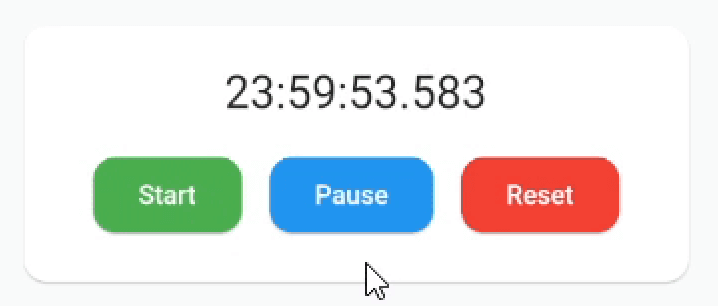
example1


Add SingleTickerProviderStateMixin to your stateful widget. 👇

class _MyAppState extends State<MyApp> with SingleTickerProviderStateMixin {

Then define a CustomTimer controller

late CustomTimerController _controller = CustomTimerController(
  vsync: this,
  begin: Duration(hours: 24),
  end: Duration(),
  initialState: CustomTimerState.reset,
  interval: CustomTimerInterval.milliseconds
);

And you are ready to use the timer:

CustomTimer(
  controller: _controller,
  builder: (state, time) {
    // Build the widget you want!🎉
    return Text(
      "${time.hours}:${time.minutes}:${time.seconds}.${time.milliseconds}",
      style: TextStyle(fontSize: 24.0)
    );
  }
)

Now you can use the controller methods:

_controller.reset();
_controller.start();
_controller.pause();
_controller.finish();

_controller.add(Duration(minutes: 30));
_controller.subtract(Duration(minutes: 30));
_controller.jumpTo(Duration(hours: 12));

You can also set the begin or end, even with the counter running:

_controller.begin = Duration();
_controller.end = Duration(hours 12);

And add listeners to state changes or just use the properties when you need them:

_controller.state.addListener(() {
  print(_controller.state.value); // 👉 CustomTimerState.paused
  print(_controller.remaining.value.hours); // 👉 12h
});

Remember to dispose when you are no longer using it.


🔧 Installation

Add this to your package's pubspec.yaml file:

dependencies:
  custom_timer: ^0.2.3

Install it:

$ flutter pub get

Import the package in your project:

import 'package:custom_timer/custom_timer.dart';

🙇 Author


Hi there 👋 This package is in development so if you find a bug or have a suggestion please let me know so we can improve it! 😃 If you want to motivate me to continue, you can give me a cup of coffee ☕ and I will get a lot of energy out of it.

Buy Me A Coffee

카테고리

소스 저장소

이 패키지를 사용하는 프로젝트