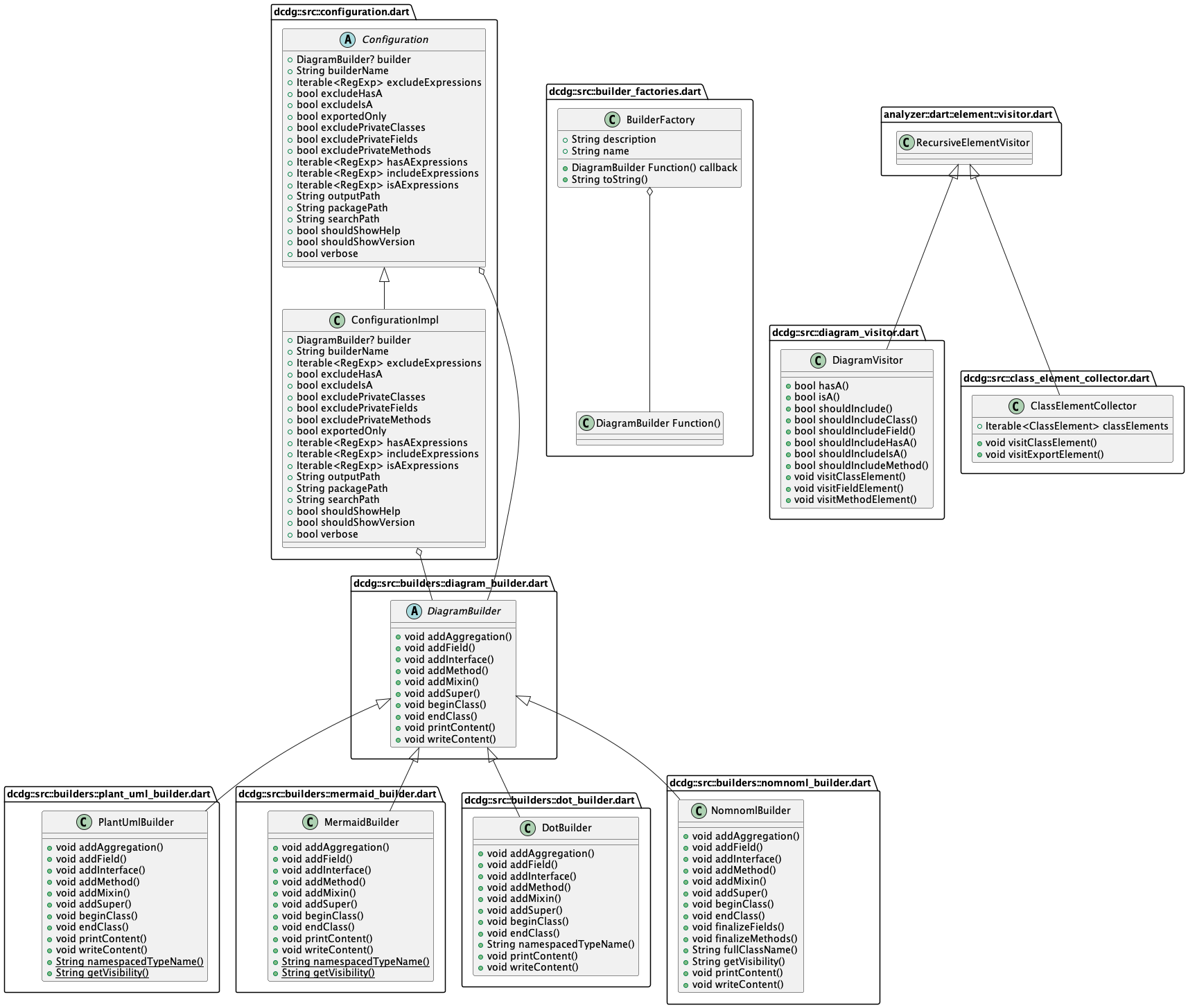
dcdg는 Dart 패키지에서 클래스 다이어그램(UML 등)을 자동으로 생성하는 개발자 도구입니다. Dart 코드의 구조를 분석하여 클래스, 그 관계 및 상속 계층을 시각화하여 복잡한 코드베이스를 이해하는 데 도움을 줍니다. 문서화, 온보딩 또는 설계 검토에 적합하며, 안드로이드, iOS, macOS, Windows, 리눅스 등 여러 플랫폼을 지원합니다. Flutter pub를 통해 통합되며 오픈소스로 GitHub에 호스팅되어 있습니다.
사용 사례
코드베이스 문서
신규 개발자 온보딩
디자인 시각화
리팩터링 계획
기술 문서
주요 기능
자동 UML 다이어그램 생성
다중 플랫폼 프로젝트를 지원합니다
오픈소스 및 확장 가능
Flutter pub와의 통합
클래스 관계 시각화
적합한 대상
Dart 개발자
팀 문서
대규모 코드베이스
소프트웨어 아키텍트
교육 목적
고려 사항
Dart 코드 분석이 필요합니다
출력 품질은 코드 구조에 따라 달라집니다
실시간 업데이트 아님
제한된 사용자 정의 옵션
정적 분석에 가장 적합
원본 README
연결된 소스 저장소의 README 원문 스냅샷입니다. 최신 내용은 저장소에서 확인하세요.
Dart Class Diagram Generator
A small command line utility to generate a class (UML or similar) diagram from a
Dart package.
Examples
Below is a UML diagram of the dcdg source code, created with dcdg. You can find
the PlantUML source in the example/ directory.
Installation
Install from pub:
dart pub global activate dcdg
Install from clone:
dart pub global activate -s path .
Usage
From inside a Dart package directory:
dart pub global run dcdg
This will dump a PlantUML file to stdout. You can save it to a file
instead with the -o option.
If you'd like to create a Mermaid file instead, pass the -b option
with mermaid as its argument:
dart pub global run dcdg -b mermaid
See --help for more options, including ways to filter what ends up
in the output. You can find the help contents in USAGE.txt
as well.
Examples
There are test fixtures in test/fixtures/. Each Dart package in this
directory contains various (fake) classes. Try running DCDG against these
fixtures to familiarize yourself with how it works.
Contributing
Pull requests are welcome! It is intended to be reasonably straightforward to
add a new output format. Take a look at the DOT format implementation in
lib/src/builders for an example.
If you have found a bug or have a feature request please open an issue.
Development
Format code using the tool/format.sh script. It will have a non-zero exit code
if the formatting changed. That's fine, it does that so it can be used in CI.
Run the full test suite (including unit and functional tests) with
tool/check.sh.
If you change the user interface or add features you should run tool/docs.sh
to regenerate documentation and other resources. This script requires
PlantUML.