연결된 소스 저장소의 README 원문 스냅샷입니다. 최신 내용은 저장소에서 확인하세요.
Dynamic_Table

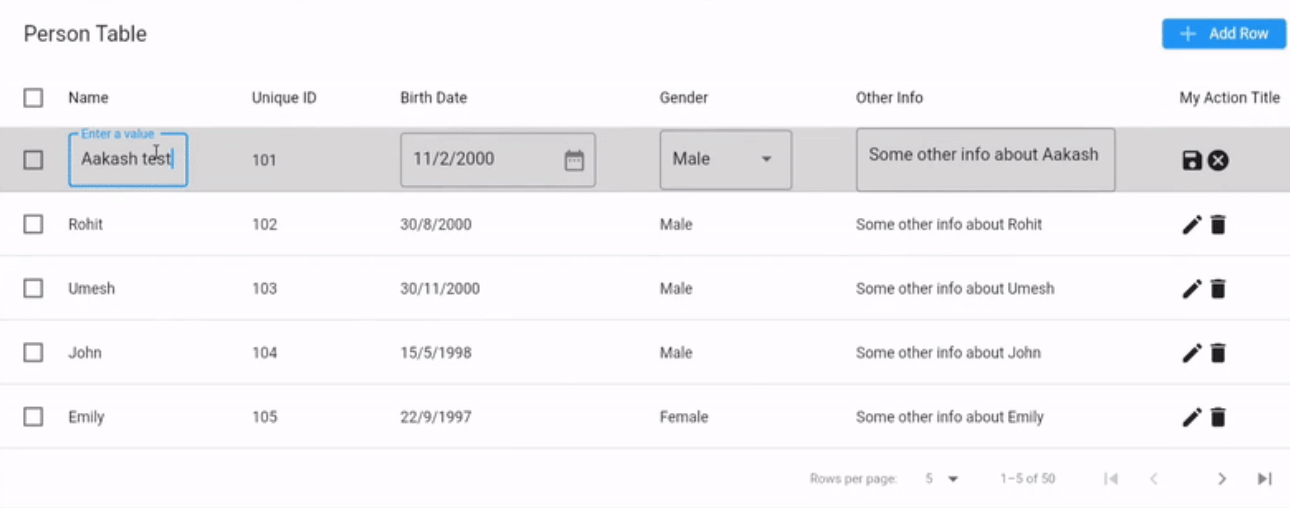
A fully customizable data table for your flutter project in which you can edit, delete, add and update values in the table.
It is build on PaginatedDataTable

Getting Started
To use Dynamic_Table just add DynamicTable Widget
See Example here https://dynamic-table-example.web.app/
Table Of Content
Features
- Add new values
- Update values
- Save values
- Delete values
- Customize style
- Non Editable Column
Usage
Non Editable Table
DynamicTable(
header: const Text("Person Table"),
rowsPerPage: 5,
showFirstLastButtons: true,
availableRowsPerPage: const [
5,
10,
15,
20,
],
columnSpacing: 60,
showCheckboxColumn: true,
onRowsPerPageChanged: (value) {
ScaffoldMessenger.of(context).showSnackBar(
SnackBar(
content: Text("Rows Per Page Changed to $value"),
),
);
},
rows: [DynamicTableDataRow(
index: index,
onSelectChanged: (value) {
ScaffoldMessenger.of(context).showSnackBar(
SnackBar(
content: value ?? false
? Text("Row Selected index:$index")
: Text("Row Unselected index:$index"),
),
);
},
cells:[
DynamicTableDataCell(value: "Name"),
DynamicTableDataCell(value: "101"),
DynamicTableDataCell(value: DateTime(2000, 2, 11)),
DynamicTableDataCell(value: "Male"),
DynamicTableDataCell(value:"Some other info about Aakash"),
],
),
],
columns: [
DynamicTableDataColumn(
label: const Text("Name"),
onSort: (columnIndex, ascending) {},
dynamicTableInputType: DynamicTableTextInput()),
DynamicTableDataColumn(
label: const Text("Unique ID"),
onSort: (columnIndex, ascending) {},
isEditable: false,
dynamicTableInputType: DynamicTableTextInput()),
DynamicTableDataColumn(
label: const Text("Birth Date"),
onSort: (columnIndex, ascending) {},
dynamicTableInputType: DynamicTableInputType.date(
context: context,
decoration: const InputDecoration(
hintText: "Select Birth Date",
suffixIcon: Icon(Icons.date_range),
border: OutlineInputBorder()),
initialDate: DateTime(1900),
lastDate: DateTime.now().add(
const Duration(days: 365),
),
),
),
DynamicTableDataColumn(
label: const Text("Gender"),
dynamicTableInputType: DynamicTableInputType.dropDown<String>(
items: genderDropdown,
selectedItemBuilder: (context) {
return genderDropdown
.map((e) => Text(e))
.toList(growable: false);
},
decoration: const InputDecoration(
hintText: "Select Gender", border: OutlineInputBorder()),
displayBuilder: (value) =>
value ??
"",
itemBuilder: (value) {
return DropdownMenuItem(
value: value,
child: Text(value),
);
},
),
),
DynamicTableDataColumn(
label: const Text("Other Info"),
onSort: (columnIndex, ascending) {},
dynamicTableInputType: DynamicTableInputType.text(
decoration: const InputDecoration(
hintText: "Enter Other Info",
border: OutlineInputBorder(),
),
maxLines: 100,
)),
],
)
Editable Table
To make table editable just set showActions,showAddRowButton,showDeleteAction to true,
And add onRowEdit, onRowDelete, onRowSave callbacks.
DynamicTable(
onRowEdit: (index, row) {
},
onRowDelete: (index, row) {
},
onRowSave: (index, old, newValue) {
},
showActions: true,
showAddRowButton: true,
showDeleteAction: true,
);
Available CallBacks
void Function(bool?)? onSelectAll
Invoked when the user selects or unselects every row, using the
checkbox in the heading row.
void Function(int)? onPageChanged
Invoked when the user switches to another page.
The value is the index of the first row on the currently displayed page.
void Function(int?)? onRowsPerPageChanged
Invoked when the user selects a different number of rows per page.
If this is null, then the value given by [rowsPerPage] will be used
and no affordance will be provided to change the value.
bool Function(int, List<dynamic>)? onRowEdit
Called when the user clicks on the edit icon of a row.
Return true to allow the edit action, false to prevent it.
If the action is allowed, the row will be editable.
bool onRowEdit(int index, List<dynamic> row){
if (index%2==1) {
ScaffoldMessenger.of(context).showSnackBar(
const SnackBar(
content: Text("Cannot edit odd rows"),
),
);
return false;
}
return true;
}
bool Function(int, List<dynamic>)? onRowDelete
Called when the user clicks on the delete icon of a row.
Return true to allow the delete action, false to prevent it.
If the delete action is allowed, the row will be deleted from the table.
bool onRowDelete(int index, List<dynamic> row){
if (row[0] == null) {
ScaffoldMessenger.of(context).showSnackBar(
const SnackBar(
content: Text("Name cannot be null"),
),
);
return false;
}
return true;
}
List<dynamic>? Function(int, List<dynamic>, List<dynamic>)? onRowSave
Called when the user clicks on the save icon of a row.
Return List<dynamic> newValue to allow the save action, null to prevent it.
The newValue must be a list of the same length as the column.
If the save action is allowed, the row will be saved to the table.
The oldValue is the value of the row before the edit.
The newValue is the value of the row after the edit.
List<dynamic>? onRowSave(int index, List<dynamic> oldValue, List<dynamic> newValue) {
if (newValue[0] == null) {
ScaffoldMessenger.of(context).showSnackBar(
const SnackBar(
content: Text("Name cannot be null"),
),
);
return null;
}
newValue[0] = newValue[0].toString().toUpperCase();
myData[index] = newValue;
return newValue;
}
Available Methods
First create a GlobalKey of DynamicTableState.
Pass the key to DynmaicTable constructor.
final tableKey = GlobalKey<DynamicTableState>();
DynamicTable(key:tableKey);
addRow()
tableKey.currentState?.addRow();
Add new empty row at the 0th position in the table. The showActions parameter must be true because the row will be added in editing mode and to save the row we need actions.
NOTE: Cant add value to Non-Editable Columns.
addRowWithValues(List<dynamic> values, {bool isEditing = false})
tableKey.currentState?.addRowWithValues(`column1,column2...columnN`);
Add new row with values at the 0th position in the table.
If isEditing passed true the newly added row will be in editing mode. And if false the row will be in non editing mode.
If isEditing is true then showActions must also be true.
The values.length must be equal to columns.length.
deleteRow(int index)
tableKey.currentState?.deleteRow(0);
Delete the row at the given index.
index should be index<rows.length && index>=0.
updateRow(int index, List<dynamic> values)
tableKey.currentState.?.updateRow(0, dummyData`column1,column2,...,columnN`);
Update the column at index with the given values.
The values.length must be equal to columns.length.
index should be index<rows.length && index>=0.
insertRow(int index, List<dynamic> values, {bool isEditing = false,})
tableKey.currentState?.insertRow(
30, dummyData`column1,column2,...,columnN`
isEditing: true);
Insert new row at index with values at the in the table.
If isEditing passed true the newly added row will be in editing mode. And if false the row will be in non editing mode.
If isEditing is true then showActions must also be true.
The values.length must be equal to columns.length.
deleteAllRows()
tableKey.currentState?.deleteAllRows();
Delete all the rows from the table.
deleteSelectedRows()
tableKey.currentState?.deleteSelectedRows();
Delete only selected rows from the table.
getRowByIndex(int index)
tableKey.currentState?.getRowByIndex(10)
Get the row at index index.
The index should be index>=0 && index<rows.length.
getSelectedRows()
tableKey.currentState?.getSelectedRows()
Get all the selected rows in the table.
getAllRows()
tableKey.currentState?.getAllRows()
Get all the rows in the table.
updateAllRows(List<List<dynamic>> data)
tableKey.currentState?.updateAllRows(data);
Update all the rows inside the table with the given data.
The data.length must be equal to rows.length.
And data.length for all must be equal to columns.length.
selectRow(int index,bool isSelected)
Select or disSelect a row at 'index' based on given isSelected.
selectAllRows(bool isSeleted)
Select or disSelect all the rows in the table based on given isSelected.
Issues
Please file issues, bugs, or feature requests in issue tracker.