연결된 소스 저장소의 README 원문 스냅샷입니다. 최신 내용은 저장소에서 확인하세요.
eraser
A Flutter plugin that allows notifications and iOS badge counts to be dismissed programmatically.
Motivation for this plugin
When you receive a push notification from most professional apps (like the Gmail app for example), the notification will be automatically dismissed when you click on the notification or when you open the app manually from the home screen of your device. However, notifications sent to a Flutter app from Firebase Cloud Messaging (FCM) are only dismissed if the user clicks on the actual notification. They are not automatically dismissed if the user opens the app manually from the home screen. This means that if the user does not click on the notification, that notification will remain on their device until they manually dismiss it or click on it, even if they have already opened the app since the notification was received.
I raised an issue in the FlutterFire repo on GitHub about this (https://github.com/FirebaseExtended/flutterfire/issues/4516) but I needed a solution urgently for my app. So I decided to implement a plugin responsible for dismissing FCM notifications, regardless of whether the user clicked on the notification in order to open the app or not.
Using the plugin
The clearAllAppNotifications method can be invoked to clear all notifications received by your Flutter app.
To clear all notifications when the app is started, just call the clearAllAppNotifications method after runApp in your main method:
void main() {
  runApp(MyApp());
  Eraser.clearAllAppNotifications();
}
To clear all notifications when the app is resumed (i.e. when the app returns to the device foreground from the background), it is necessary to add the WidgetsBindingObserver mixin to your app and implement the didChangeAppLifecycleState method:
void main() {
  runApp(MyApp());
}

class MyApp extends StatefulWidget {
  @override
  _MyAppState createState() => _MyAppState();
}

class _MyAppState extends State<MyApp> with WidgetsBindingObserver {
  @override
  void initState() {
    super.initState();
    WidgetsBinding.instance.addObserver(this);
  }

  @override
  Widget build(BuildContext context) {
    return MaterialApp(
      home: Scaffold(
        body: Text('Example'),
      ),
    );
  }

  @override
  void didChangeAppLifecycleState(AppLifecycleState state) {
    if (AppLifecycleState.resumed == state) {
      Eraser.clearAllAppNotifications();
    }
  }

  @override
  void dispose() {
    WidgetsBinding.instance.removeObserver(this);
    super.dispose();
  }
}
In order to dismiss notifications selectively, the notification needs to include a tag (for Android) and an apns-collapse-id header (for iOS). The below code snippet shows how to do this using a Google Cloud Function written in node.js:
const notificationTag: string = 'notificationTag';

await admin.messaging().sendMulticast({
        tokens: deviceTokens,
        notification: {
            title: 'Notification Title',
            body: 'Notification message',
        },
        android: {
            notification: {
                tag: notificationTag,
            },
        },
        apns: {
            headers: {
                'apns-collapse-id': notificationTag,
            },
        },
    });
The clearAppNotificationsByTag method can then be used to clear all notifications with that notificationTag.
Badge count
Upon receiving push notifications, iOS devices typically display a red dot on top of the app icon with a number inside. If iOS notifications are dismissed, this badge count remains, so it was necessary to provide some functionality to remove this badge count.
By default, dismissing the badge count also dismisses all notifications from the iOS notification center. If this is acceptable, use the resetBadgeCountAndRemoveNotificationsFromCenter method.
If however you require the notifications to remain in the notification center after dismissing the badge count, then the resetBadgeCountButKeepNotificationsInCenter method should be used.
Android 8.0 introduced similar 'badge count' functionality. However Android calls this functionality 'notification badges', and the number inside the badge is known as a 'notification count'. When notifications are dismissed, Android automatically gets rid of the notification count. For this reason, the resetBadgeCount... methods do nothing when called on an Android device.
iOS compatibility
This plugin is only capable of clearing notifications on iOS devices running iOS 10 or above. The methods will return silently without dismissing notifications if running on devices with iOS 9 or lower. This was deemed acceptable because it seems that the Firebase plugins themselves only support iOS 10 and above.
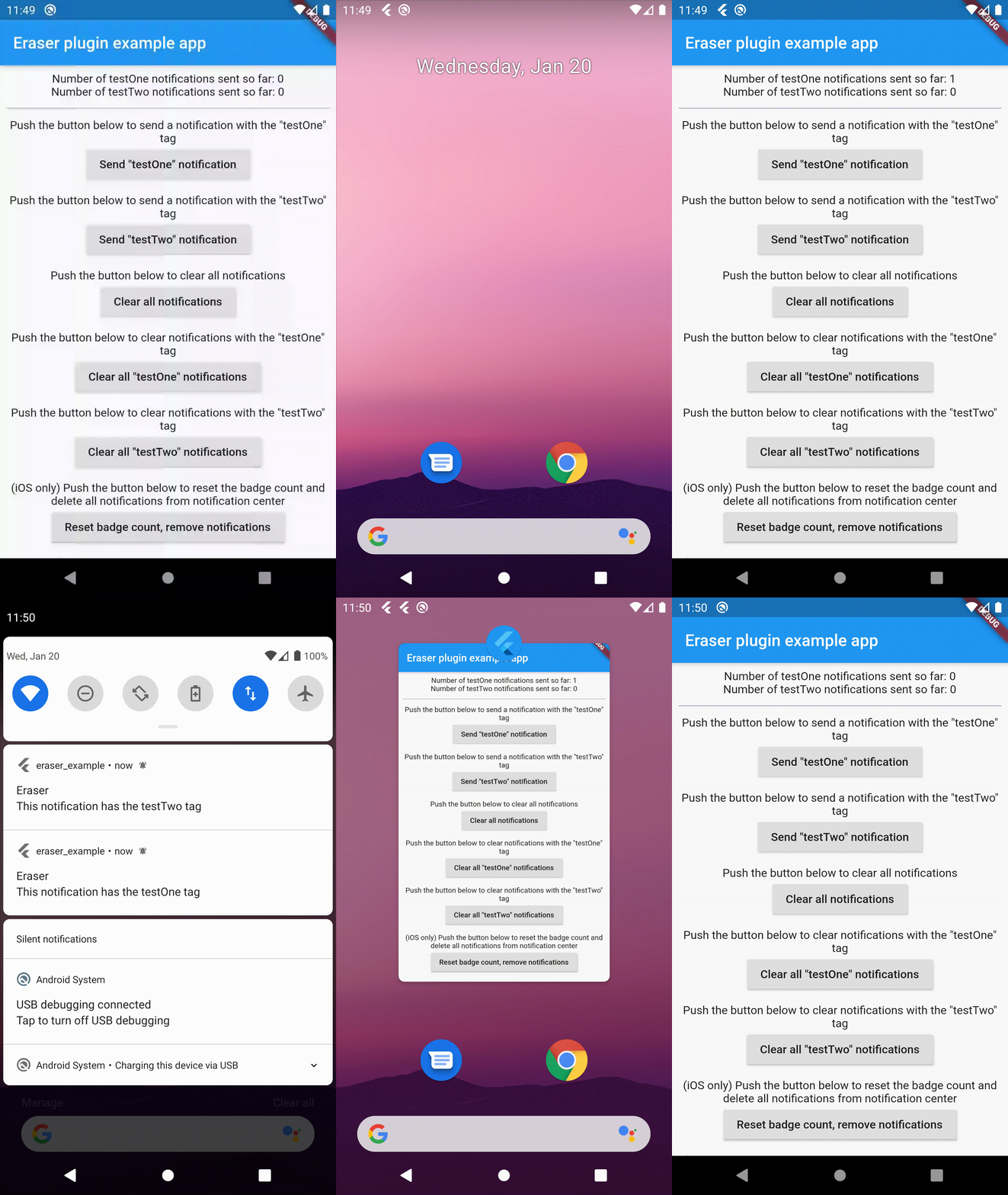
Example app recording
Possible integration with the FlutterFire plugin
Ideally, this functionality would be integrated with the FlutterFire Cloud Messaging plugin. The problem is that the 'eraser' functionality needs to be called at certain points in the app lifecycle (i.e. when the app is first opened and/or when the app is brought into the foreground from the background). The FlutterFire plugin does not currently seem to be aware of the app lifecycle in this way.
That is why I decided to put the 'eraser' functionality in a separate plugin, so that users of the plugin can call it from their main method (to clear notifications when the app is first started) or from a WidgetsBindingObserver (to clear notifications when the app comes back into the foreground), as explained in the Getting Started section above.
Tests
This plugin is quite simple and just delegates to platform-specific code in order to provide its functionality. This platform-specific code should already be tested by Google and Apple. For that reason, there isn't really anything to test and the plugin has no unit tests.
If anyone can think of any possible unit tests, then feel free to suggest them, or open a pull request.
