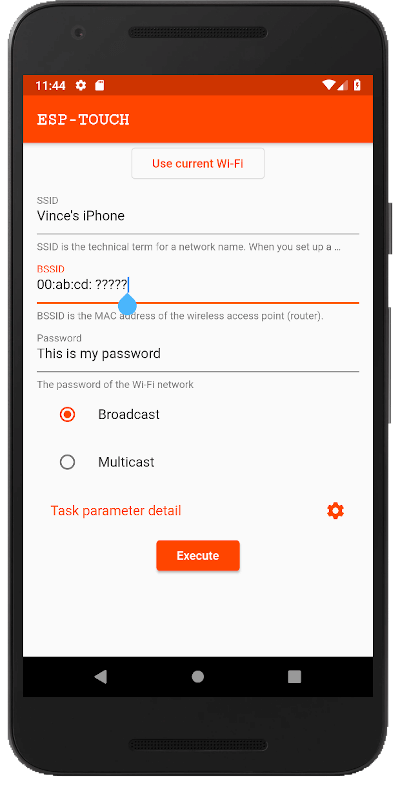
esptouch_flutter는 ESP-8266 및 ESP-32 장치의 Wi-Fi 네트워크 설정을 위한 ESP-Touch(스마트 구성) 기능을 가능하게 하는 Flutter 플러그인입니다. 모바일 장치에서 대상 하드웨어로 Wi-Fi를 통해 설정 데이터를 직접 전송함으로써 원활한 네트워크 설정이 가능합니다. Android와 iOS 모두 호환되며, 자격 증명을 수동으로 입력할 필요 없이 IoT 장치의 온보딩을 간소화합니다. 간단한 API를 사용하여 Flutter 앱에 쉽게 통합할 수 있습니다.
사용 사례
사물인터넷 장치 페어링
ESP 모듈용 Wi-Fi 구성
스마트 홈 장치 설정
자동 장치 프로비저닝
모바일 앱과 ESP 장치 통합
주요 기능
ESP-Touch 프로토콜을 지원합니다
Android 및 iOS에서 작동합니다
간단한 API 통합
수동으로 SSID/비밀번호 입력할 필요 없음
실시간 장치 탐지
적합한 대상
IoT 앱을 개발하는 개발자
ESP 칩을 사용하는 하드웨어 통합 엔지니어
스마트 기기용 모바일 앱
제로 터치 장치 설정이 필요한 프로젝트
고려 사항
호환되는 ESP 펌웨어가 필요합니다
ESP-Touch 지원 장치에 한정
Android/iOS에서 필요한 네트워크 권한
일부 플랫폼에서는 백그라운드 실행이 필요할 수 있습니다
원본 README
연결된 소스 저장소의 README 원문 스냅샷입니다. 최신 내용은 저장소에서 확인하세요.
esptouch_flutter
Flutter plugin for ESP-Touch to configure network for ESP-8266 and ESP-32 devices. Runs on iOS and Android.
esptouch_flutter is Flutter plugin package which contains an API for ESP-Touch written in Dart combined with
platform-specific implementation for Android using Java and iOS using Objective-C.
This package provides a high customizability to the ESP Touch tasks and an idiomatic Dart interface for launching tasks. Custom task parameters lets the users of this plugin change how long the task runs, you could set it to hours, if this is what your workflow requires.
import'package:esptouch_flutter/esptouch_flutter.dart';
// Somewhere in your widget...finalESPTouchTask task = ESPTouchTask(
ssid: 'My WiFi network',
bssid: 'ab:cd:ef:12:23:34',
password: 'I love SMAHO',
);
finalStream<ESPTouchResult> stream = task.execute();
final printResult = (ESPTouchResult result) {
print('IP: ${result.ip} MAC: ${result.bssid}');
};
StreamSubscription<ESPTouchResult> streamSubscription = stream.listen(printResult);
// Don't forget to cancel your stream subscription.// You might cancel after the UDP wait+send time has passed (default 1 min)// or you could cancel when the user asked to cancel// for example, either via X button, or popping a route off the stack.
streamSubscription.cancel();
If you would like to customize the task, provide an ESPTouchTaskParameter instance as taskParameter to ESPTouchTask. In the code example, I specify the types for clarity but you can omit the types as Dart can infer them.
finalESPTouchTask task = ESPTouchTask(
ssid: 'My WiFi network',
bssid: 'ab:cd:ef:12:23:34',
password: 'I love Flutter and ESP-Touch, too',
// Tweak the task using task parameters
taskParameter: ESPTouchTaskParameter(waitUdpReceiving: Duration(hour: 12)),
);
// You can still stop the task at any point by calling .cancel on the stream subscription:
streamSubscription.cancel();
In a real world example, you'd get the WiFi credentials from the user and you could either display the configured device, save it locally in SQLite or send it to your backend.
Fundamentals
Use a real phone for development. The plugin will not work in emulators and simulators, so you need real phones for development. Run flutter devices to verify.
Prepare your embedded devices. To verify that the ESP-Touch app works, you need some hardware with ESP8266 and ESP32 to connect to your WiFi network.
connectivity
You may to provide an easy way for getting the current WiFi network's SSID and BSSID. Use the connectivity plugin for discovering the state of the network (WiFi & mobile/cellular) connectivity on Android and iOS.
ESP-Touch
Using ESP-Touch, you can configure network for ESP8266 and ESP32 devices.
Espressif’s ESP-Touch protocol implements the Smart Config technology to help users connect
ESP8266EX- and ESP32-embedded devices to a Wi-Fi network through simple configuration on a
smartphone.
The original iOS and
Android modules had to be heavily customized and
tweaked in order to support custom task parameters.
Known issues
We needed full customizability for the touch task parameters, these made changing a significant
chunk of the Android and iOS platform side code necessary.
We added builders for the task parameters as this looked like a solution that required the least
changes to the platform code.
The only way I could implement this plugin is by pasting the platform-specific code into this
project. One reason for this was that it wasn't published anywhere as easily installable packages,
and the second reason is that I had to tweak the platform code to support configuration of
the ESPTouchTaskParameters. This means that new changes to the original git repositories do not
automatically show up in this project, so we need to manually update the Android and iOS code.
The underlying Android and iOS apps support different task parameters. There were multiple
changes especially around IPv4 vs IPv6 handling. The plugin does not handle all of these
differences.
Keeping track of finished tasks is necessary on Flutter's side.
AES support (last I checked the support differred on Android and iOS, so I haven't added them)
Breaking change in iOS 14.6
Starting with iOS 14.6 the com.apple.developer.networking.multicast entitlement is required, to allow the broadcasting of IP packages on iOS, which is used by esptouch.
In order ot enable it, you need to request the entitlemant as an account holder here.
Once you are enrolled, you can configure it here
If you are coming from IoT background, you might not know what Flutter is.
Flutter is Google's UI toolkit for creating beautiful, native experiences for iOS and Android from a single codebase. For help getting started with Flutter, view the online documentation.
This repository contains a Flutter plugin package for ESP-Touch. A plugin package is a specialized package that includes platform-specific implementation code for Android and iOS. The Flutter portion of the app sends messages to its host (iOS or Android) over a platform channel. This plugin relies on platform channels (event channels) heavily.