이벤트 버스는 스트림을 사용하여 애플리케이션 내 구성 요소 간의 이벤트 기반 통신을 가능하게 하는 가벼운 Dart 패키지입니다. 객체가 이벤트를 게시하고 구독할 수 있도록 하여 직접적인 종속성 없이 느슨한 결합을 촉진합니다. UI 업데이트, 상태 변경 또는 모듈 간 상호작용과 같은 앱의 다양한 부분에서 작업을 조율하는 데 이상적입니다. 패키지는 쉽게 통합할 수 있으며, 플러터가 지원하는 모든 주요 플랫폼에서 원활하게 작동합니다.
사용 사례
UI 컴포넌트 분리
글로벌 상태 변경 처리
앱 전역 알림 브로드캐스트
모듈 간 통신 단순화
비동기 이벤트 관리
상태 관리에서 반복 코드 줄이기
주요 기능
스트림 기반 이벤트 전달
간단한 발행/구독 패턴
크로스 플랫폼 호환성
최소 API 표면
타입화된 이벤트를 지원합니다
외부 종속성 없음
적합한 대상
느슨한 결합이 필요한 앱
복잡한 상태 관리자를 피하는 개발자
자주 구성 요소 간 통신을 하는 프로젝트
빠른 이벤트 흐름 프로토타이핑
구성보다 단순성을 선호하는 팀
고려 사항
대규모 상태 관리에 적합하지 않음
제한된 내장 오류 처리
충돌을 방지하기 위해 이벤트 이름을 신중하게 지정해야 합니다
앱 재시작 후 이벤트를 유지하지 않습니다
복잡한 앱을 위한 다른 상태 관리 솔루션과 함께 사용하는 것이 가장 좋습니다
원본 README
연결된 소스 저장소의 README 원문 스냅샷입니다. 최신 내용은 저장소에서 확인하세요.
Event Bus
A simple Event Bus using Dart Streams
for decoupling applications.
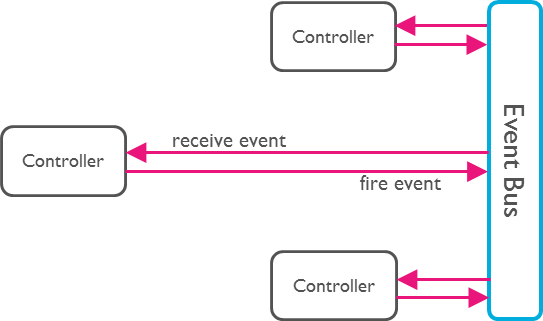
An Event Bus follows the publish/subscribe pattern. It allows listeners to
subscribe for events and publishers to fire events. This enables objects to
interact without requiring to explicitly define listeners and keeping track of
them.
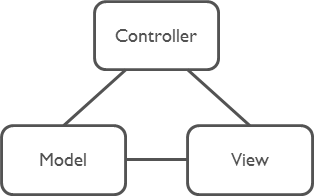
Event Bus and MVC
The Event Bus pattern is especially helpful for decoupling MVC
(or MVP) applications.
One group of MVC is not a problem.
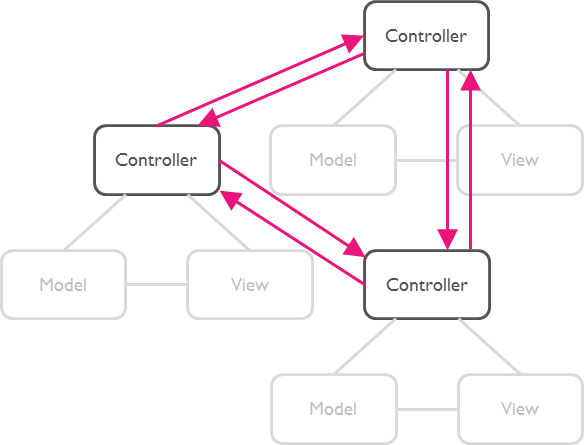
But as soon as there are multiple groups of MVCs, those groups will have to talk
to each other. This creates a tight coupling between the controllers.
By communication through an Event Bus, the coupling is reduced.
Usage
1. Create an Event Bus
Create an instance of EventBus and make it available to other classes.
Usually there is just one Event Bus per application, but more than one may be
set up to group a specific set of events.
Note:The default constructor will create an asynchronous event bus. To
create a synchronous bus you must provide the optional sync: true attribute.
2. Define Events
Any Dart class can be used as an event.
classUserLoggedInEvent{
User user;
UserLoggedInEvent(this.user);
}
classNewOrderEvent{
Order order;
NewOrderEvent(this.order);
}
3. Register Listeners
Register listeners for specific events:
eventBus.on<UserLoggedInEvent>().listen((event) {
// All events are of type UserLoggedInEvent (or subtypes of it).print(event.user);
});
Register listeners for all events:
eventBus.on().listen((event) {
// Print the runtime type. Such a set up could be used for logging.print(event.runtimeType);
});
About Dart Streams
EventBus uses Dart Streams
as its underlying mechanism to keep track of listeners. You may use all
functionality available by the Stream
API. One example is the use of StreamSubscriptions
to later unsubscribe from the events.