패키지, 저장소 및 앱 카테고리 검색

expandable_page_view 표지
패키지 상세v1.3.0

expandable_page_view

현재 표시된 페이지에 따라 높이를 조정하는 PageView 위젯

AndroidiOSWebmacOSWindowsLinux
30일 다운로드
17.3만
좋아요
596
Pub 점수
160

패키지 설치

flutter pub add expandable_page_view

패키지 개요

공개 정보를 바탕으로 생성한 선택 가이드입니다.

expandable_page_view 패키지는 현재 보이는 페이지의 콘텐츠에 따라 Flutter의 PageView 높이를 동적으로 조정함으로써 PageView를 향상시킵니다. 각 페이지가 서로 다른 높이를 가질 수 있지만 전체 레이아웃을 방해하지 않고 부드럽고 반응성 있는 스크롤링이 가능합니다. 양식, 카드, 또는 동적 목록과 같은 변동 높이의 콘텐츠를 갖는 앱에 적합합니다. 이 패키지는 Android, iOS, Web, macOS, Windows, Linux 등 모든 주요 플랫폼을 지원하며 장치 간 일관된 동작을 보장합니다.

사용 사례

  • 동적 폼 페이지
  • 가변 높이 카드 레이아웃
  • 반응형 스크롤 가능한 콘텐츠
  • 인터랙티브 온보딩 화면
  • 콘텐츠가 풍부한 대시보드

주요 기능

  • 높이가 현재 페이지에 맞게 조정됩니다
  • 페이지 간 부드러운 전환
  • 크로스 플랫폼 호환성
  • PageView와의 간단한 통합
  • 중첩 스크롤 뷰를 지원합니다

적합한 대상

  • 변동 높이 페이지를 가진 앱
  • 반응형 스크롤 동작을 찾는 개발자
  • 적응형 UI 레이아웃을 요구하는 프로젝트
  • 동적 콘텐츠를 갖춘 모바일 및 웹 애플리케이션
  • 유연한 스크롤 경험을 원하는 UI 디자이너

고려 사항

  • 중량 있는 콘텐츠와 함께 성능에 영향을 줄 수 있습니다
  • 스크롤 물리에 주의 깊게 대응해야 합니다
  • 고정 높이 페이지 디자인에 적합하지 않습니다
  • 높이 조절 외에 사용자 정의 기능은 제한적입니다
  • 예측 가능한 페이지 콘텐츠 크기와 함께 사용하는 것이 가장 좋습니다

원본 README

연결된 소스 저장소의 README 원문 스냅샷입니다. 최신 내용은 저장소에서 확인하세요.

expandable_page_view

A PageView widget adjusting its height to currently displayed page. It accepts the same parameters as classic PageView.

Horizontal Vertical

Getting Started

In the pubspec.yaml of your flutter project, add the following dependency:

dependencies:
  ...
  expandable_page_view: ^1.0.17

Import it:

import 'package:expandable_page_view/expandable_page_view.dart';

Usage Examples

Fixed Expandable Page View

In order to create a fixed page view just pass a list of widgets to children parameter:

ExpandablePageView(
  children: [
     ExamplePage(Colors.blue, "1", 100),
     ExamplePage(Colors.green, "2", 200),
     ExamplePage(Colors.red, "3", 300),
  ],
),
Dynamically built Expandable Page View

If You have multiple pages to display, and You want to build them dynamically while scrolling, use .builder constructor and pass itemCount and itemBuilder parameters:

ExpandablePageView.builder(
  itemCount: 3,
  itemBuilder: (context, index) {
    return ExamplePage(Colors.blue, index.toString(), (index + 1) * 100.0);
  },
),
Loop Mode

To create an infinitely scrolling page view, set loop: true:

ExpandablePageView(
  loop: true,
  children: [
    ExamplePage(Colors.blue, "1", 100),
    ExamplePage(Colors.green, "2", 200),
    ExamplePage(Colors.red, "3", 300),
  ],
),
Programmatic Control in Loop Mode

To programmatically navigate pages in loop mode (e.g., for auto-play carousels or custom indicators), use ExpandablePageController:

final controller = ExpandablePageController(itemCount: 3);

ExpandablePageView(
  controller: controller,
  loop: true,
  children: [
    ExamplePage(Colors.blue, "1", 100),
    ExamplePage(Colors.green, "2", 200),
    ExamplePage(Colors.red, "3", 300),
  ],
),

// Navigate programmatically
controller.jumpToPage(2);
controller.animateToPage(0, duration: Duration(milliseconds: 300), curve: Curves.ease);

// Read current page
print(controller.page);     // e.g., 1.5 (fractional during scroll)
print(controller.realPage); // e.g., 1 (rounded)

Note: ExpandablePageController uses shortest-path navigation — animating from page 0 to the last page will scroll backward (1 step) rather than forward through all pages.

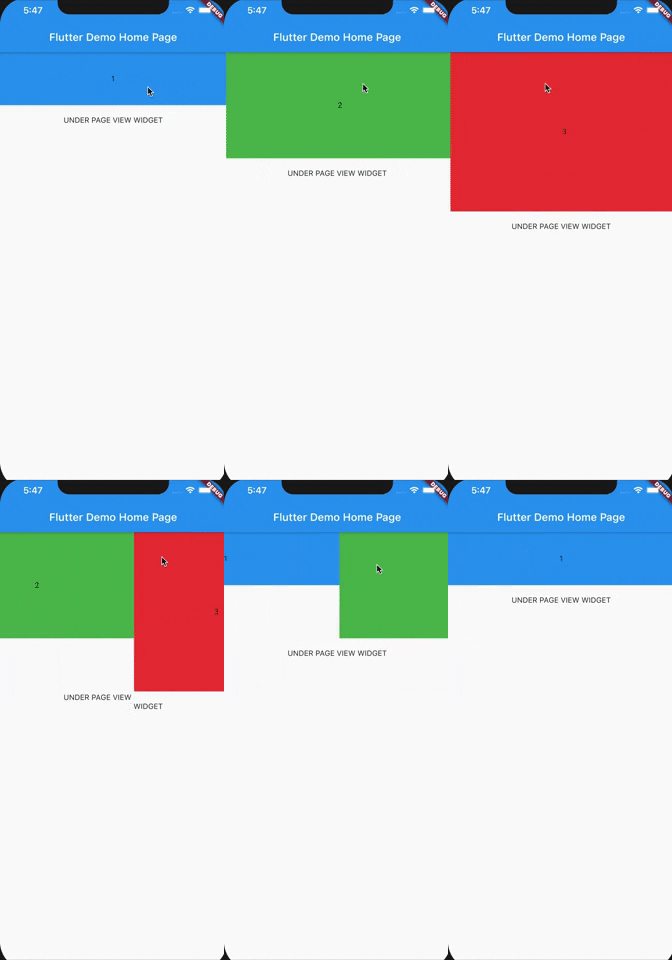
Check out example project to play with ExpandablePageView.

카테고리

소스 저장소

이 패키지를 사용하는 프로젝트