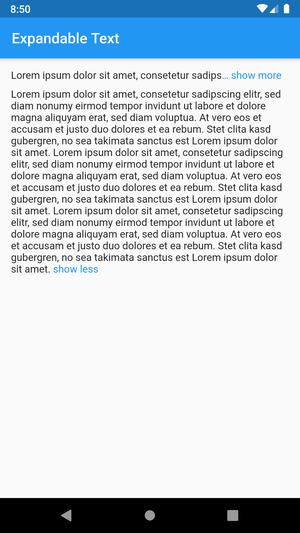
expandable_text 패키지는 처음 몇 줄의 텍스트만 표시하고 전체 내용을 보여주기 위한 클릭 가능한 링크를 제공하는 Flutter 위젯을 제공합니다. 긴 텍스트 조각을 깔끔하고 사용자 친화적인 방식으로 관리하는 데 이상적입니다. 확장 또는 축소 시 부드러운 애니메이션을 지원하며, Android, iOS, Web, macOS, Windows, Linux 등 모든 주요 플랫폼에서 작동합니다. 과도한 수직 공간 사용을 방지하면서 가독성을 향상시키면서 접근성도 유지합니다.
사용 사례
목록에 긴 설명 표시
자르기된 리뷰 또는 댓글 표시
대규모 텍스트 블록을 통한 UI 성능 향상
상호작용형 콘텐츠 섹션 만들기
채팅 인터페이스에서 화면 혼잡도 줄이기
주요 기능
부드러운 전개/접기 애니메이션
보이는 줄 수 사용자 지정
사용자 정의 가능한 전개/접기 텍스트
리치 텍스트 및 스타일링을 지원합니다
크로스 플랫폼 호환성
기존 위젯과의 간편한 통합
적합한 대상
긴 텍스트 콘텐츠를 포함한 앱
동적 텍스트 확장을 요구하는 사용자 인터페이스
경량 텍스트 관리를 원하는 개발자
반응형 텍스트 레이아웃이 필요한 프로젝트
미니멀리즘에 중점을 둔 UI/UX 디자이너
고려 사항
일관된 외관을 위해 추가 스타일링이 필요할 수 있습니다
매우 큰 텍스트 사용 시 성능 영향
복잡한 레이아웃에 대한 맞춤 설정 제한
비상호작용 텍스트 표시에 적합하지 않습니다
텍스트 오버플로우 처리에 주의가 필요합니다
원본 README
연결된 소스 저장소의 README 원문 스냅샷입니다. 최신 내용은 저장소에서 확인하세요.
This Flutter package includes the widget ExpandableText which you can use to initially only show a
defined number of lines of a probably long text. The widget appends a configurable text link which
lets the user expand the full text, or collapse it again.
This example shows a message that was posted by a user.
The username is always visible right before the text and tapping on it opens the user profile.
The text is truncated after two lines and can be expanded by tapping on the link show more at the end or the text itself.
After the text was expanded it cannot be collapsed again as no collapseText was provided.
URLs, @mentions and #hashtags in the text are styled differently and can be tapped to open the browser or the user profile.
Expand and collapse animation (animation, animationDuration, animationCurve)
Optional link to collapse the expanded text (collapseText)
Configure the style of the link (linkStyle / linkColor)
Control whether the ellipsis is part of the link (linkEllipsis)
Optional prefix text with style and tap callback (prefixText, prefixStyle, onPrefixTap)
Text with tappable and styled links (onUrlTap, urlStyle)
Text with tappable and styled @mentions (onMentionTap, mentionStyle)
Text with tappable and styled #hashtags (onHashtagTap, hashtagStyle)
Configure the number of visible lines of the collapsed text (maxLines)
Control the default expanded state (expanded, onLinkTap)
Callback for expanded changed event (onExpandedChanged)
Tap on the text to expand or collapse the text (expandOnTextTap, collapseOnTextTap)
Bugs and feature requests
Have a bug or a feature request? Please first search for existing and closed issues.
If your problem or idea is not addressed yet, please open a new issue.
Copyright & License
Code copyright 2020–2022 Florian Weinaug.
Code released under the MIT license.