패키지, 저장소 및 앱 카테고리 검색

fab_circular_menu_plus 표지
패키지 상세v0.0.4

fab_circular_menu_plus

플로팅 액션 버튼을 사용하여 아름다운 원형 메뉴를 만드는 Flutter 패키지입니다.

AndroidiOSWebmacOSWindowsLinux
30일 다운로드
571
좋아요
56
Pub 점수
160

패키지 설치

flutter pub add fab_circular_menu_plus

패키지 개요

공개 정보를 바탕으로 생성한 선택 가이드입니다.

플로팅 액션 버튼(FAB)을 중심으로 우아한 원형 메뉴를 생성할 수 있도록 해주는 플러터 패키지입니다. 부드러운 애니메이션과 사용자 정의 가능한 메뉴 항목 옵션을 제공하여 모바일 및 웹 애플리케이션에서 사용자 인터랙션을 향상시키기에 이상적입니다. 안드로이드, iOS, 웹, 맥OS, 윈도우, 리눅스 등 다양한 플랫폼을 지원하며, 기기 간 일관된 동작을 보장합니다. 직관적인 구성과 반응형 디자인을 통해 FAB 기반의 상호작용 탐색 구현을 단순화합니다.

사용 사례

  • 모바일 앱에 인터랙티브 FAB 메뉴 추가하기
  • 애니메이션 원형 액션 패널로 UI 개선
  • 맥락 기반 빠른 작업 인터페이스 만들기
  • 웹 앱에서 제스처 기반 탐색 구현
  • 접근성 있는 터치 친화적 컨트롤 설계

주요 기능

  • 메뉴 확장용 부드러운 원형 애니메이션
  • 사용자 정의 가능한 메뉴 항목 레이아웃 및 스타일
  • 다중 플랫폼 대상 지원
  • 기존 FAB 구성 요소와의 간편한 통합
  • 사용자 정의 가능한 트리거 제스처 및 타이밍

적합한 대상

  • 기능이 풍부한 모바일 UI를 구축하는 개발자
  • 동적 FAB 상호작용을 찾는 디자이너
  • 크로스 플랫폼 일관성에 초점을 맞춘 팀
  • 직관적인 제스처 기반 탐색이 필요한 앱
  • 시각적 완성도와 사용자 참여를 강조하는 프로젝트

고려 사항

  • 저사양 기기에서는 성능 튜닝이 필요할 수 있습니다
  • 복잡한 메뉴 동작에 대한 사용자 정의 제한
  • Flutter의 제스처 시스템의 안정성에 의존합니다
  • 밀집된 메뉴 구조에 적합하지 않음
  • 메뉴 항목 수가 중간(4~8개)일 때 가장 적합

원본 README

연결된 소스 저장소의 README 원문 스냅샷입니다. 최신 내용은 저장소에서 확인하세요.

FAB Circular Menu

Pub package License Null safety Platform

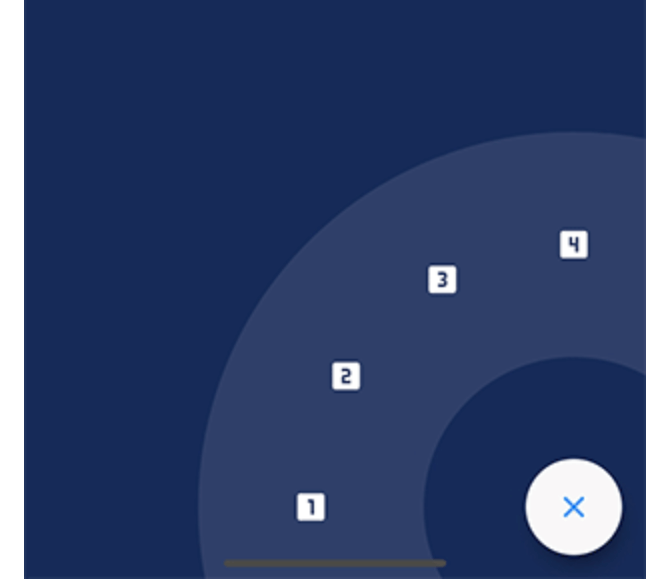
A Flutter package to create a nice circular menu using a Floating Action Button.

Originally inspired by Mayur Kshirsagar's great FAB Microinteraction design. It is implemented as a Flutter plugin by Mariano Cordova (source code). This plugin is the continuation of the discontinued original plugin. I merged some of my bug fixes and made some changes to my liking.

I forked this plugin out of necessity and I have only a very limited time for maintenance, so PRs are highly welcome if any change is desired.

Showcase

Installation

Just add fab_circular_menu_plus to your pubspec.yml file

dependencies:
  fab_circular_menu_plus: ^0.0.1

Example

class MyApp extends StatelessWidget {
  @override
  Widget build(BuildContext context) {
    return MaterialApp(
      home: Scaffold(
        body: Placeholder(),
        floatingActionButton: FabCircularMenuPlus(
          children: <Widget>[
            IconButton(icon: Icon(Icons.home), onPressed: () {
              print('Home');
            }),
            IconButton(icon: Icon(Icons.favorite), onPressed: () {
              print('Favorite');
            })
          ]
        )
      )
    );
  }
}

You can check for a more complete example in the example directory.

Customize

You can customize the widget appearance using the following properties:

Property Description Default
alignment Sets the widget alignment Alignment.bottomRight
ringColor Sets the ring color accentColor
ringDiameterLimitFactor Sets the ring diameter limit factor 1.5
ringDiameter Sets the ring diameter screenWidth * ringDiameterLimitFactor (portrait)
screenHeight * ringDiameterLimitFactor (landscape)
ringWidthLimitFactor Sets the ring width limit factor 0.2
ringWidth Sets the ring width ringDiameter * ringWidthLimitFactor
fabSize Sets the FAB size 64.0
fabElevation Sets the elevation for the FAB 8.0
fabColor Sets the FAB color primaryColor
fabOpenColor Sets the FAB color while the menu is open. This property takes precedence over fabColor -
fabCloseColor Sets the FAB color while the menu is closed. This property takes precedence over fabColor -
fabChild Sets the child inside the FAB. This property takes precedence over fabOpenicon and fabCloseIcon -
fabOpenIcon Sets the FAB icon while the menu is open Icon(Icons.menu)
fabCloseIcon Sets the FAB icon while the menu is closed Icon(Icons.close)
fabMargin Sets the widget margin EdgeInsets.all(16.0)
animationDuration Changes the animation duration Duration(milliseconds: 800)
animationCurve Allows you to modify the animation curve Curves.easeInOutCirc
onDisplayChange This callback is called every time the menu is opened or closed, passing the current state as a parameter. -

Handling the menu programmatically

It is possible to handle the menu programmatically by using a key. Just create a key and set it in the key property of the FabCircularMenuPlus, then use the key to get the current state and open, close or check the status of the menu.

class MyApp extends StatelessWidget {
  final GlobalKey<FabCircularMenuPlusState> fabKey = GlobalKey();

  @override
  Widget build(BuildContext context) {
    return MaterialApp(
      home: Scaffold(
        body: RaisedButton(
          onPressed: () {
            if (fabKey.currentState.isOpen) {
              fabKey.currentState.close();
            } else {
              fabKey.currentState.open();
            }
          },
          child: Text('Toggle menu')
        ),
        floatingActionButton: FabCircularMenuPlus(
          key: fabKey,
          children: <Widget>[
            // ...
          ]
        )
      )
    );
  }
}

Contributing

I will be very happy if you contribute to this project, feel free to submit a PR.

카테고리

의존성

의존성 목록 1 개

소스 저장소

이 패키지를 사용하는 프로젝트