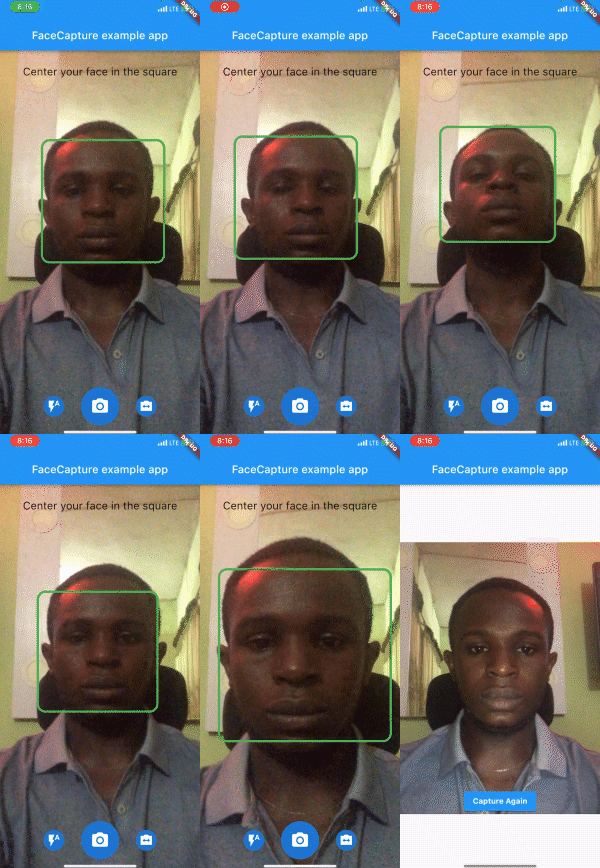
face_camera 패키지는 기기의 카메라를 사용하여 실시간 얼굴 감지를 위한 Flutter 플러그인입니다. 얼굴이 감지될 때 자동으로 이미지를 캡처하므로 KYC 프로세스 중 사진 촬영에 이상적입니다. 머신 러닝을 기반으로 개발되어 Android 및 iOS 플랫폼과 원활하게 통합되며, 복잡한 설정 없이 얼굴 인식 기능을 갖춘 카메라 기능을 구현할 수 있도록 개발자에게 효율적인 방법을 제공합니다. 얼굴 존재 시 트리거되는 이미지 캡처를 단순화하여 신원 확인 워크플로우에서 사용자 경험을 향상시킵니다.
사용 사례
KYC 신원 확인
자동 셀피 캡처
앱에서 실시간 얼굴 감지
얼굴을 통한 사용자 인증
모바일 온보딩 흐름
주요 기능
실시간 얼굴 감지
얼굴 감지 시 자동 사진 캡처
크로스 플랫폼 지원 (Android & iOS)
Flutter와의 가벼운 통합
얼굴 트리거 캡처를 위한 간단한 API
적합한 대상
KYC 앱을 개발하는 개발자
자동 스냅샷이 필요한 앱
신원 확인 시스템
얼굴 기반 상호작용을 갖춘 모바일 애플리케이션
저코드 얼굴 감지가 필요한 프로젝트
고려 사항
카메라 권한이 필요합니다
오래된 기기에서는 성능이 다를 수 있습니다
정확도는 조명과 얼굴의 가시성에 따라 달라집니다
고보안 생체 인증에 적합하지 않습니다
얼굴 감지에 국한되며, 인식 또는 추적은 포함되지 않음
원본 README
연결된 소스 저장소의 README 원문 스냅샷입니다. 최신 내용은 저장소에서 확인하세요.
face_camera
A Flutter camera plugin that detects face in real-time.
Preview
Installation
First, add face_camera as a dependency in your pubspec.yaml file.
face_camera:^<latest-version>
iOS
Minimum iOS Deployment Target: 15.5.0
Follow this link and setup ML Kit this is required for face_camera to function properly on iOS
Add two rows to the ios/Runner/Info.plist:
one with the key Privacy - Camera Usage Description and a usage description.
and one with the key Privacy - Microphone Usage Description and a usage description.
Then render the component in your application using the required options.
@overrideWidgetbuild(BuildContext context) {
returnScaffold(
body: SmartFaceCamera(
controller: controller,
message: 'Center your face in the square',
)
);
}
Customization
Here is a list of properties available to customize your widget:
Name
Type
Description
controller
FaceCameraController
The controller for the [SmartFaceCamera] widget
showControls
bool
set false to hide all controls
showCaptureControl
bool
set false to hide capture control icon
showFlashControl
bool
set false to hide flash control control icon
showCameraLensControl
bool
set false to hide camera lens control icon
message
String
use this pass a message above the camera
messageStyle
TextStyle
style applied to the message widget
lensControlIcon
Widget
use this to render a custom widget for camera lens control
flashControlBuilder
FlashControlBuilder
use this to build custom widgets for flash control based on camera flash mode
messageBuilder
MessageBuilder
use this to build custom messages based on face position
indicatorShape
IndicatorShape
use this to change the shape of the face indicator
indicatorAssetImage
String
use this to pass an asset image when IndicatorShape is set to image
indicatorBuilder
IndicatorBuilder
use this to build custom widgets for the face indicator
captureControlBuilder
CaptureControlBuilder
use this to build custom widgets for capture control
autoDisableCaptureControl
bool
set true to disable capture control widget when no face is detected
Here is a list of properties available to customize your widget from the controller:
Name
Type
Description
onCapture
Function(File?)
callback invoked when camera captures image
onFaceDetected
Function(DetectedFace?)
callback invoked when camera detects face
imageResolution
ImageResolution
use this to set image resolution
defaultCameraLens
CameraLens
use this to set initial camera lens direction
defaultFlashMode
CameraFlashMode
use this to set initial flash mode
enableAudio
bool
set false to disable capture sound
autoCapture
bool
set true to capture image on face detected
ignoreFacePositioning
bool
set true to trigger onCapture even when the face is not well positioned
orientation
CameraOrientation
use this to lock camera orientation
performanceMode
FaceDetectorMode
Use this to set your preferred performance mode
Contributions
Contributions of any kind are more than welcome! Feel free to fork and improve face_camera in any way you want, make a pull request, or open an issue.
Support the Library
You can support the library by donating, liking it on Pub, starring it on GitHub, and reporting any bugs you encounter.